

A few weeks ago I pulled 12 agentic harness patterns from the Claude Code leak. Then I wrote about 14 patterns for authoring Skills, the layer that extends the agent. Anthropic keeps dropping excellent posts where they share what they are learning from building and running agents in the real world. After reading the latest one, I could not resist doing the same thing again: study the recurring ideas, reformulate them as patterns, give each one a name, and support them with visuals that make the trade-offs easier to see.
This post goes one layer further out. Once an agent has a harness and a way to load Skills, the next question is more practical: how does it reach the production systems it needs to do real work?
Anthropic’s post, Building agents that reach production systems with MCP, is about exactly that. It compares direct API calls, CLIs, and MCP, then explains why production agents increasingly land on MCP: agents are moving to the cloud, the systems they need are remote, and auth, discovery, and rich interaction need a common layer. Anthropic says they are seeing this across more than 200 MCP servers, millions of daily Claude users, and fast-growing MCP SDK usage.
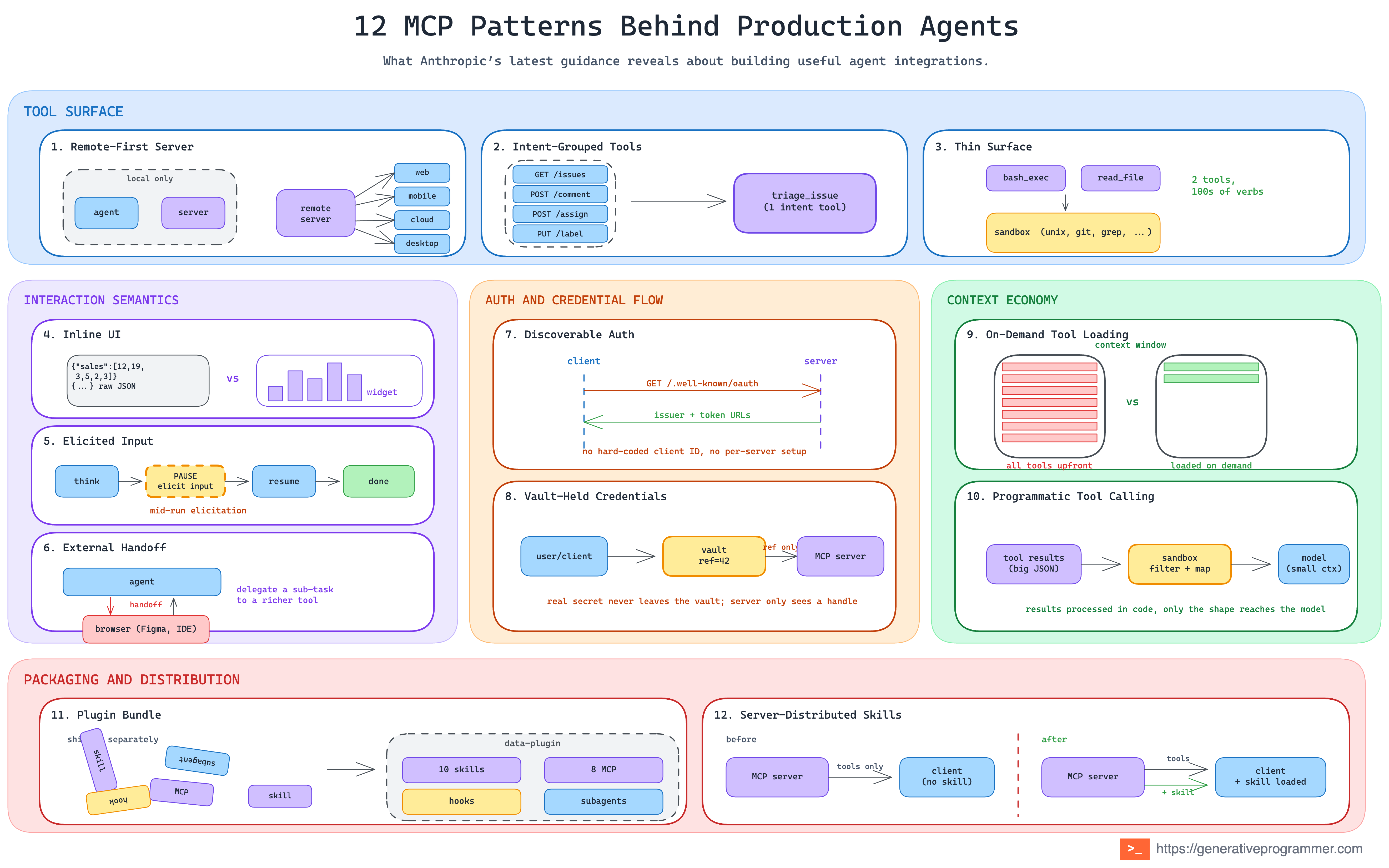
The original post is written as practical guidance for MCP servers and clients. I am taking a slightly different angle: the pattern view. What are the reusable shapes behind the advice? What problems do they solve? When should you use them? And what are the trade-offs? I see 12 core patterns spread across five groups.
Tool surface
The shape of your tool set is the first architectural choice, and it is rarely “one tool per endpoint.” Three default moves cover the span from small services to hundreds-of-endpoints monsters.
1. Remote-First Server Pattern
The first foundational architectural choice for an MCP server is where it runs.
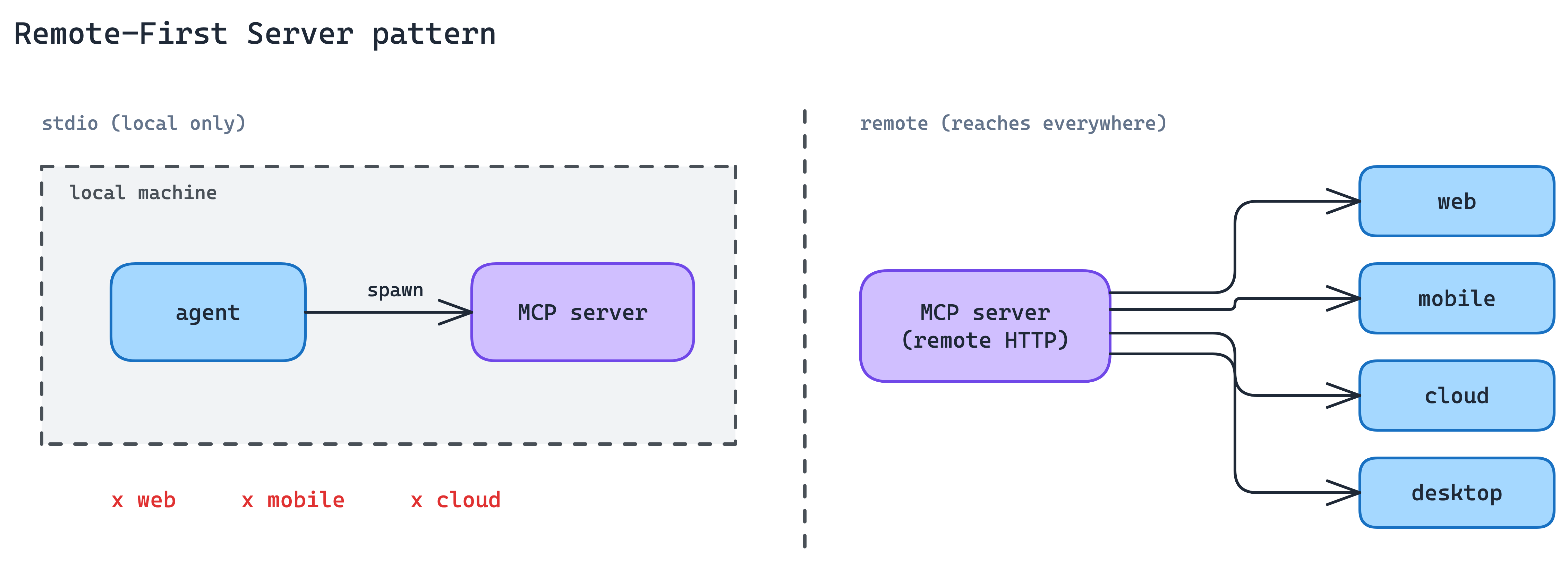
Local MCP servers over stdio work only when the agent can spawn a child process on the same machine: desktop Claude, local IDE agents, and some CLIs. That excludes agents running in browsers, mobile apps, or cloud execution environments, which is where most production agent traffic is heading.
Build the server as a remote HTTP endpoint from day one, not as a local-only module the team might “put on the network later”. Every other production concern in this post (auth, elicitation, discovery) assumes the server is reachable over the network. A local-only server has to rebuild each of those the moment it needs to scale beyond the local machine.
Remote-first also makes distribution portable. One server, one auth flow, many clients. No per-client bundle to ship, no machine-level install to maintain.
When to use. Any time the agent on the other side might not run on the same machine as the server. In practice, this is the default for most production integrations.
The main trade-off. Network transport raises the bar on reliability, latency budgeting, and auth. You have to engineer a public surface where a local process would have been enough, and you carry the operational weight of every internet-facing service.
2. Intent-Grouped Tools Pattern
This is probably the most common MCP server design mistake: exposing one tool per API endpoint. It feels like the fastest and most faithful implementation, but it creates the wrong interface for agents.
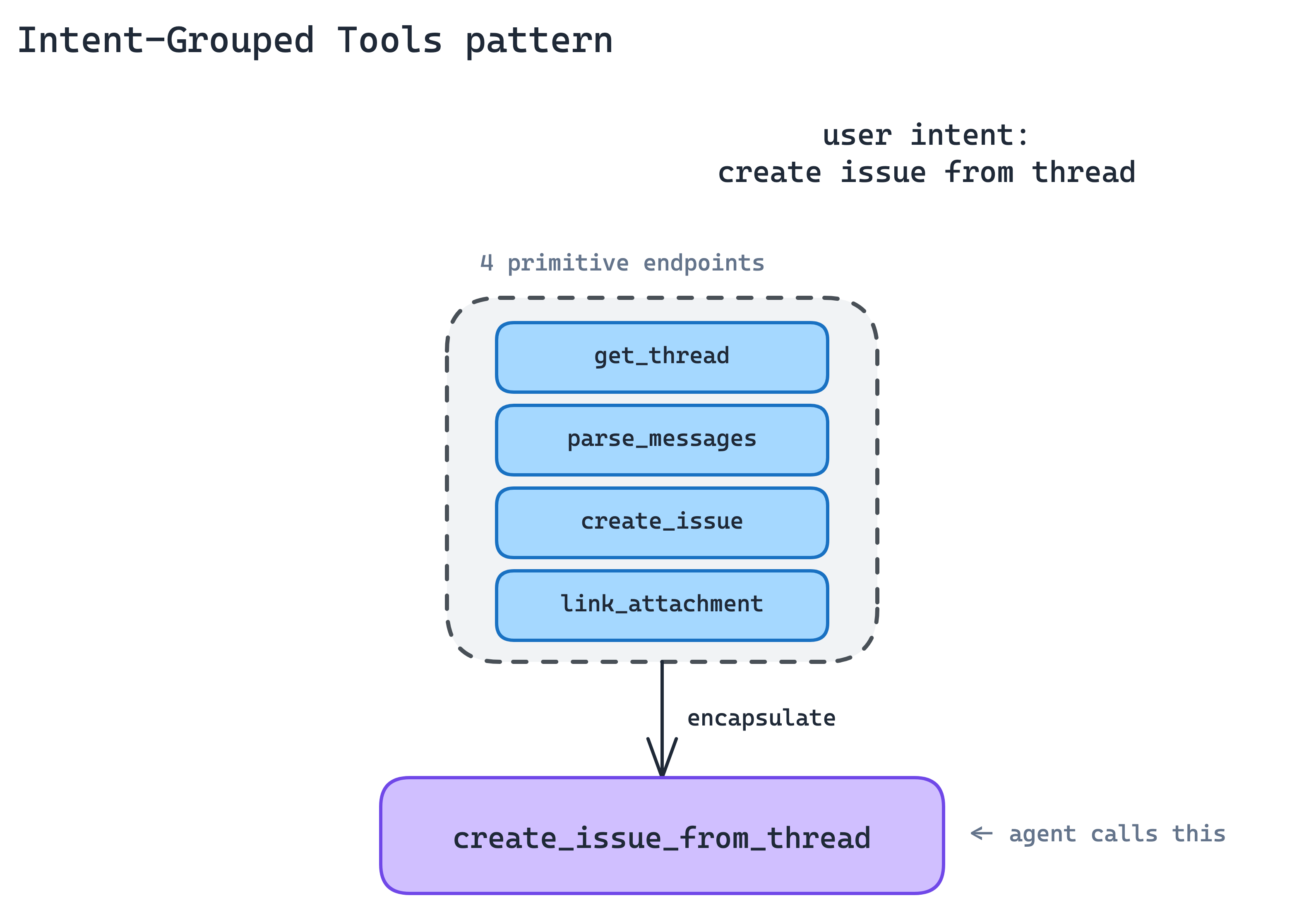
The agent does not think in API endpoints. It thinks in tasks. A 1:1 API wrapper leaves the agent assembling long chains of primitives. More tool definitions in context, more round-trips per task, more ways to get the chain wrong.
Group tools around user intent, not around the endpoints they happen to hit.
A single create_issue_from_thread tool is better than
get_thread + parse_messages + create_issue + link_attachment.
The agent goes from a four-call chain to a one-call intent, and each intent is something a human reviewer can reason about directly.
The implication is that your MCP server is not a proxy. It is a new surface. Expect to write wrapper tools that compose multiple endpoints, normalise half-formed IDs, retry on rate-limited calls, and return the output the agent will actually use, not the output the endpoint happened to produce. Anthropic has a companion post on writing effective tools that covers the craft details.
When to use. Default for any service with roughly fifty or fewer tools. When you find yourself inventing a fifth parameter to keep tool count down, you have probably outgrown this pattern.
The main trade-off. Every new intent is new code on your side, not a schema export. The server stops being a thin translation layer and becomes a product surface you have to design, test, and version.
3. Thin Surface Pattern
Some services have hundreds, sometimes thousands, of operations: Cloudflare, AWS, Kubernetes. Even grouped by intent, the full toolset blows past what fits in context, and any given agent task touches only a sliver of it.
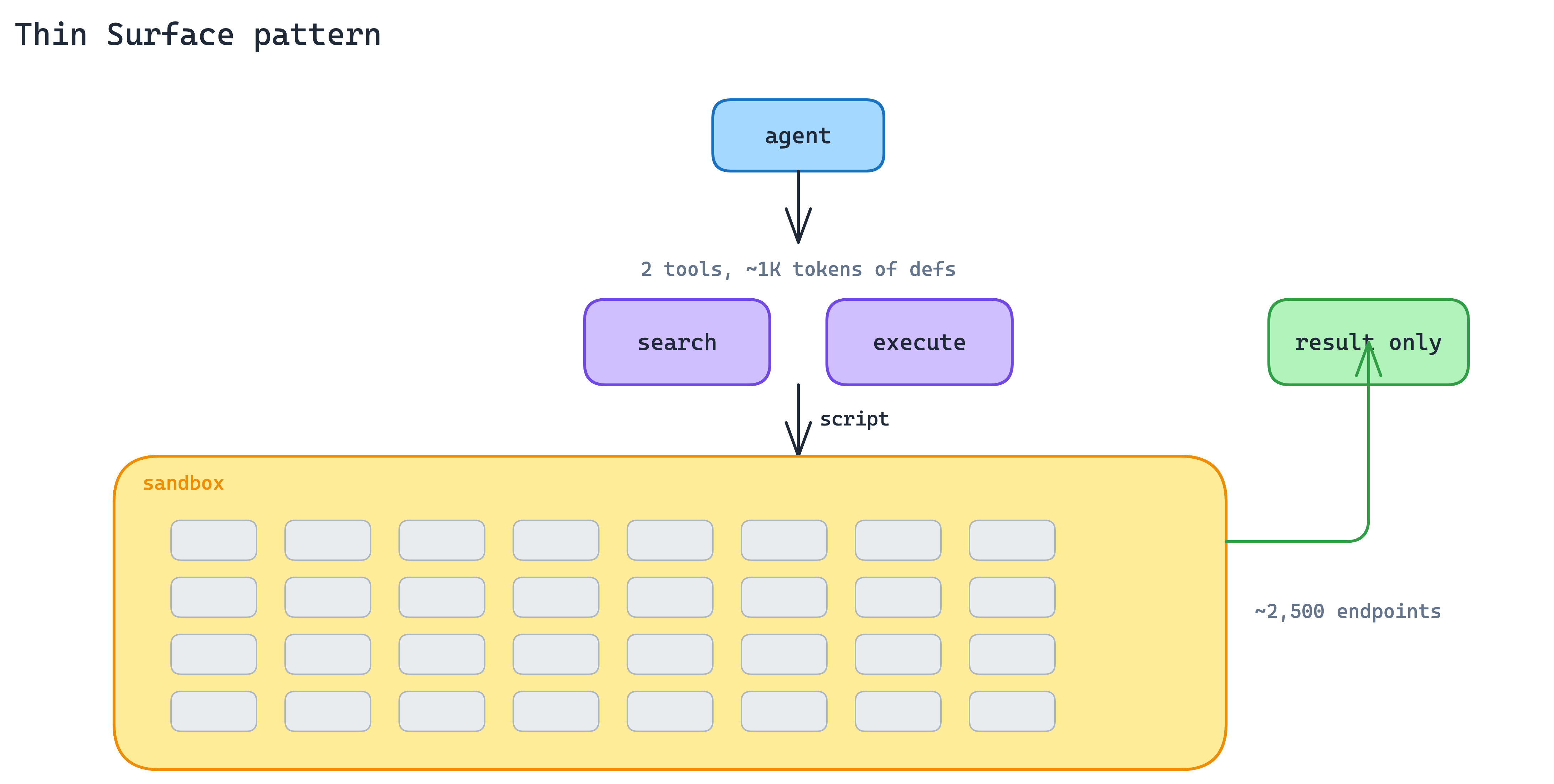
Drop the intent-grouped model and expose a deliberately thin surface that accepts code. Two tools suffice: a search tool that lets the agent find the right API operation, and an execute tool that runs a short script written by the agent against the underlying API in a server-side sandbox. Only the result returns to the model.
Cloudflare’s MCP server is the reference implementation: two tools cover roughly 2,500 endpoints in about 1,000 tokens of definitions. The agent gets the full expressive power of the API without paying to have every operation described upfront. The sandbox contains the blast radius. Scripts cannot reach past what the server hands them. This pattern compounds with Programmatic Tool Calling on the client side: the client processes results in its sandbox, the server executes calls in its sandbox, and raw data never needs to reach the model.
When to use. When an intent-grouped surface would need more than roughly thirty to fifty tools to be useful, or when the underlying service is API-shaped (Cloudflare, AWS) rather than intent-shaped (Linear, Slack).
The main trade-off. You inherit sandbox operations. Script isolation, resource limits, timeout policies, and API-key handling inside the sandbox are all your problem. The agent has more power, which means you have more to defend.
Interaction Semantics
A tool that only returns text pushes the UI problem to the model. That is fine for small answers, but a poor fit for dashboards, tables, forms, previews, confirmations, and anything else the user needs to inspect or act on.
MCP adds interaction primitives that let the server take back some of that responsibility. Instead of asking the model to describe everything in prose, the server can return UI, ask for structured input, or hand the user to an external flow when needed.
4. Inline UI Pattern
A tool that returns a wall of JSON leaves the user reading compressed prose about their own data. For anything dashboard-shaped, such as charts, tables, forms, and interactive confirmations, the agent is the wrong rendering layer.
Ship UI with the tool response. MCP Apps let the server return an interactive interface that the client renders inline in chat: charts, forms, dashboards, and mini-views built from your product’s real components.
The bar is not “build a full web app.” The bar is simpler: if the tool’s result is something a user wants to look at rather than hear described, return a view, not a paragraph. Your product’s design system is more readable than any Markdown the model can synthesise.
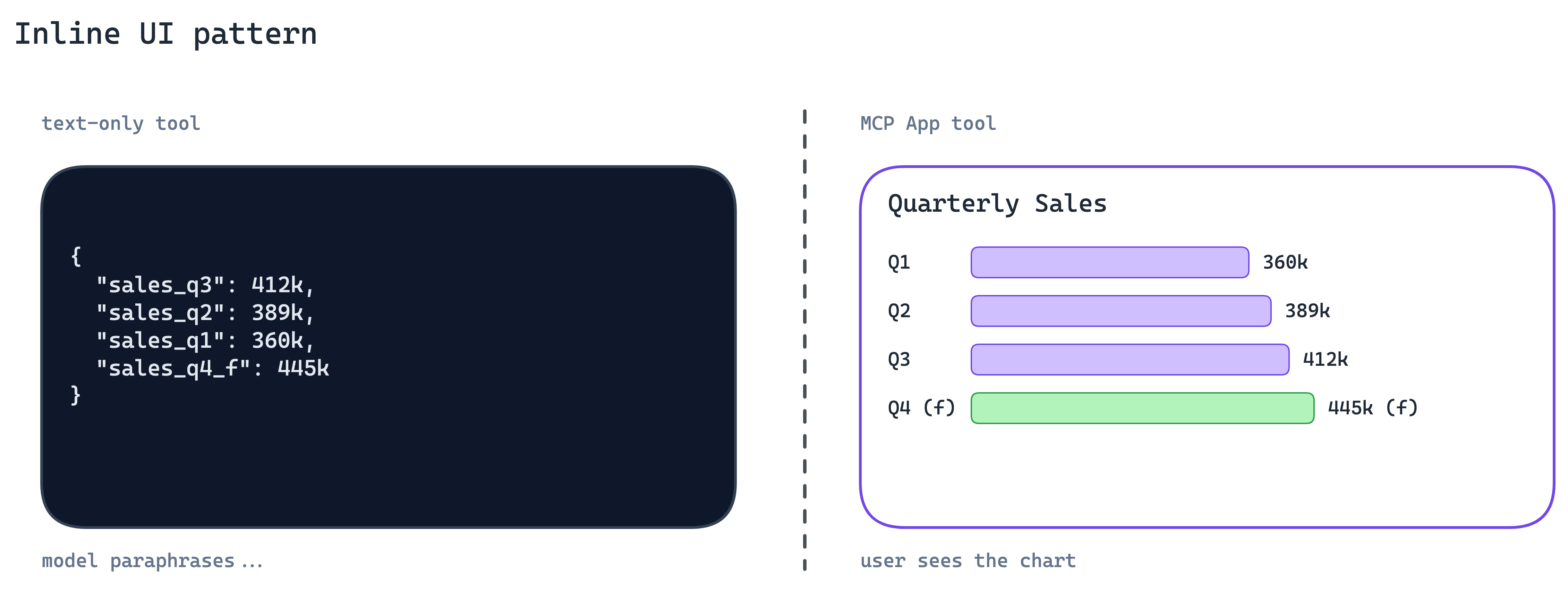
When to use. Any tool whose output is fundamentally visual or tabular: search results, dashboards, file previews, status views.
The main trade-off. You now ship UI alongside your API, which means component versioning, accessibility, and design review. The MCP server is no longer backend-only.
5. Elicited Input Pattern
Agents hit real-world ambiguity constantly: missing parameters, destructive actions that need confirmation, multiple matches that need disambiguation. The usual fallback is to guess, or to ask the user to restart the conversation with more detail. Both cost trust.
Pause the tool call and ask the user directly. MCP elicitation, specifically Form Mode, lets the server return a form schema mid-call. The client renders it natively. The user fills it. Control returns to the server, and the tool completes.
This keeps the user in the flow instead of sending them back to model output with “please specify the region.” The agent’s job stays the same; the server gets to be honest about what it does not yet know.
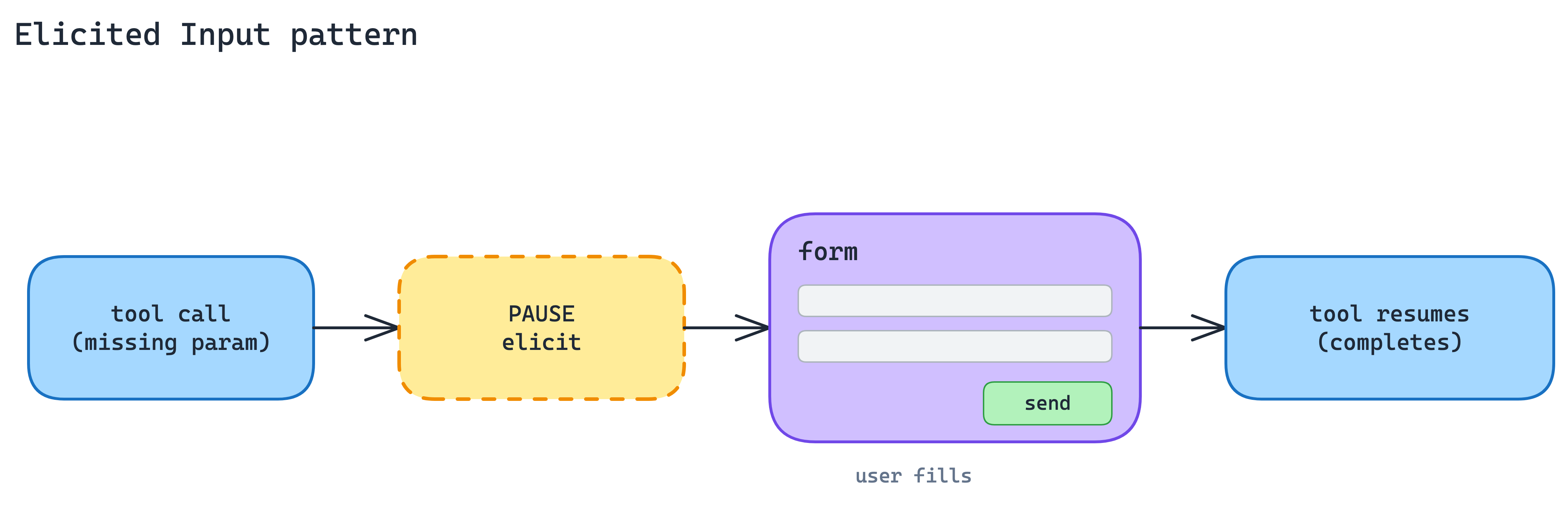
When to use. When the missing information is structured, such as a region, an ID, or a confirmation, and the user is the only source of truth.
The main trade-off. Every elicitation is a UX moment your server now owns. Poor form design turns a helpful pause into an annoying interrogation, and the pattern is untested in headless or batch agents where no human is available to fill it.
6. External Handoff Pattern
Some steps should never transit the MCP client at all. Downstream OAuth against a third party, taking a payment, collecting a credential that the agent’s context window must not see. If the client sees it, your threat model just widened.
This is not for authorizing the MCP client to access the MCP server. That belongs to MCP authorization. URL Mode is for sensitive downstream flows the server needs to complete on the user’s behalf.
Hand the user to a browser URL with URL-Mode elicitation. The server returns a link; the client opens it in the user’s browser; the user completes the sensitive flow out-of-band; control returns to the server once it is done. The MCP client never sees the secret. This is the right shape for downstream OAuth, payments, or any credential that should never transit the MCP client.
The distinguishing question between this and Form-Mode elicitation is where the secret lives after the interaction. Data the server can legitimately hold goes to Form Mode. Data a third party should hold goes to URL Mode.
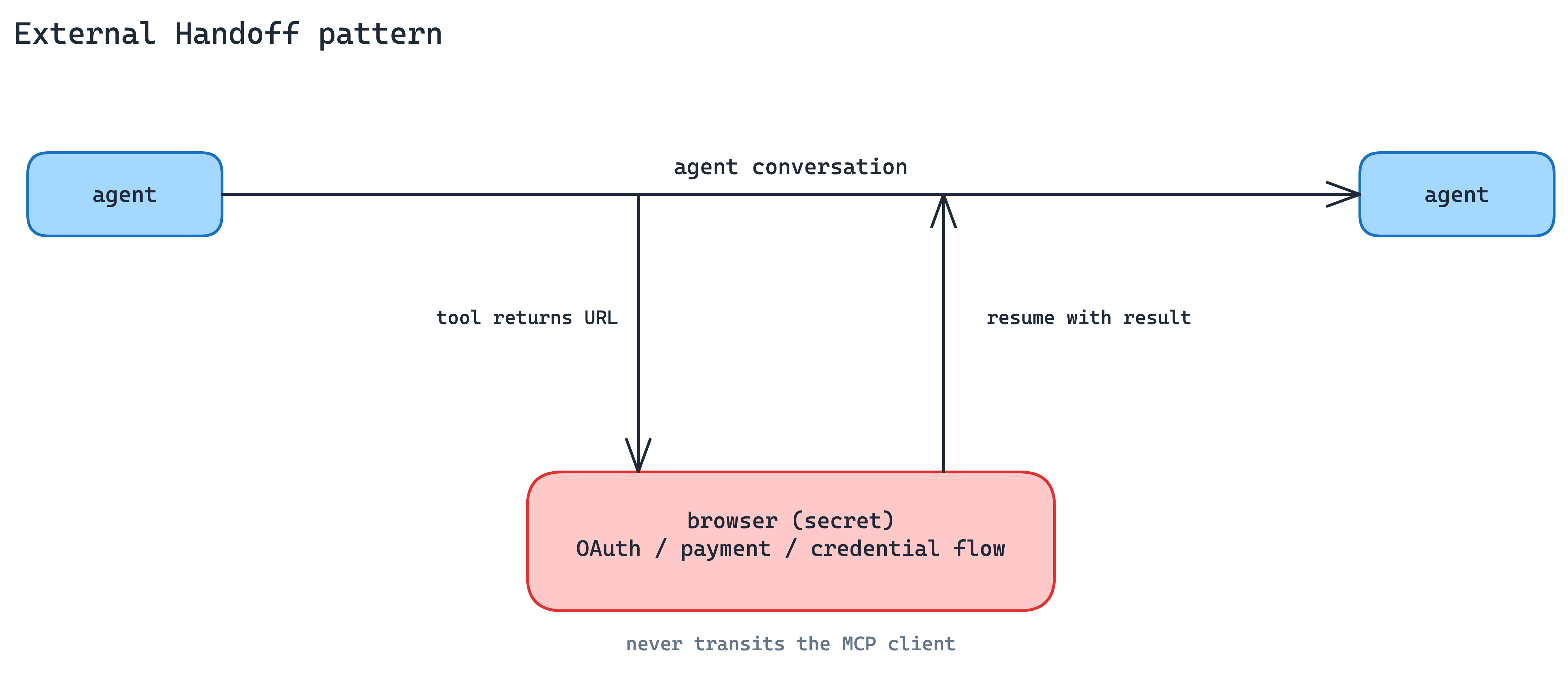
When to use. Third-party OAuth flows, payments, and anything governed by compliance rules that say the credential never hits your infrastructure.
The main trade-off. The user leaves the agent interface. Every handoff is a chance for them to drop off, and you have to design resume-after-redirect cleanly.
Auth and Credential Flow
Production agents run in the cloud, against systems protected by OAuth. Two patterns replace custom per-server authentication with standard plumbing.
7. Discoverable Auth Pattern
Every MCP server that invents its own auth adds friction at install time: configuration screens, token pastes, stale credentials. First-time failure rates climb, and re-auth prompts wear users down.
Publish and support standard OAuth metadata so the client can discover how authentication should work. For client registration, MCP supports Client ID Metadata Documents: the client uses an HTTPS URL as its client_id, and that URL points to a JSON document describing the client, its redirect URIs, and related metadata.
The practical effect: a user adds the server, the client discovers the auth flow, OAuth starts with the right client metadata, and the user does not have to paste tokens or manually configure client IDs.
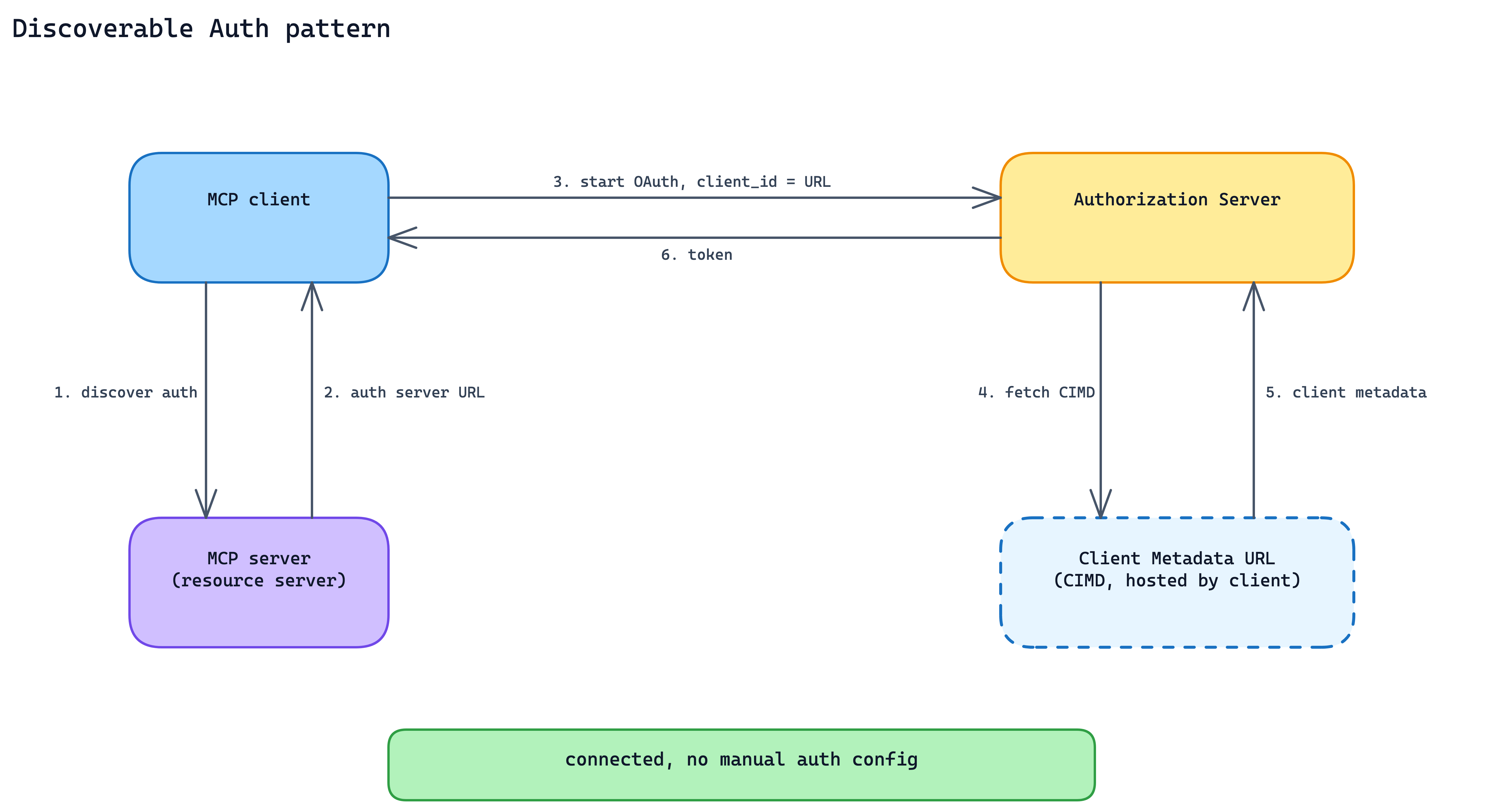
When to use. Every production MCP server with user-scoped data. It is not optional if the goal is cross-client adoption.
The main trade-off. You are committing to standard OAuth behavior rather than a shortcut that works only for your own client. That means metadata endpoints, scope discipline, redirect URI validation, token validation, and the operational discipline to keep the flow working across clients.
8. Vault-Held Credentials Pattern
Even with discoverable auth, OAuth tokens still need a home. If every MCP server handles tokens directly, every integration ends up rebuilding the same secret store, refresh loop, rotation policy, and revocation path.
Offload token lifecycle to a platform vault. In Claude Managed Agents, OAuth credentials can be registered once, referenced by vault ID at session creation, and injected into the right MCP connections by the platform.
The practical effect: the MCP server does not need to receive tokens in tool calls or implement its own token storage. Refresh, revocation, and credential handling move one layer up.
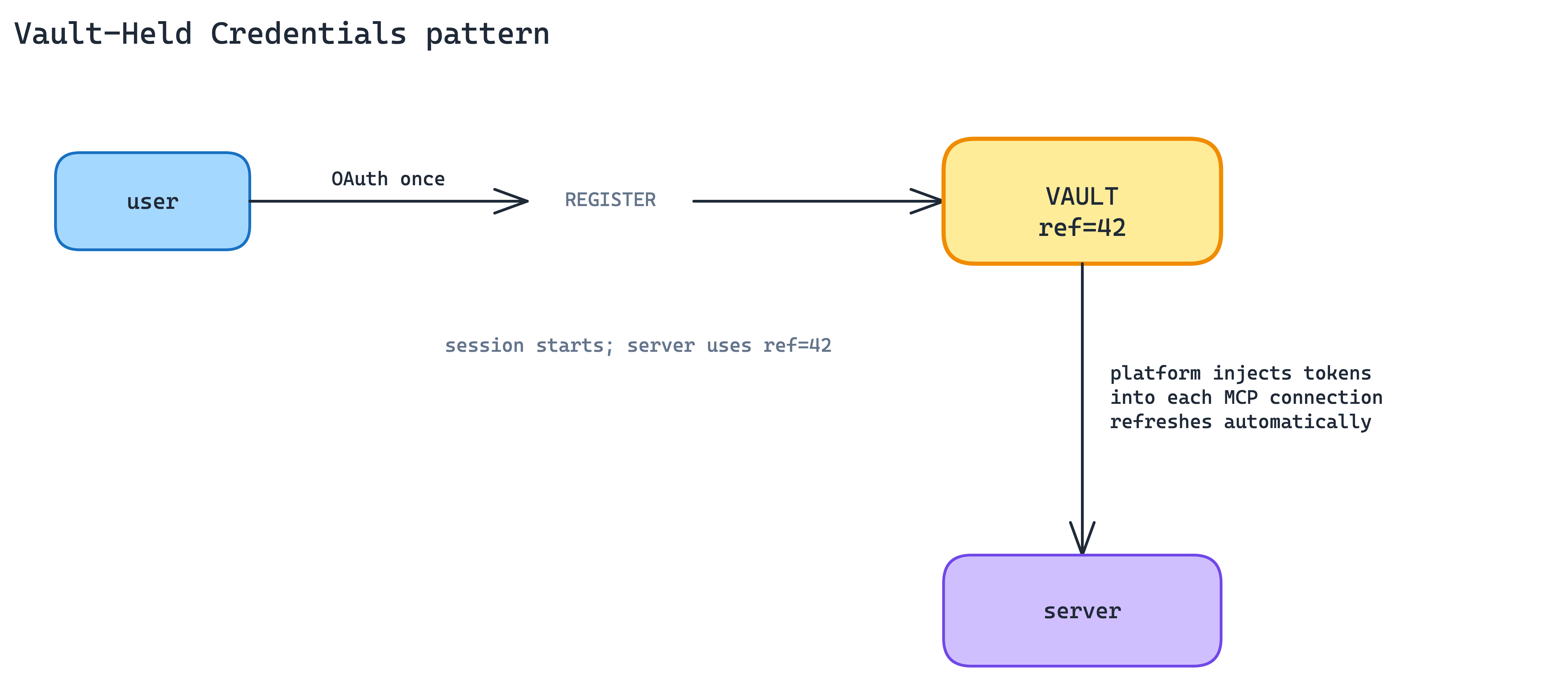
When to use. Whenever you are shipping on a managed-agent platform that offers a vault. At a minimum, design your server so that credentials could be injected from one. Do not bake token handling into tool calls.
The main trade-off. You are trusting a platform vault with production credentials. Its uptime, security posture, and export policy become part of your production story. Self-hosted servers outside a managed platform have to rebuild the pattern themselves.
Context Economy
The agent’s context window is finite. Two client-side patterns keep it lean even when the tool population and tool results are large.
9. On-Demand Tool Loading Pattern
A client connected to several MCP servers can easily have hundreds of tool definitions in play. Loading all of them upfront blows the context budget before the first tool even fires.
Load tool definitions lazily through a tool-search meta-tool. The agent searches for tools by description; only matching definitions are loaded into context; everything else stays out. Tool search can cut tool-definition tokens significantly while maintaining high selection accuracy (docs).
This is the client-side complement to Intent-Grouped Tools and Thin Surface on the server side. Good server design keeps the total tool count manageable. Good client design keeps only the needed subset in context.
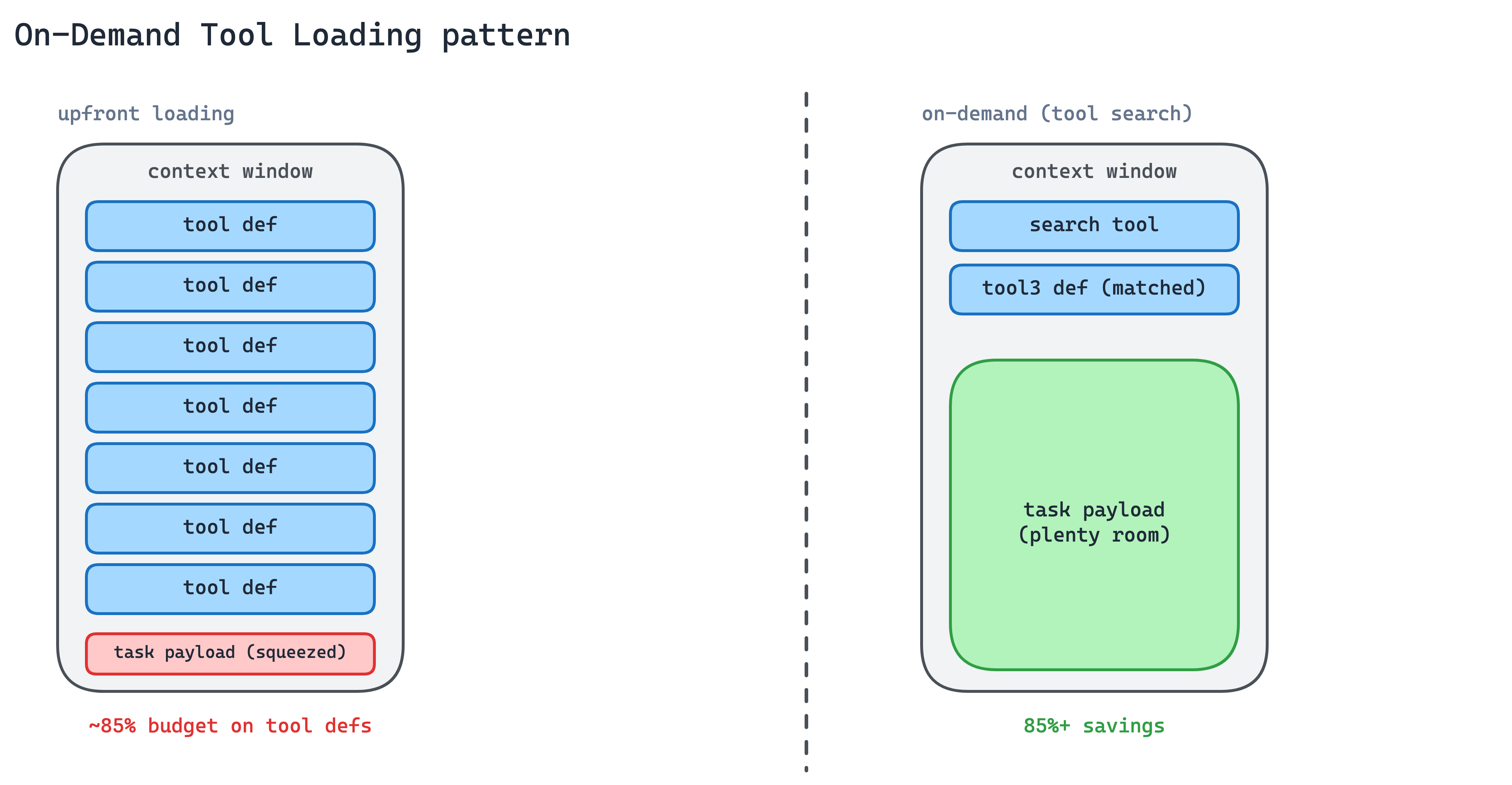
When to use. Any agent with more than a handful of tool sources, or any cross-cutting task that might touch tools from several MCP servers.
The main trade-off. The search step adds a round-trip and depends on description quality. Tools with vague descriptions will not surface when they should, and the cost of a miss is the agent picking a neighbouring tool that looks close.
10. Programmatic Tool Calling Pattern
Tool results, such as long lists, nested JSON, logs, traces, or large document payloads, often land in the model’s context window raw. The agent pays tokens to read them, even when the task is only to filter, count, aggregate, or join the data.
Process tool results in a code-execution sandbox before they reach the model. Programmatic tool calling lets the agent loop, filter, and aggregate across calls in code, with only the final useful output entering context. The same idea is described in more detail in the engineering post on code execution with MCP.
This cuts token usage on complex multi-step workflows and compounds with On-Demand Tool Loading. Fewer tool definitions go in, less raw data comes back, and the model reasons over the result rather than the full payload.
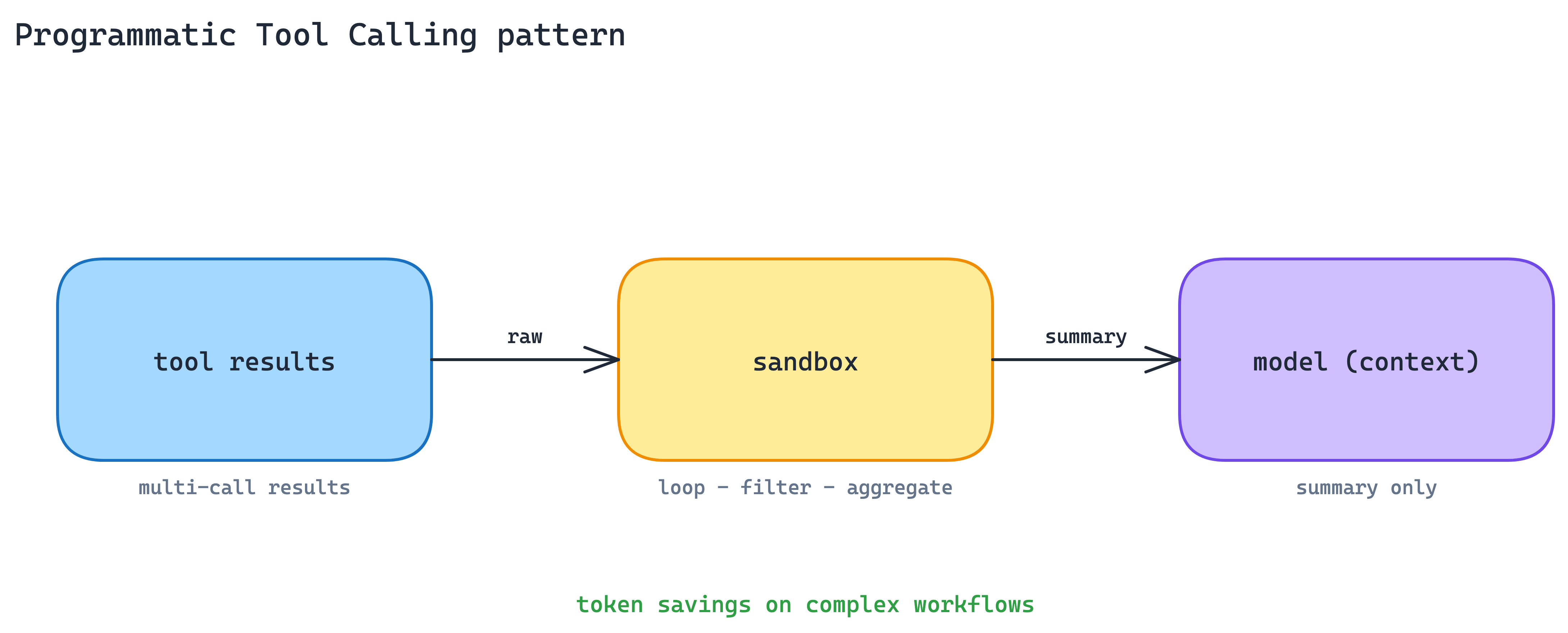
When to use. Multi-step workflows that chain several tool calls and transform results before the model needs to see them.
The main trade-off. You need a sandbox environment, sandbox debugging, and a mental model that includes code the agent writes against your results. Simple single-call tools do not benefit.
Packaging and Distribution
A server on its own is rarely the whole integration. Two patterns ship servers with the skills, hooks, and subagents that make them useful.
11. Plugin Bundle Pattern
A real integration rarely ships as a single MCP server. It is usually an MCP server plus a Skill that teaches the agent how to use it, a subagent for specialised work, and hooks for lifecycle events. Distributing them separately creates configuration drift and version skew.
In Claude Code, ship them as one plugin. Plugins bundle Skills, MCP servers, hooks, LSP servers, and specialised subagents into one distribution unit. One install, one version, one name.
The data plugin for Cowork is a good reference example: 10 Skills and 8 MCP servers covering Snowflake, Databricks, BigQuery, Hex, and more, installable as a unit.
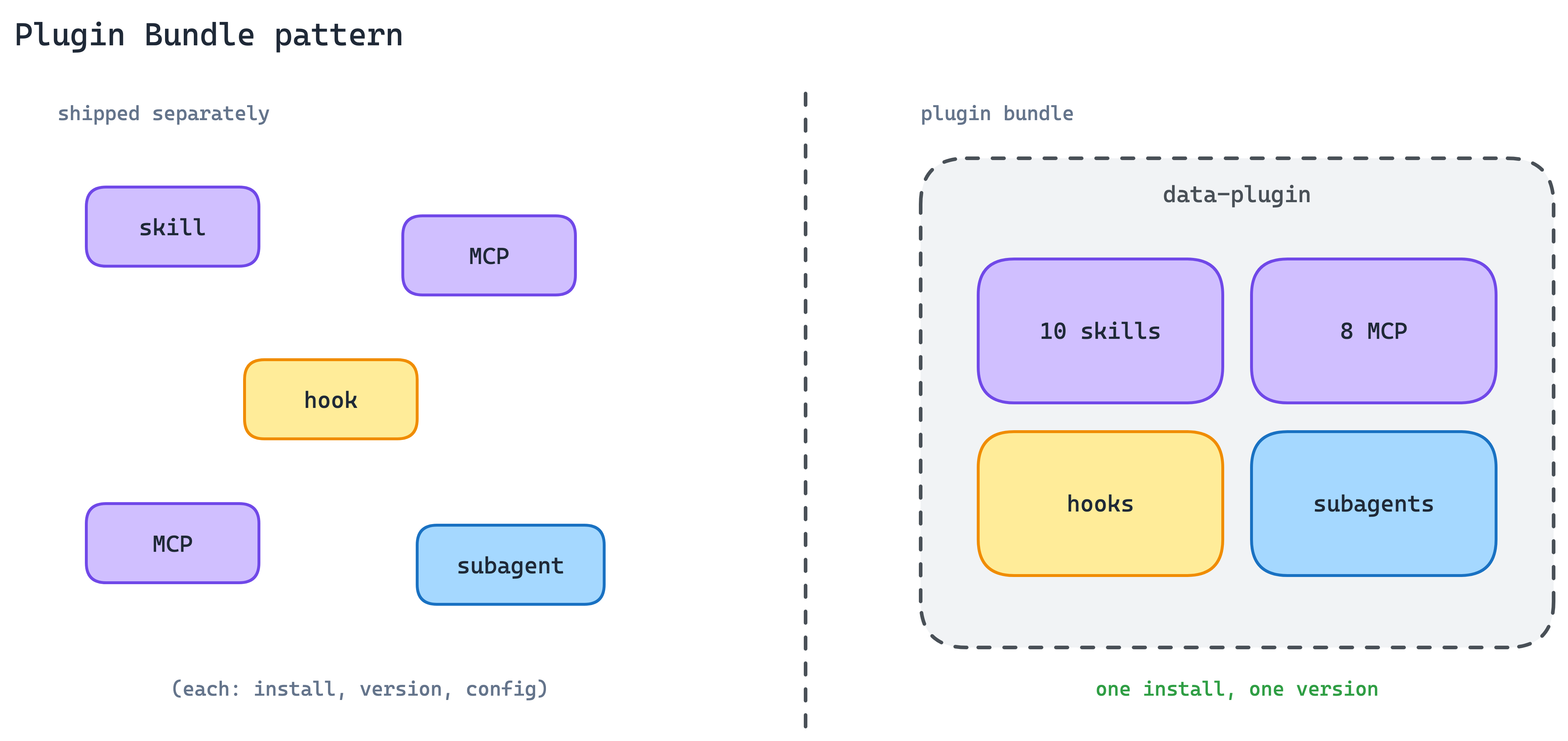
When to use. Whenever your integration needs more than a bare MCP server to be genuinely useful, which in practice is most real-world integrations.
The main trade-off. Bundling couples release cadences. An update to any component ships the whole plugin, and teams with independent release cycles per component will feel the drag.
12. Server-Distributed Skills Pattern
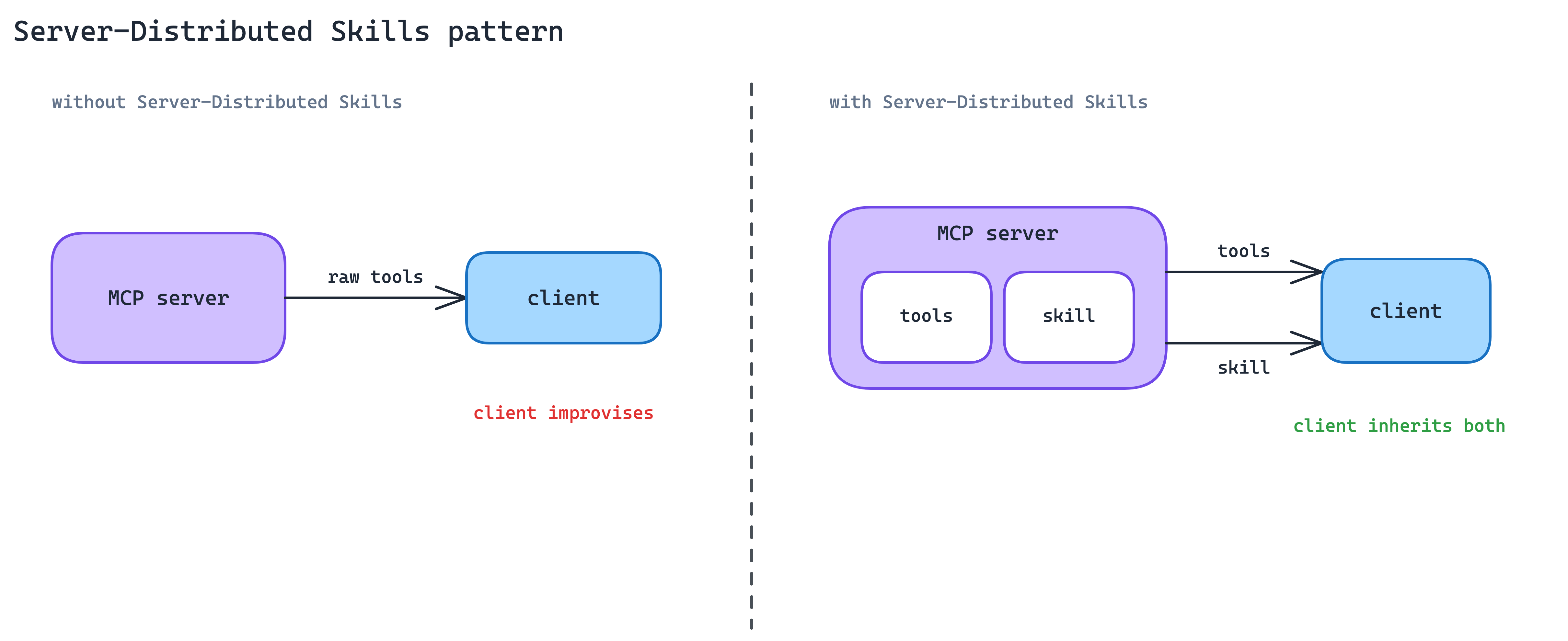
An MCP server gives the agent access to tools, but access is not the same as expertise. The server provider usually knows the best workflows, safe sequences, common mistakes, and domain-specific conventions. Without a way to share that knowledge, each client has to rediscover it, and each agent has to improvise.
Ship Skills from the MCP server itself. The client gets both the raw tool access and the procedural knowledge for using those tools well. In practice, the server does not only expose capabilities; it also ships the playbook for using them. Canva, Notion, and Sentry already do this in Claude today.
The MCP community is working on a portable extension so that Skill delivery can work across compliant clients, versioned with the API the Skill depends on. Today the pattern is client-specific; the experimental extension makes it protocol-level.
When to use. When your MCP server wraps a surface rich enough that “how to use it well” is a real Skill, not a one-paragraph hint.
The main trade-off. Experimental today. Early adopters of portable server-distributed Skills commit to spec changes; sitting out means losing the adoption advantage that comes with shipping expertise alongside capabilities.
The takeaway
These patterns are not only about MCP as a protocol. They show the shape production agent integrations are starting to take:
MCP servers are becoming agent-facing product surfaces. The useful ones expose intent-based tools, not endpoint mirrors. They hide API choreography, return agent-ready outputs, and sometimes return UI instead of prose.
Interaction is moving beyond text. The server can ask for structured input, request confirmation, show inline UI, or hand the user to an external flow when secrets, payments, or third-party auth are involved.
Auth is becoming standard plumbing. Discoverable OAuth flows and vault-held credentials move production agents away from custom token handling inside every tool call.
Context is now an architectural constraint. Tool definitions need on-demand loading, and large tool results need filtering, joining, and aggregation before they hit the model. Otherwise, the context window becomes the bottleneck.
Distribution is becoming richer than “ship an MCP server.” Real integrations include servers, Skills, hooks, subagents, and product-specific playbooks. The raw capability matters, but the instructions for using it well matter just as much.
Some of these extensions are still early, and the patterns will keep evolving. But they are already visible in real MCP usage, and several are gaining traction across production servers and clients. That is why they are worth naming.
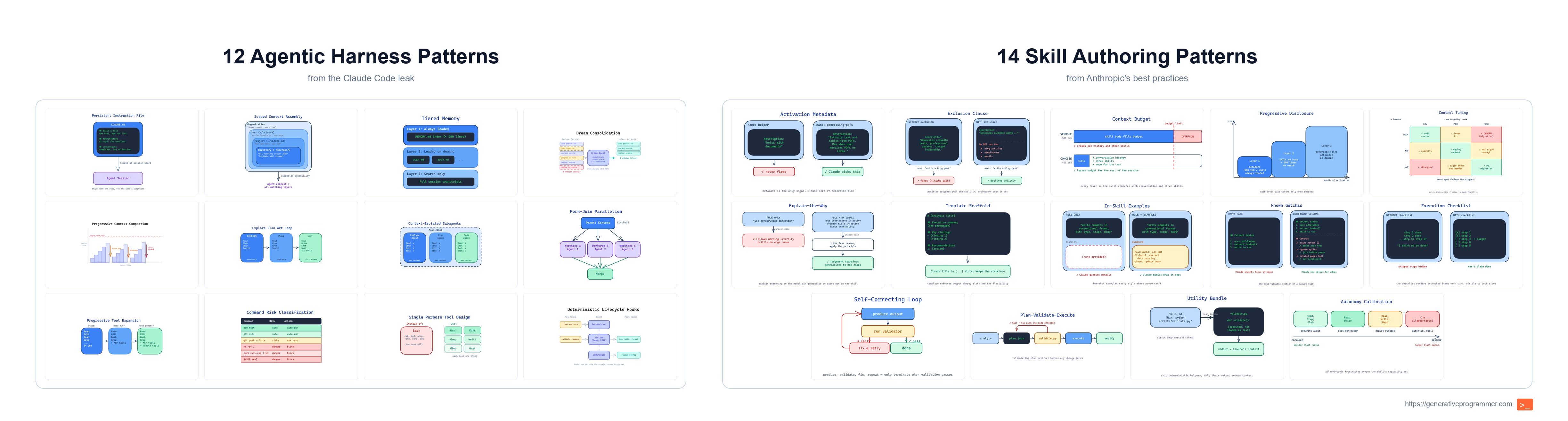
If you want to read the earlier parts of this series, start with these two posts: