

My previous post pulled 12 patterns from the Claude Code harness itself, how the agent works under the hood. This one looks one layer up: when you author a Skill to extend Claude, what patterns recur?
Skills come in two rough types. Task skills (often as disable-model-invocation: true) are step-by-step workflows (deploy, commit, security-review) that a user often invokes directly via /skill-name. Reference skills (user-invocable: false) are passive knowledge (style guides, domain vocabulary) that Claude applies inline whenever a relevant request matches. Most of the patterns below apply to both, but where emphasis shifts I will call it out.
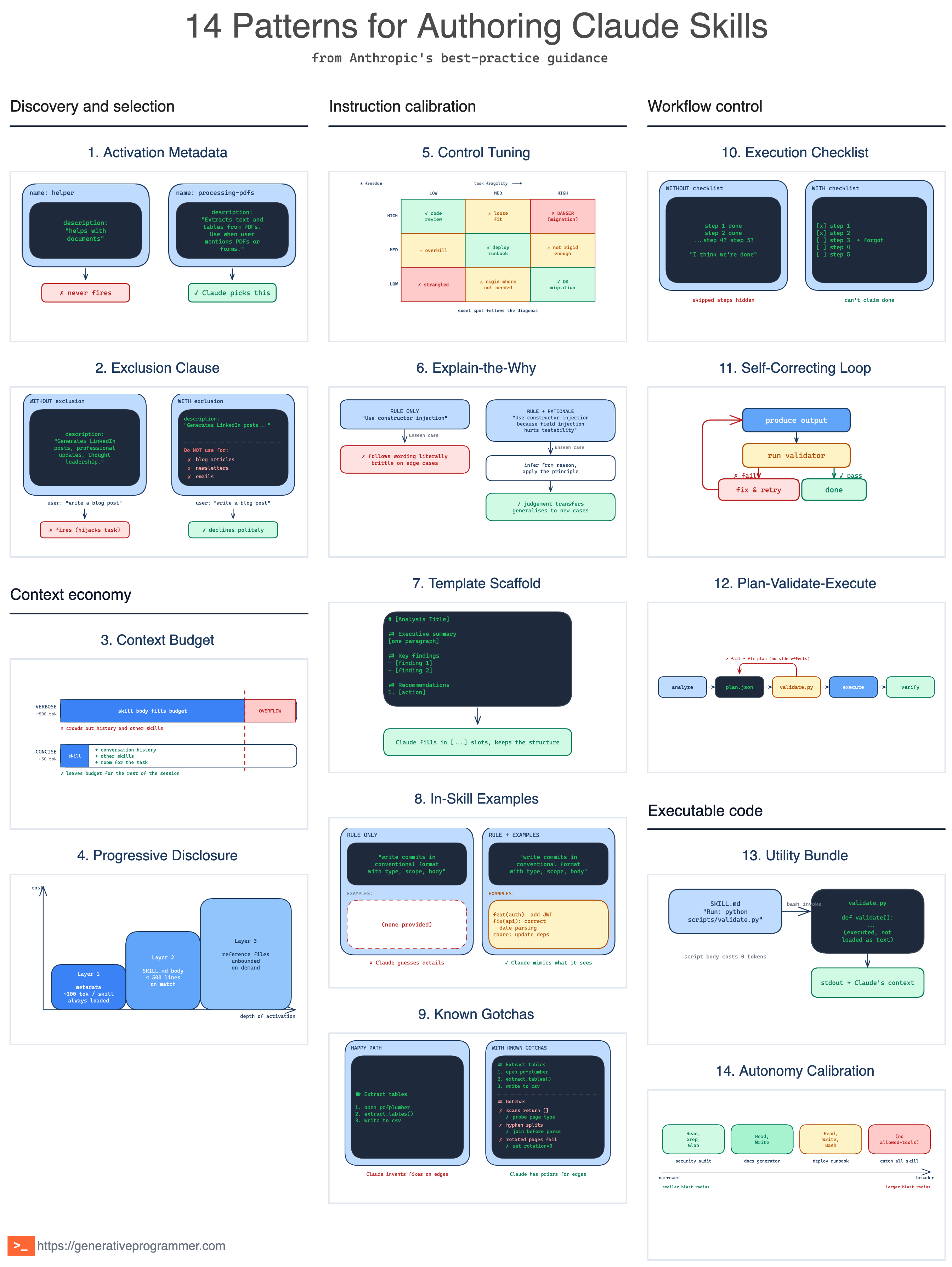
The 14 patterns fall into five categories: discovery and selection, context economy, instruction calibration, workflow control, and executable code.
Discovery and selection
Two patterns decide whether a skill fires at all. At session start Claude sees only metadata: the name and description of every installed skill. A skill that cannot survive this metadata-only round never runs.
1. Activation Metadata pattern
With dozens of installed skills, Claude picks the wrong one, or none at all, when descriptions are vague like “helps with documents”. The description field is not just a summary; it is the only signal Claude has at selection time.
This pattern packs the description with both what the skill does and the specific triggers or contexts that should fire it, written in third person. Anthropic’s skill-creator goes further and recommends writing descriptions that are a little “pushy”, since Claude has a measured tendency to under-trigger skills: “Make sure to use this skill whenever the user mentions dashboards, data visualization, or internal metrics, even if they do not explicitly ask for a dashboard.”
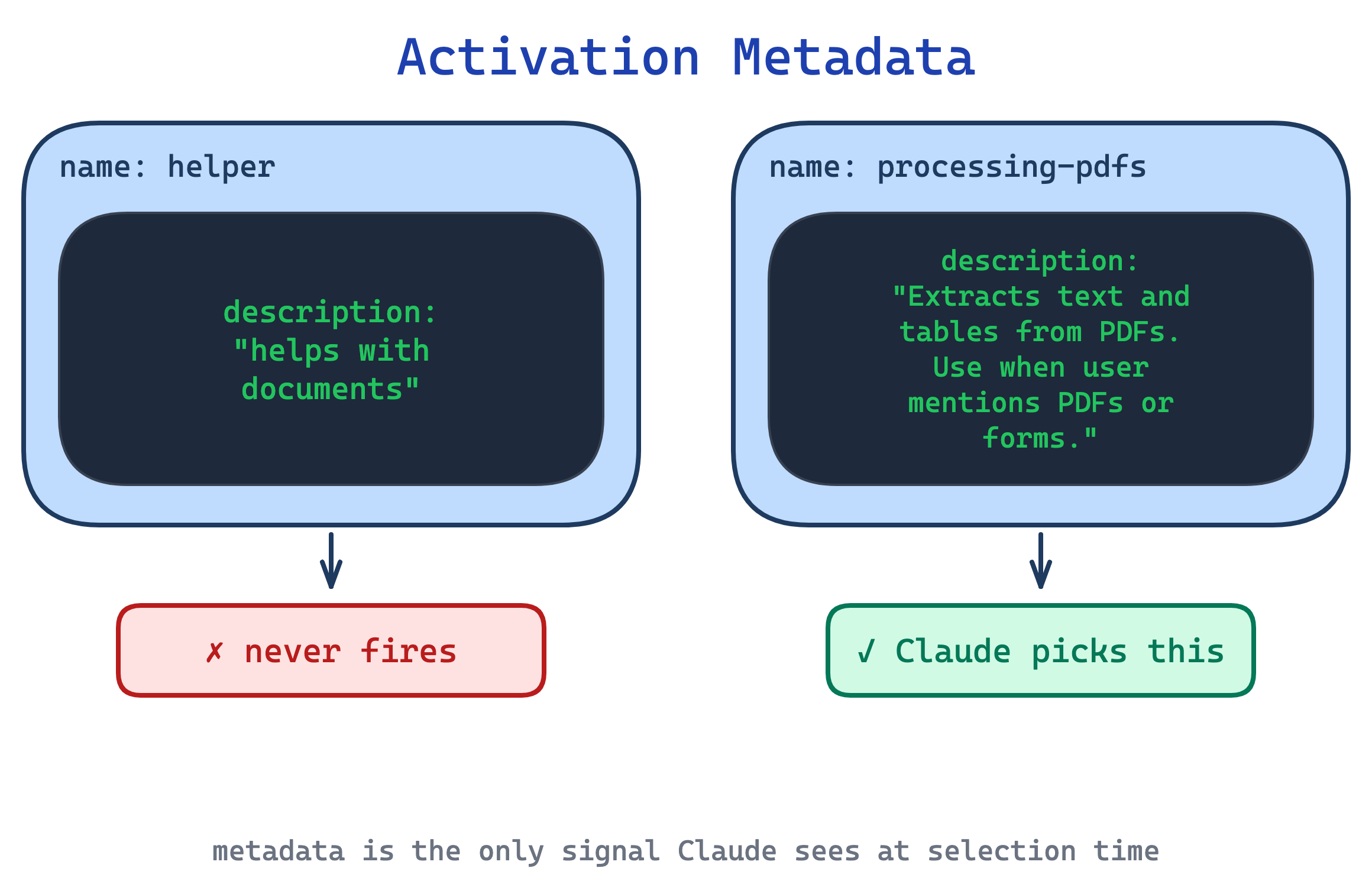
Use this pattern on every skill. Nothing else matters if the skill fails at selection. The trade-off is budget: in the open Agent Skills spec, the description field caps at 1024 characters; in Claude Code, the combined description and optional when_to_use text is truncated at 1536 characters in the skill listing. So every sentence competes with positive triggers, exclusion clauses, and domain keywords for space.
2. Exclusion Clause pattern
A description that only says when to fire misses half the job. The skill triggers on tangentially related requests, hijacks work that belongs to another skill, or steps in when bare Claude would have done fine.
This pattern ends the description with explicit exclusions: “Do NOT use for blog articles, newsletters, emails, tweets, or long-form content.” Ruben Hassid calls this the single most important line in the description, above the positive trigger. Positive triggers pull a skill in; exclusions push it out. Both are needed and they compete for the same budget.
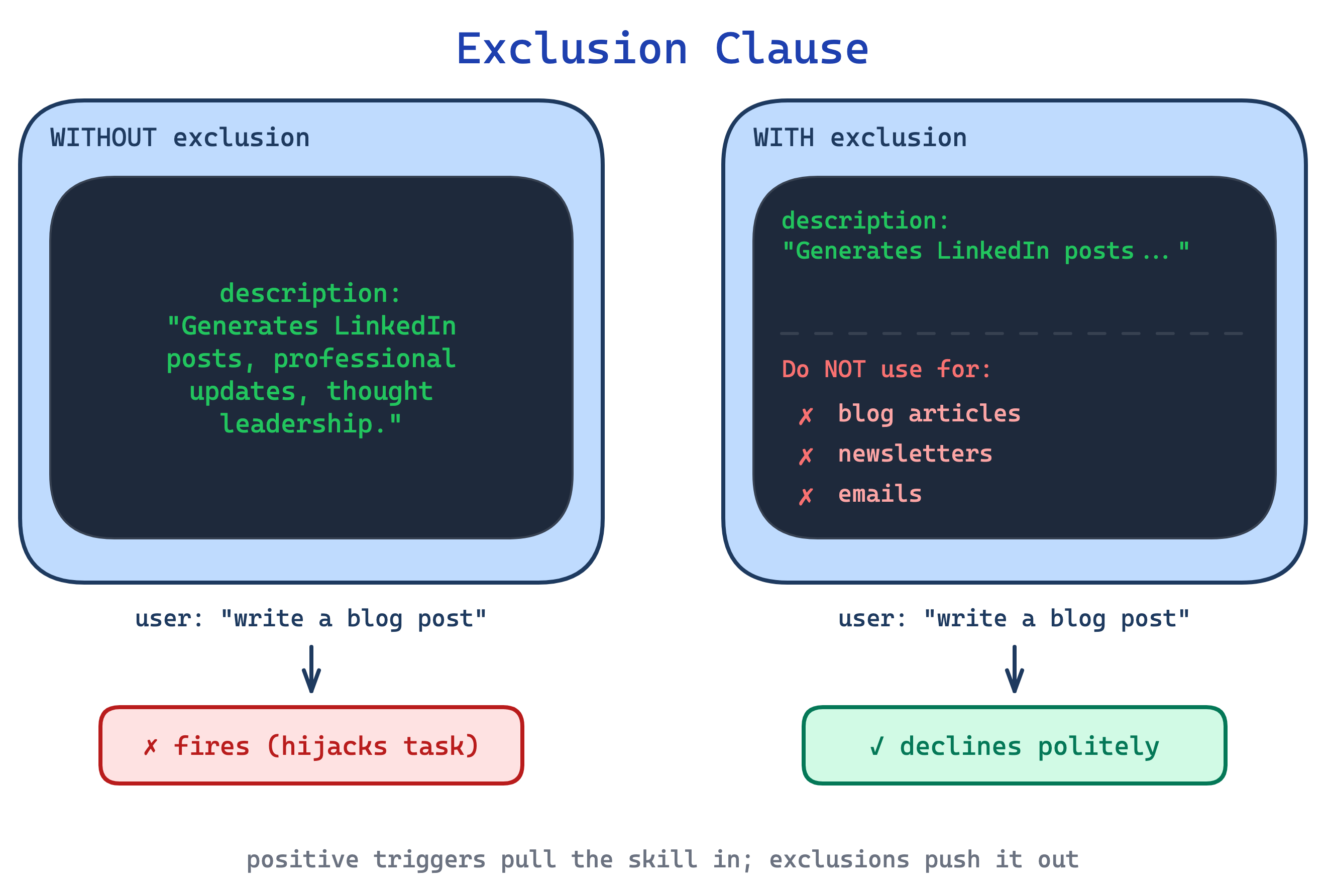
Use this for any skill that shares vocabulary with other skills or with bare Claude (most of them). The trade-off is maintenance: as your skill library grows, exclusion clauses must be kept in sync so two skills do not both claim or both reject the same territory.
Context economy
Two patterns exist because the context window is a shared budget. Every token in your skill crowds out tokens from other skills, the conversation history, and the user’s actual request.
3. Context Budget pattern
A skill that re-explains what a PDF is, what a library is, or how JSON works spends tokens teaching Claude things Claude already knows. Multiply that waste across a library of 20 skills and the context window is half-full before the user has said anything.
This pattern demands each paragraph justify its token cost. Default assumption: Claude is smart. If removing a sentence would not confuse a competent reader, remove it. Consistent terminology matters too: pick one term (always “field”, never “field / box / element”) to reduce cognitive load. And avoid time-sensitive phrasing (”before August 2025...”) that dates the skill; put legacy information in an “old patterns” appendix instead.
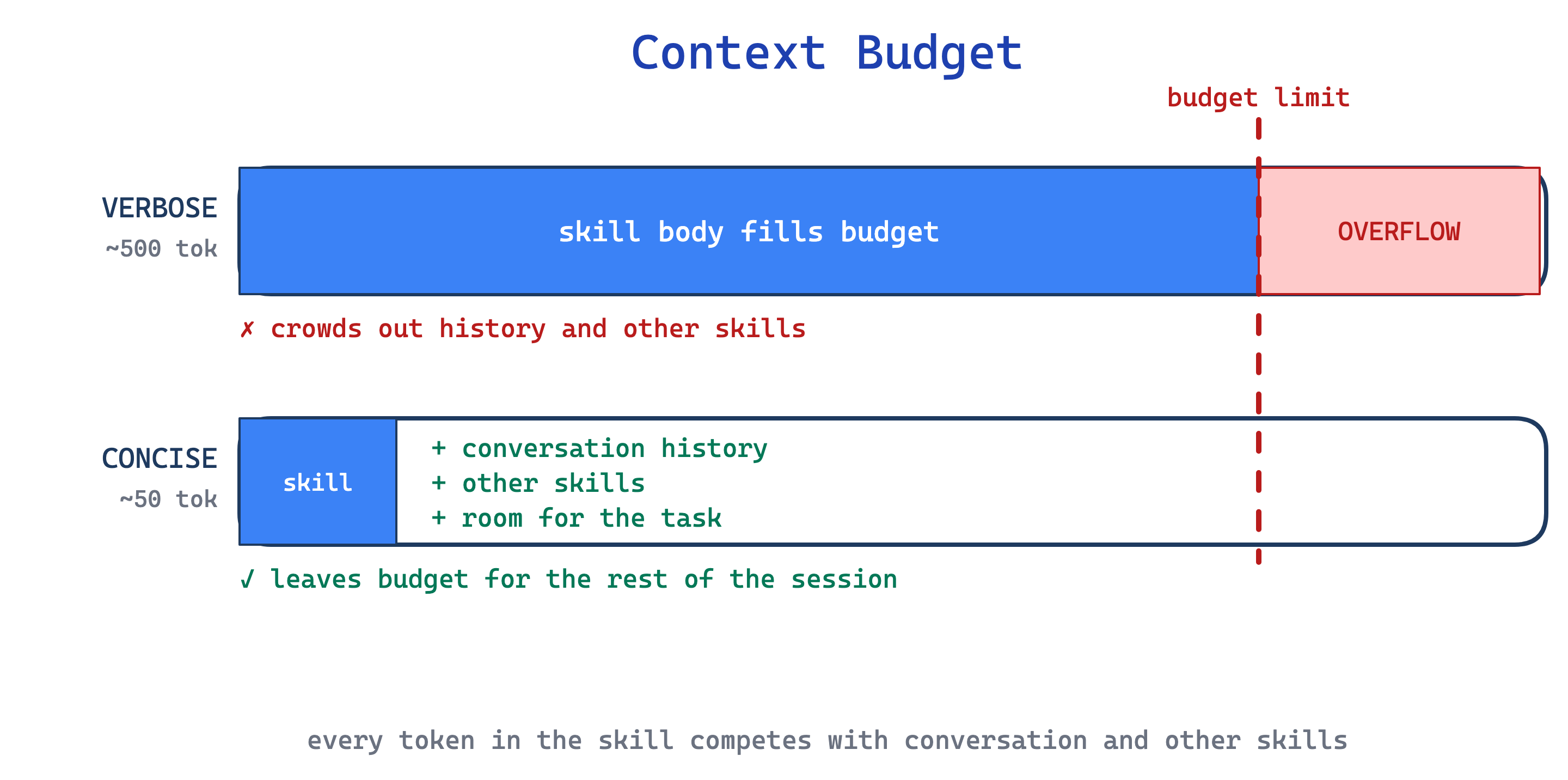
Use this pattern on every skill; it is a baseline discipline. The trade-off shows up with less-capable models: what reads as crisply concise to Sonnet may be too terse for Haiku. If you target multiple models, aim for the level of detail that works for the weakest one you plan to support.
4. Progressive Disclosure pattern
Stuffing every detail into SKILL.md burns context on material most invocations never need. An 800-line SKILL.md with forms, API references, and examples costs the same whether the user asked about forms or about something else entirely.
This pattern treats SKILL.md as a table of contents. The body stays under 500 lines and links to domain files (FORMS.md, REFERENCE.md, reference/finance.md). Claude reads the metadata on every session; loads SKILL.md only when the skill is triggered; and pulls in detail files only when the current task references them. Scripts in scripts/ can execute without loading, so their internal code usually stays out of the context window. Keep the reference graph shallow: every file one hop from SKILL.md. Nested chains like SKILL.md -> advanced.md -> details.md increase the odds Claude only partially reads the target and misses the rest. Long reference files, especially those over a few hundred lines, get a table of contents at the top so Claude can see the full scope even from a truncated read.
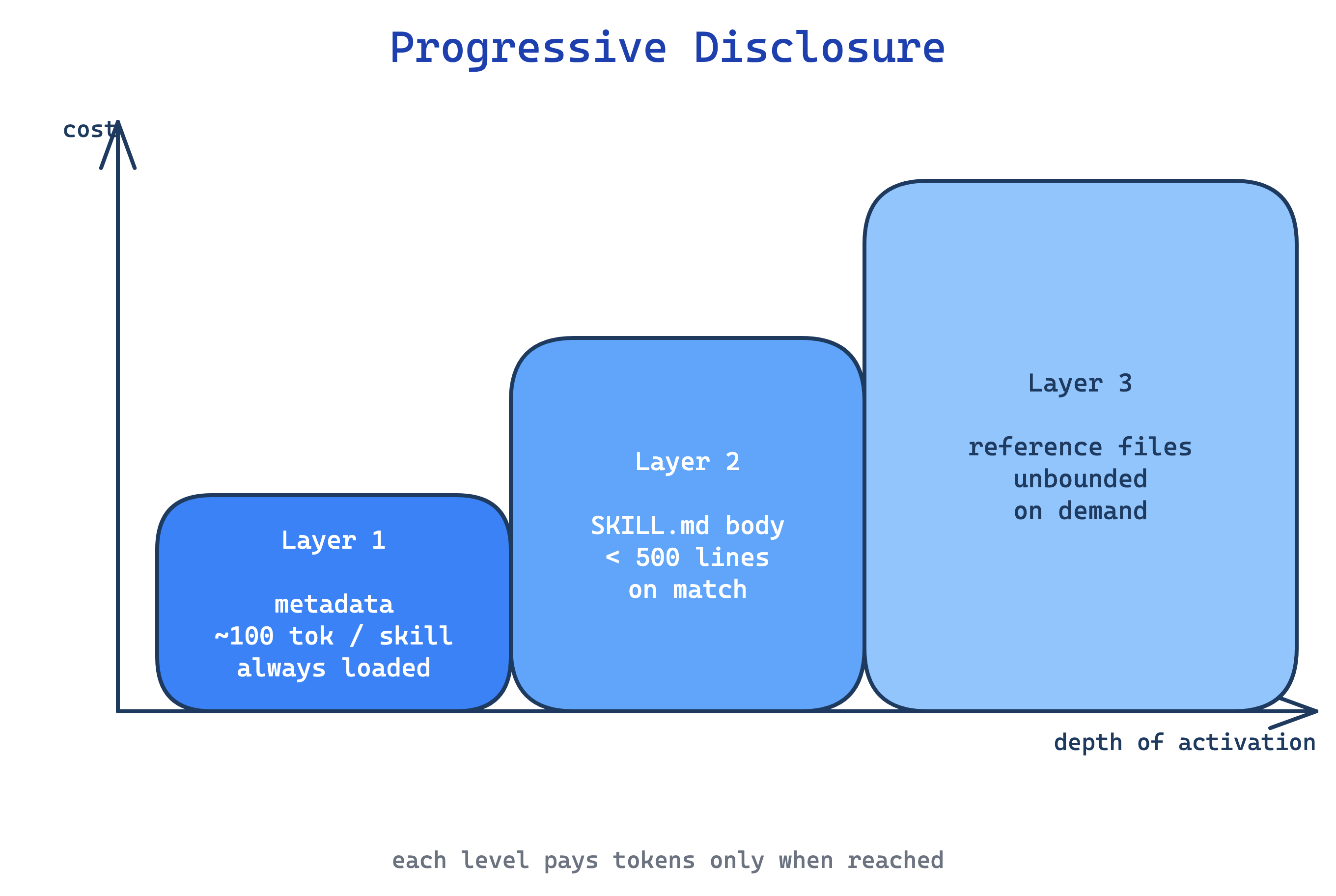
Use this for any skill pushing past ~300 lines in SKILL.md. The trade-off is fragmentation: splitting content across files makes it harder for authors to hold the whole skill in their head, and Claude has to make correct routing decisions about which file to load next. Mis-routing costs turns.
Instruction calibration
Five patterns dial instruction specificity up or down. Control Tuning is the meta-rule for how tightly to constrain Claude. Explain-the-Why shapes how that specificity is phrased. Template Scaffold, In-Skill Examples, and Known Gotchas are concrete techniques at the low-freedom end of the dial.
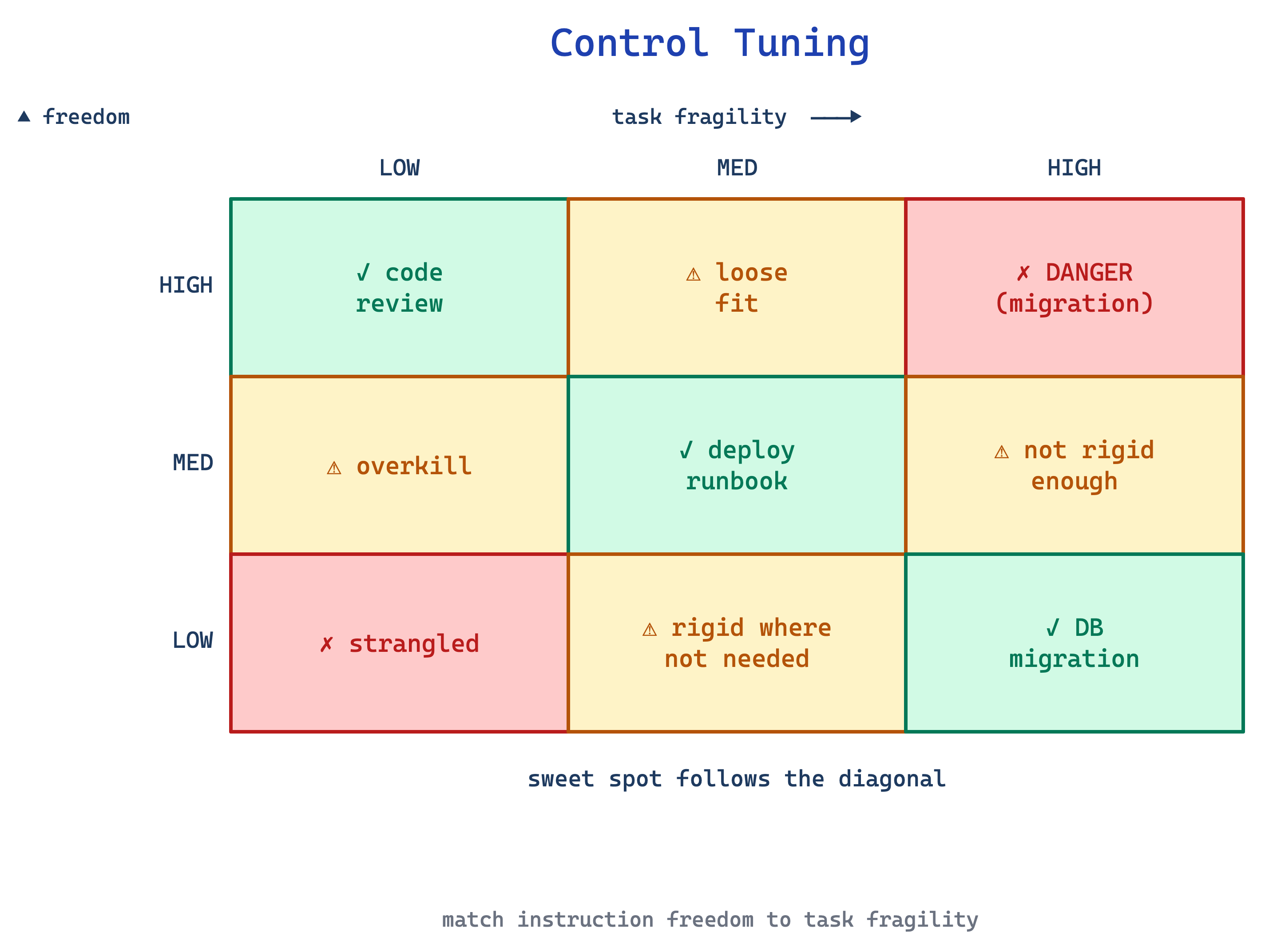
5. Control Tuning pattern
A skill that rigidly scripts every action strangles Claude on tasks where context should shape the approach. A skill that gives only loose guidance fails on fragile procedures where one wrong step breaks everything.
This pattern matches instruction freedom to task fragility. High freedom (text instructions, “use your judgement”) fits open-field tasks like code review where many valid approaches exist. Medium freedom (pseudocode, parameterised scripts) fits preferred-but-flexible flows like a deploy runbook. Low freedom (exact scripts, no flags, “do not modify this command”) fits fragile operations like database migrations where one wrong step is catastrophic.
Tone is part of the dial too: opening with a persona (”You are a senior code reviewer focused on correctness over style”) sets the judgement rubric for the whole skill and is common in reference skills that shape voice.
Use this pattern by asking, for each step in the skill, how much variance is acceptable. The trade-off is judgement: authors consistently err toward over-constraining, because rigid instructions feel safer. They are not; they just fail differently.
6. Explain-the-Why pattern
Skills written as strings of ALWAYS, NEVER, MUST in capital letters give Claude rigid rules with no context. The model follows the letter but misses edge cases the author did not anticipate, or over-applies a rule in situations where a judgement call was needed. Anthropic’s skill-creator explicitly flags all-caps MUST/ALWAYS/NEVER as a yellow flag to reframe.
This pattern states the rule, then explains why so Claude can generalise to cases the skill did not spell out. “Use constructor injection. Field injection breaks testability because we cannot mock the field without Spring context” beats “MUST use constructor injection. NEVER use field injection.” The reasoning becomes the rubric for unanticipated cases.
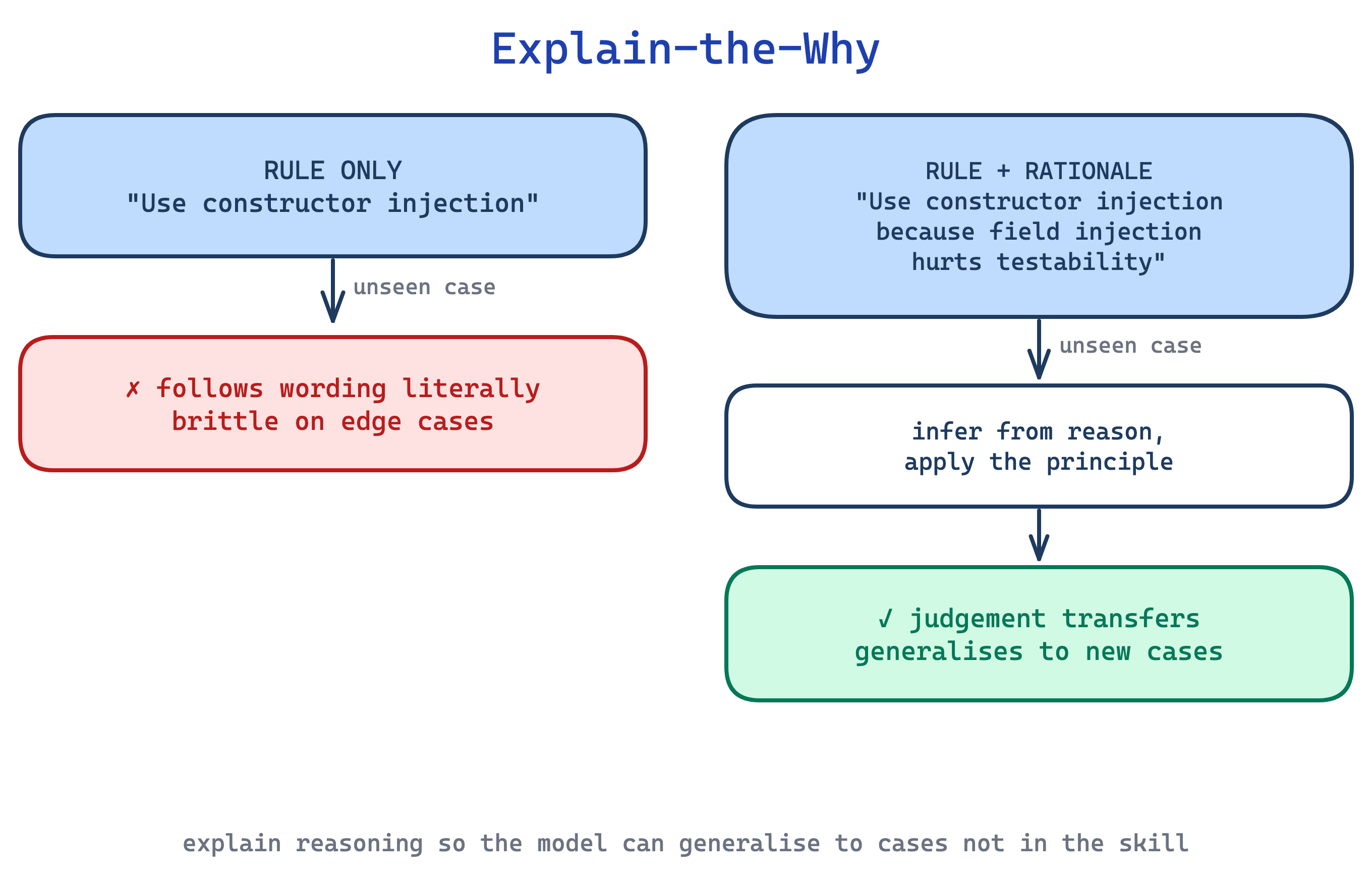
Use this pattern wherever you catch yourself reaching for capitalised imperatives. The trade-off is length: explanations cost tokens, and for genuinely fragile steps (see Control Tuning), a bare imperative is still correct. Reserve prose-with-reasoning for the cases where Claude will need to exercise judgement.
7. Template Scaffold pattern
When output structure matters, reports, commit messages, API payloads, release notes, Claude produces inconsistent shapes across invocations. The shape is implicit in examples elsewhere, but the skill does not make it explicit, and each run rediscovers a slightly different structure.
This pattern ships a template in the skill body with placeholders Claude fills in. Templates come in two strictness levels. Strict: “ALWAYS use this exact template structure” for data contracts or machine-parsed output. Flexible: “A sensible default; adapt sections as needed” for documents where the author trusts Claude to judge.
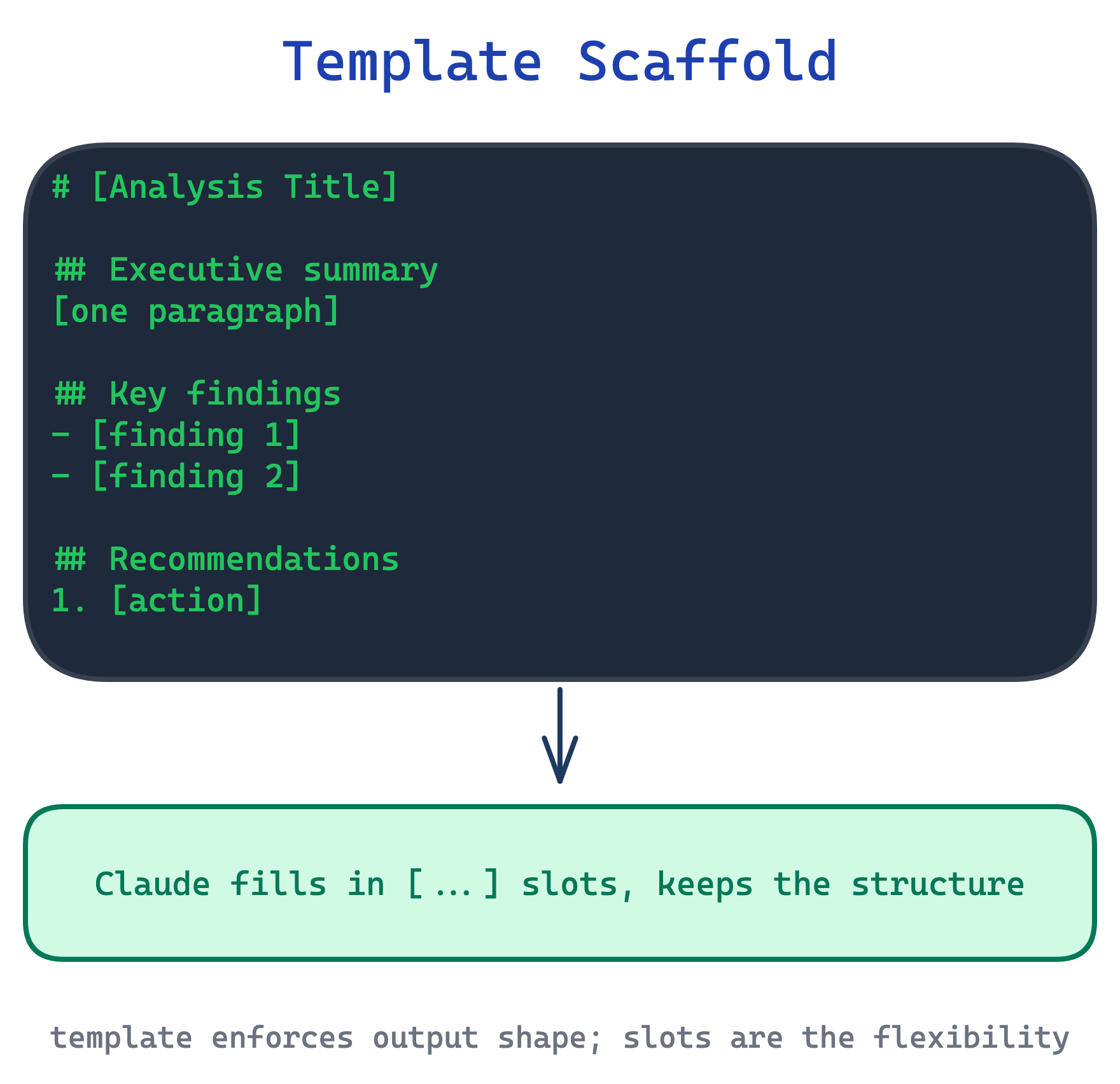
Use this whenever output structure has downstream readers or parsers. The trade-off is creative flatness: strict templates suppress the structural variation that can make output more useful in edge cases, so prefer flexible templates unless a machine is reading the output.
8. In-Skill Examples pattern
Description alone rarely conveys tone, formatting conventions, or the right level of detail. Claude hits the right shape but the wrong style: commit messages that use the correct conventional-commit prefix but miss the tone the team writes in.
This pattern embeds concrete input/output pairs in the skill body, the same few-shot trick used in prompting. Two or three examples, each labelled Input: and Output:, show the desired pattern directly. Claude matches on the examples instead of inferring from prose. Templates (previous pattern) show the skeleton; examples show populated instances. The two compose well, with the template defining shape and examples calibrating style.
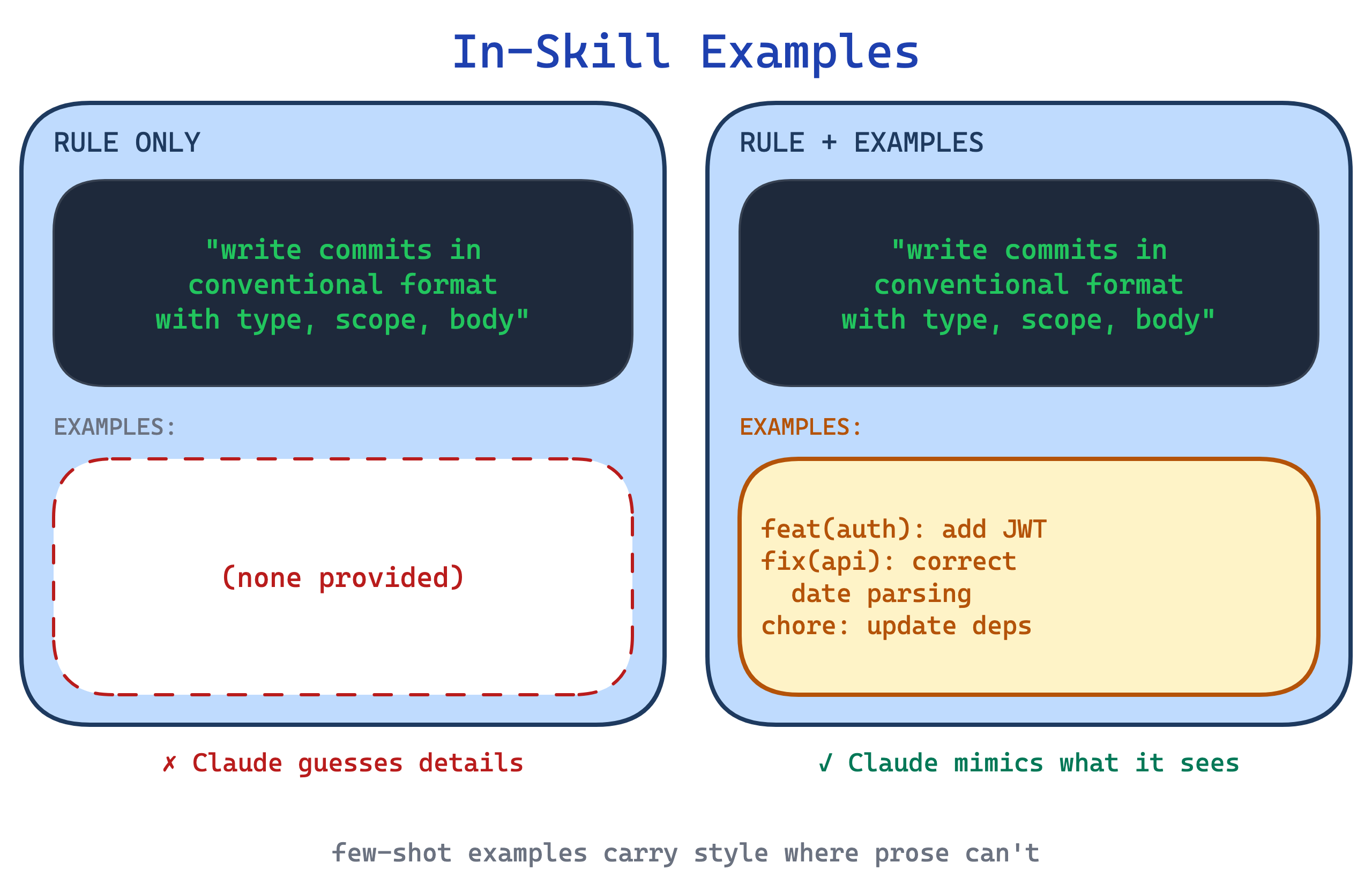
Use this for skills where output quality depends on style as much as structure: commit messages, release notes, changelog entries, review summaries. The trade-off is drift toward the examples. If the three examples share a subtle bias, Claude reproduces that bias across all invocations, so the examples need to span the variation the skill should support.
9. Known Gotchas pattern
Skills that document only the happy path teach Claude what to do, not what to watch for. The first time the skill hits a real-world edge case, a form field that does not exist, a command that works on macOS but fails on Linux, a library that silently returns empty results, Claude has no prior and invents a fix.
This pattern adds a dedicated section to SKILL.md listing concrete failure modes previously seen: “Scanned PDFs return [] silently. Check page type first.” “Rotated pages need page.rotation=0 before column extraction.” One practitioner guide calls the gotchas section the most valuable content of a mature skill.
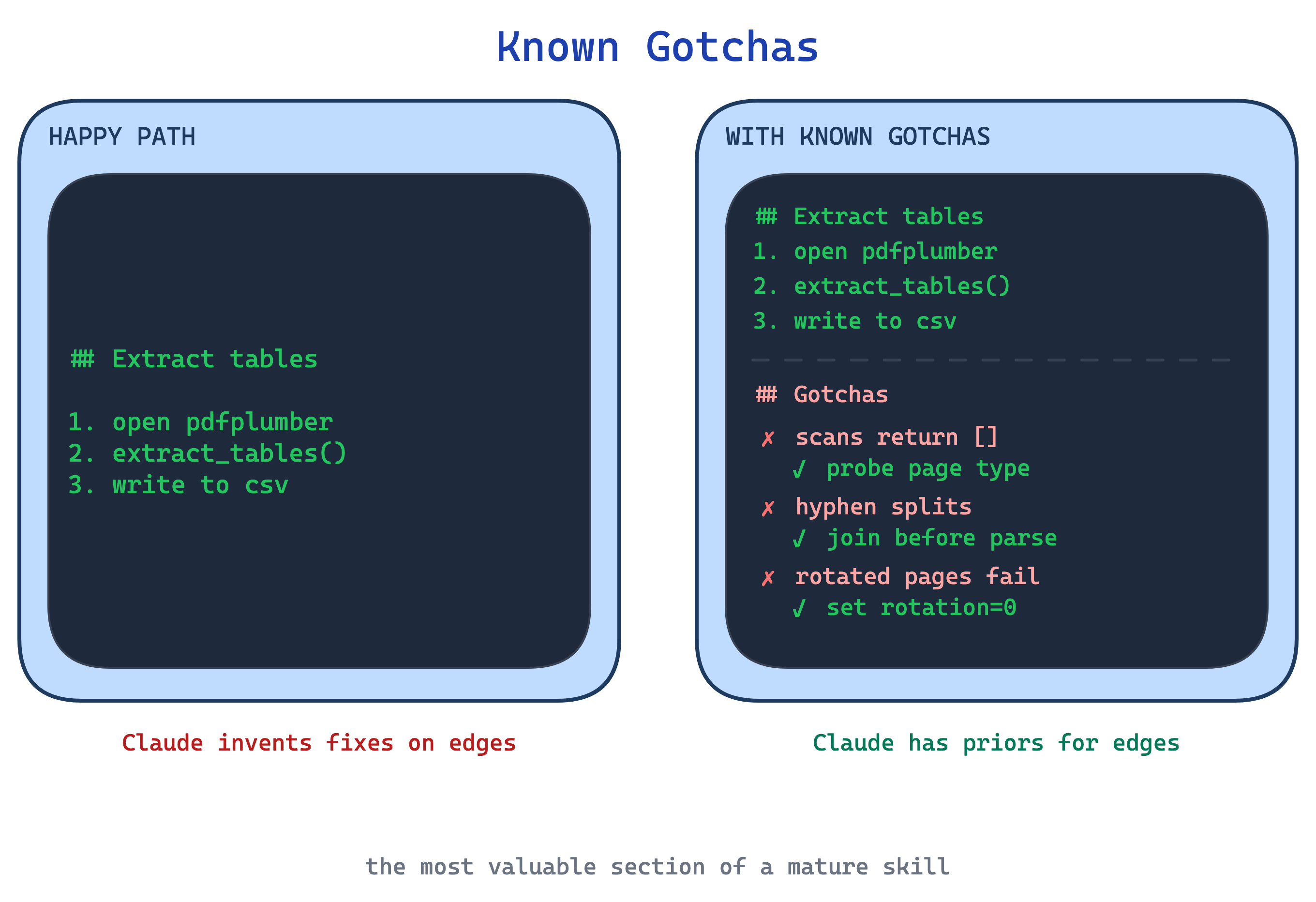
Use this pattern on mature skills, populated from observing real runs. The trade-off is that gotchas are a moving target: libraries update, APIs change, and a stale gotcha can send Claude chasing a problem that no longer exists.
Workflow control
Three patterns structure multi-step procedures. Execution Checklist is the linear case. Self-Correcting Loop introduces iteration. Plan-Validate-Execute adds a verifiable artifact before any side effects.
10. Execution Checklist pattern
In long multi-step procedures Claude skips validation steps, loses track of which step it is on, or declares done prematurely. “I think we are finished” at step four of a six-step process is a common failure mode.
This pattern provides a copyable checklist Claude pastes into its response and ticks off as it works. The checklist lives in the conversation, so skipping a step is now visible to both Claude and the user. The act of rendering unchecked items each turn raises the bar for declaring completion.
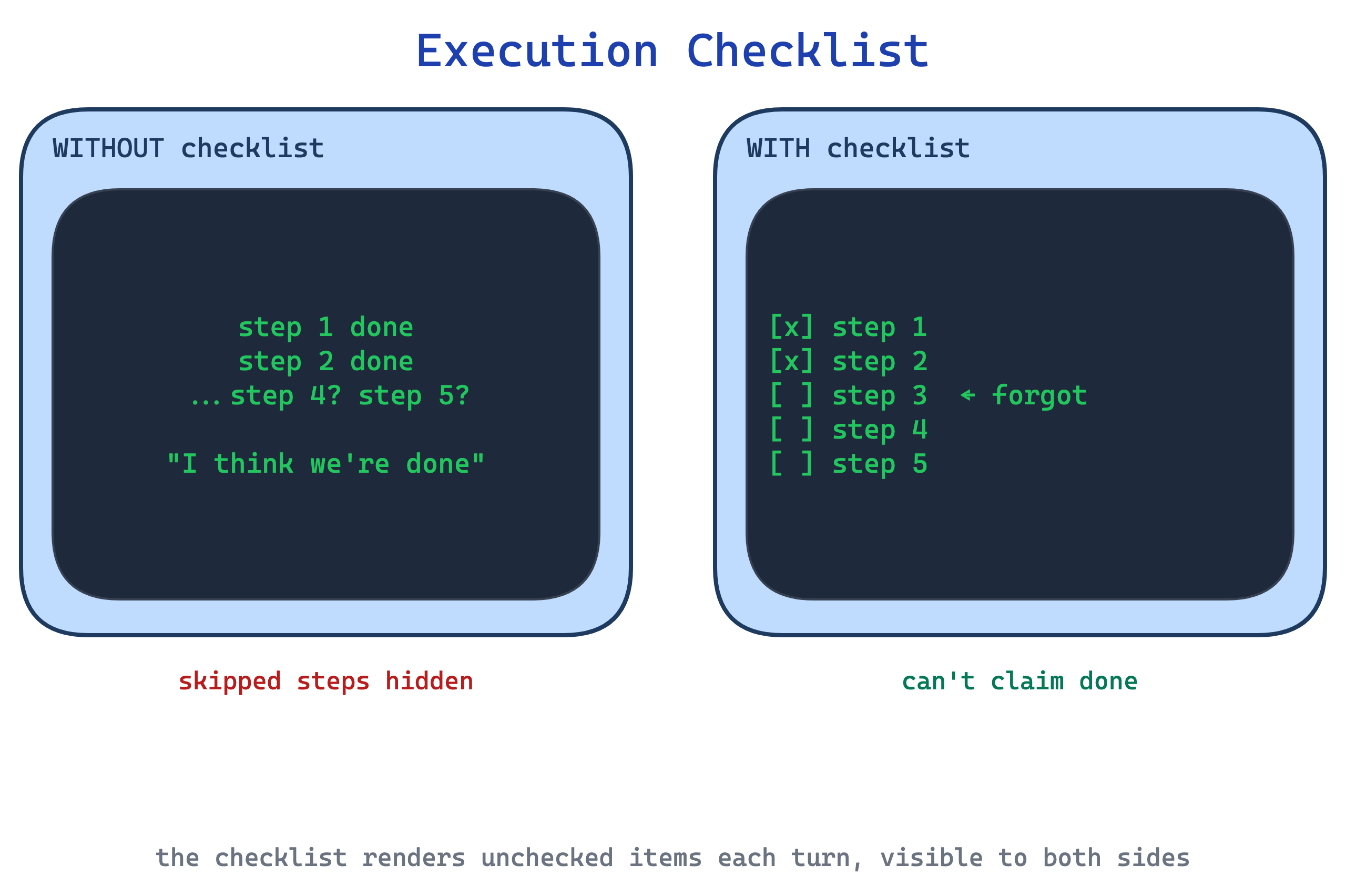
Use this for any workflow with more than three steps, especially where a skipped validation step is costly. The trade-off is verbosity: the checklist is rendered in full on every turn, so in long sessions it multiplies tokens, and for very short flows it is overkill.
11. Self-Correcting Loop pattern
When Claude generates code, edits XML, or drafts against a style guide, a single forward pass often ships mistakes the skill could have caught. The skill describes the correct output but has no mechanism to verify what Claude actually produced.
This pattern wires in an explicit loop: produce output, run a validator, if it fails, fix and revalidate. The validator can be a script (python validate.py fields.json) or a document (re-read STYLE_GUIDE.md and check each rule). The loop terminates only when validation passes.
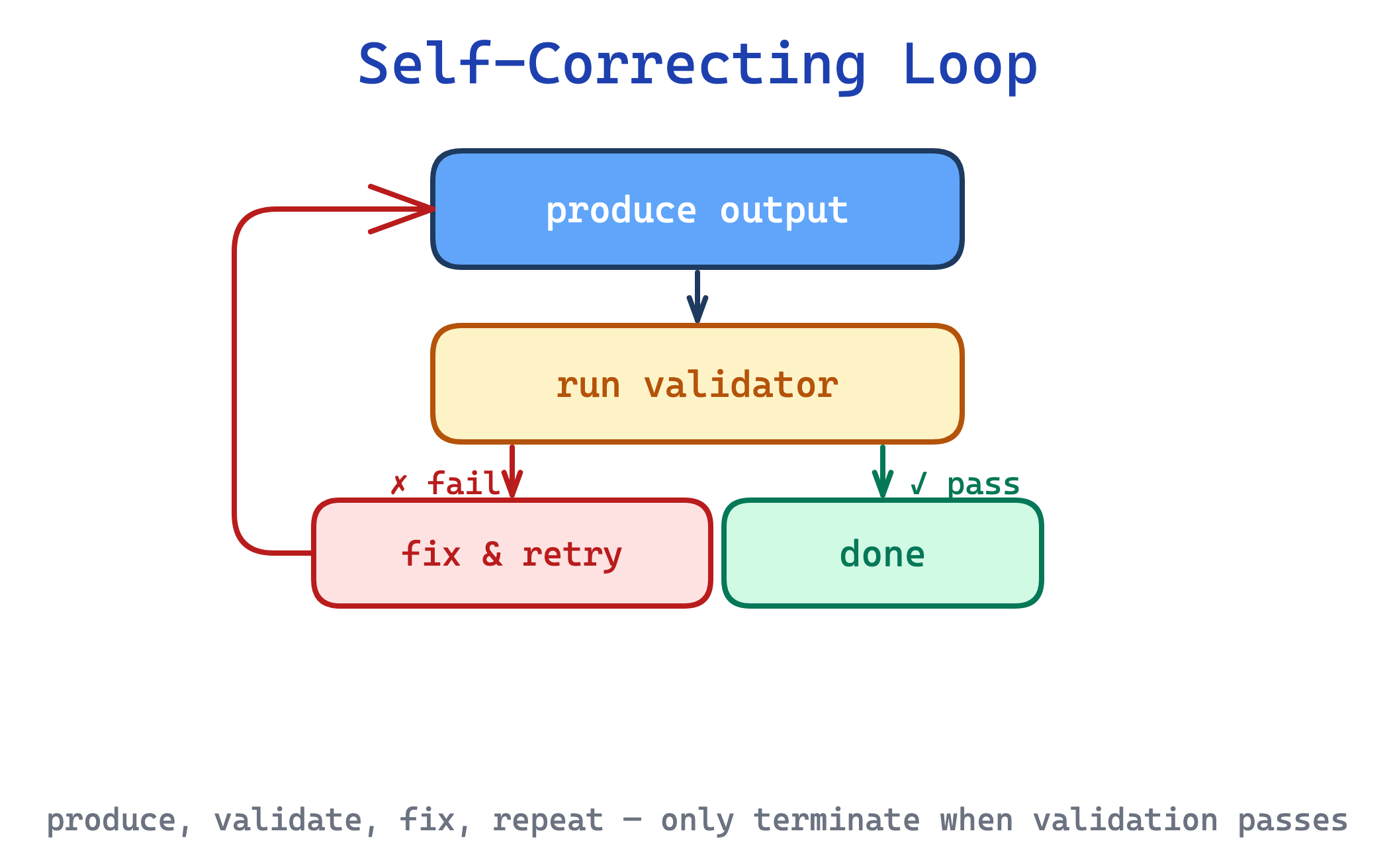
Use this for quality-critical tasks where mistakes are expensive and programmatic verification is feasible. The trade-off is non-termination: a weak validator (or a Claude that keeps making the same mistake) can loop indefinitely, so the pattern needs a retry cap and a fallback to the user.
12. Plan-Validate-Execute pattern
For batch or destructive operations, updating 50 form fields, migrating rows, rewriting a document, a direct “just do it” pass lets errors cascade silently. By the time you notice Claude referenced non-existent fields, the changes are already applied.
This pattern inserts a verifiable intermediate artifact, typically a JSON plan, between understanding the task and acting on it. A script validates the plan before any side effects. That is the distinction from Self-Correcting Loop, which iterates after the work has already landed. Claude iterates on the plan freely; the real target is only touched once the plan passes validation.
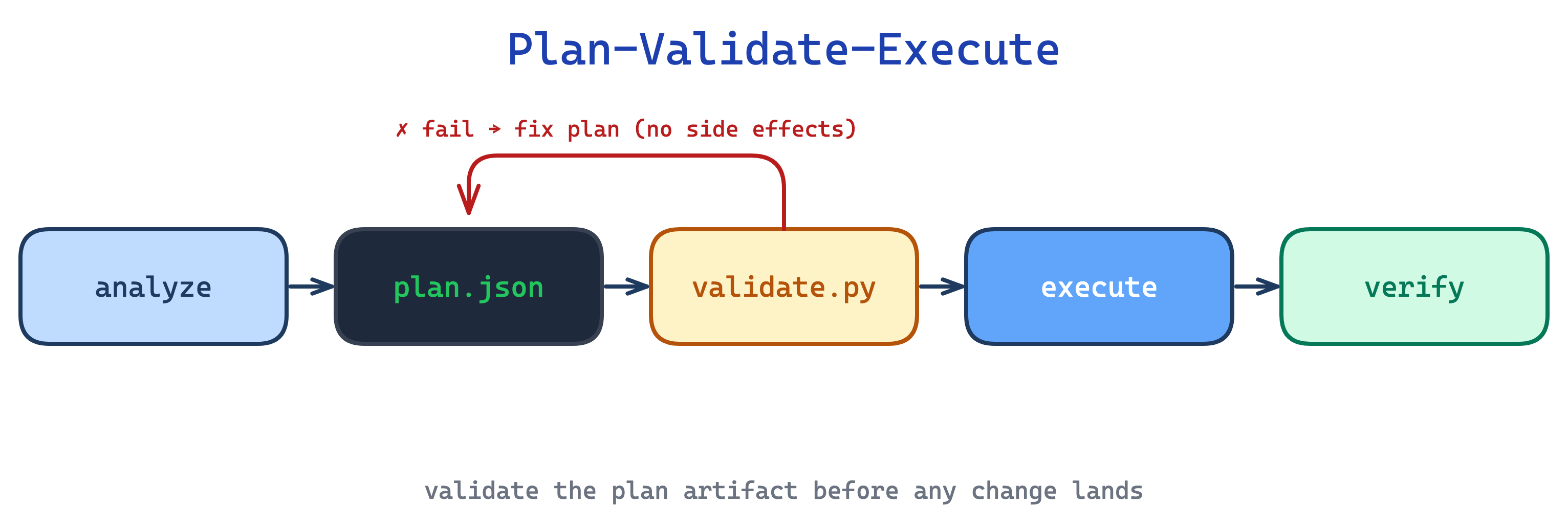
Use this for batch, destructive, or high-stakes operations. The trade-off is ceremony: for a two-field edit the plan-validate-execute loop is more process than the task deserves, so reserve it for operations where “undo” is costly or impossible.
Executable code
Two patterns apply to skills that ship runnable helpers alongside SKILL.md. Together they shift work out of Claude’s inference loop and into deterministic scripts that run, succeed or fail, and return only their output.
13. Utility Bundle pattern
Asking Claude to generate a validation script, a PDF extractor, or a data-normaliser from scratch every invocation is slower, less reliable, and burns tokens on code the user never sees. Each run rediscovers the same logic with small variations.
This pattern ships purpose-built scripts in scripts/ alongside SKILL.md. Claude invokes them via bash, so only their output consumes context. Scripts should handle common failure modes cleanly instead of dumping ambiguity back on Claude. Sometimes that means creating a missing file with a sensible default. Sometimes it means failing fast with a clear error. Constants need justifying comments (”30s timeout covers slow connections”), not magic numbers. When in doubt about which helpers to bundle, run the skill on three test cases and read the transcripts: if subagents all wrote the same helper independently, promote it to scripts/.
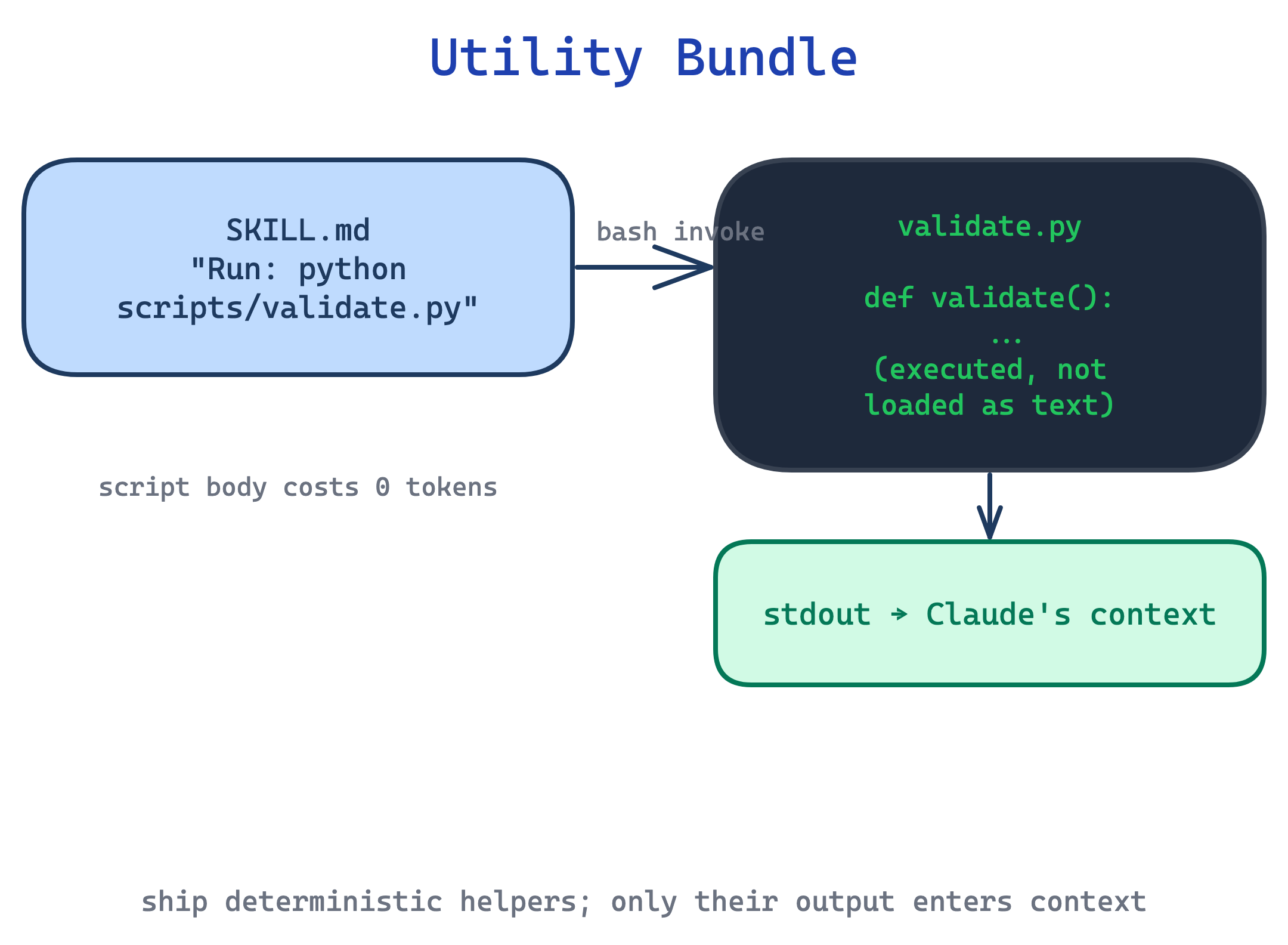
Use this for any operation that is deterministic, frequently repeated, and worth testing independently. The trade-off is environment dependence: scripts need a runtime, and platform-specific helpers fail differently on user machines than on the author’s, so validate package availability in SKILL.md and prefer forward slashes in every path.
14. Autonomy Calibration pattern
A skill that runs with the full default tool set can do anything: write files, shell out, call MCP servers, even when its task only needs read access. A security-audit skill with Write and Bash permissions is still a standing risk, regardless of what SKILL.md says.
This pattern declares an allowed-tools list in the skill’s YAML frontmatter to pre-approve only the capabilities it actually needs. A security audit gets Read, Grep, Glob; a documentation generator gets Read, Write; a deploy skill gets Bash with a narrow command matcher. That reduces approval friction, but it does not by itself restrict which tools are available. In Claude Code, actual restrictions come from permission rules, not from allowed-tools alone.
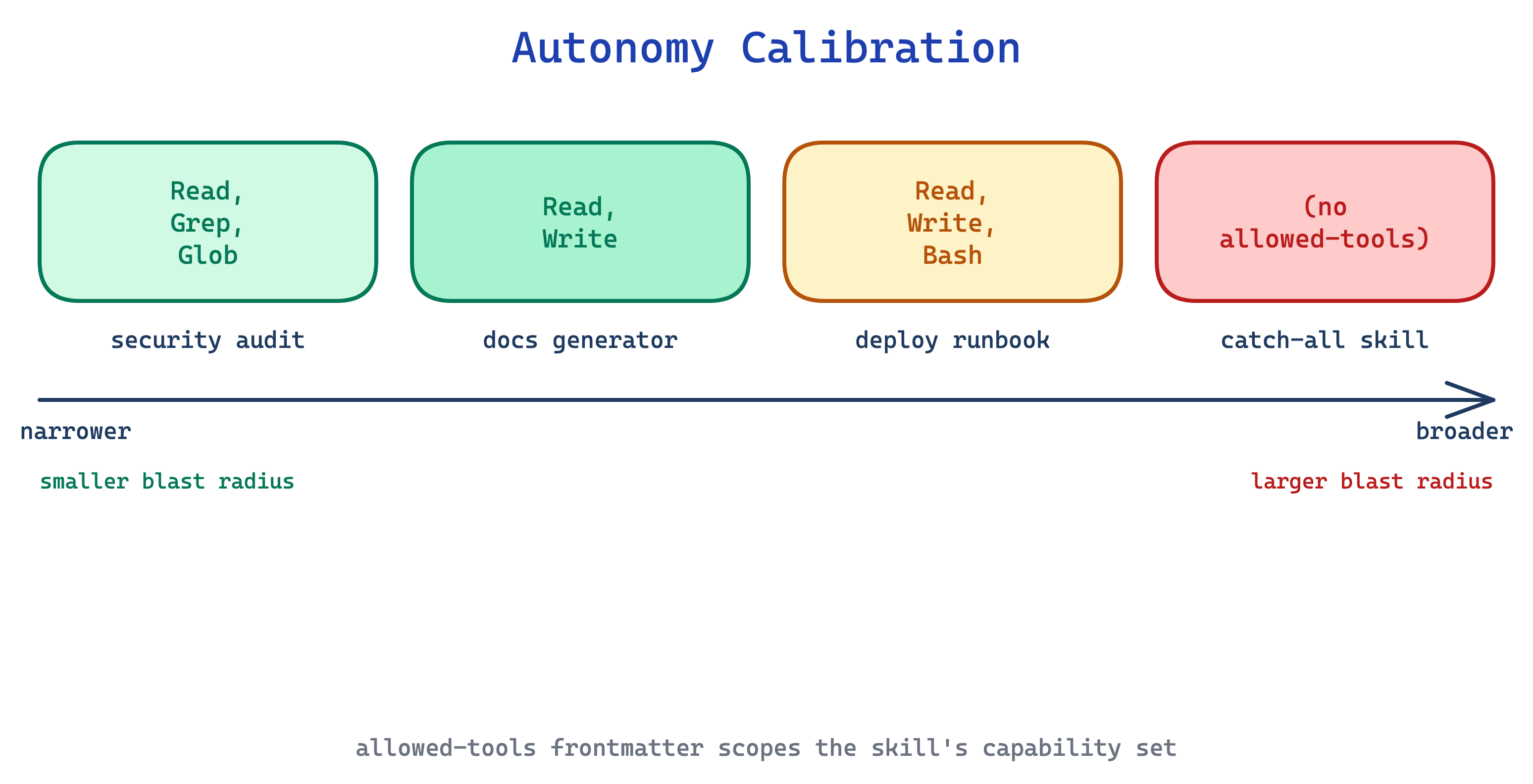
Use this for any skill where a narrow pre-approved tool set is genuinely sufficient, especially security, audit, review, and analysis skills. The trade-off is confusion: an over-broad allowed-tools list quietly grants more hands-off autonomy than intended, and it is easy to mistake pre-approval for sandboxing. If you need real restrictions, pair this with permission rules.
The takeaway
These 14 patterns are essential. The description field decides whether the skill even runs; progressive disclosure decides how much context it costs; explain-the-why and known gotchas decide whether Claude handles the edge cases; plan-validate-execute and autonomy calibration decide how much can go wrong when something breaks. Each pattern addresses a failure mode that shows up across authors and domains.
As with the harness patterns in the previous post, these are not product-specific tricks. They are becoming the cornerstones of how agents get extended, and they will remain relevant as the models and tools change underneath them.
The source material for this post is Anthropic’s own Skill authoring best practices, their skill-creator SKILL.md (Anthropic eating their own dog food), the 33-page Complete Guide, plus community writing from Akshay Pachaar, Ruben Hassid, Tort Mario, Alex Xu, and Siva.