

Large codebases expose different failure modes for AI coding assistants. They span teams, conventions, build systems, and naming rules. Generated files can outnumber source files, and the most useful answers often live outside the repo. An agent that reads files like a person can work in a starter project, but at scale it needs stronger signals about where to start, what to ignore, which commands apply, and which knowledge lives outside the codebase.
This post follows my 12 Agentic Harness Patterns. It looks at how engineering organizations adapt Claude Code for large codebases, based on Anthropic’s post on how Claude Code works in large codebases.
The 13 patterns fall into three groups:
How Claude finds the right code context.
How the harness keeps a session effective.
How a working setup reaches every developer and stays maintained.
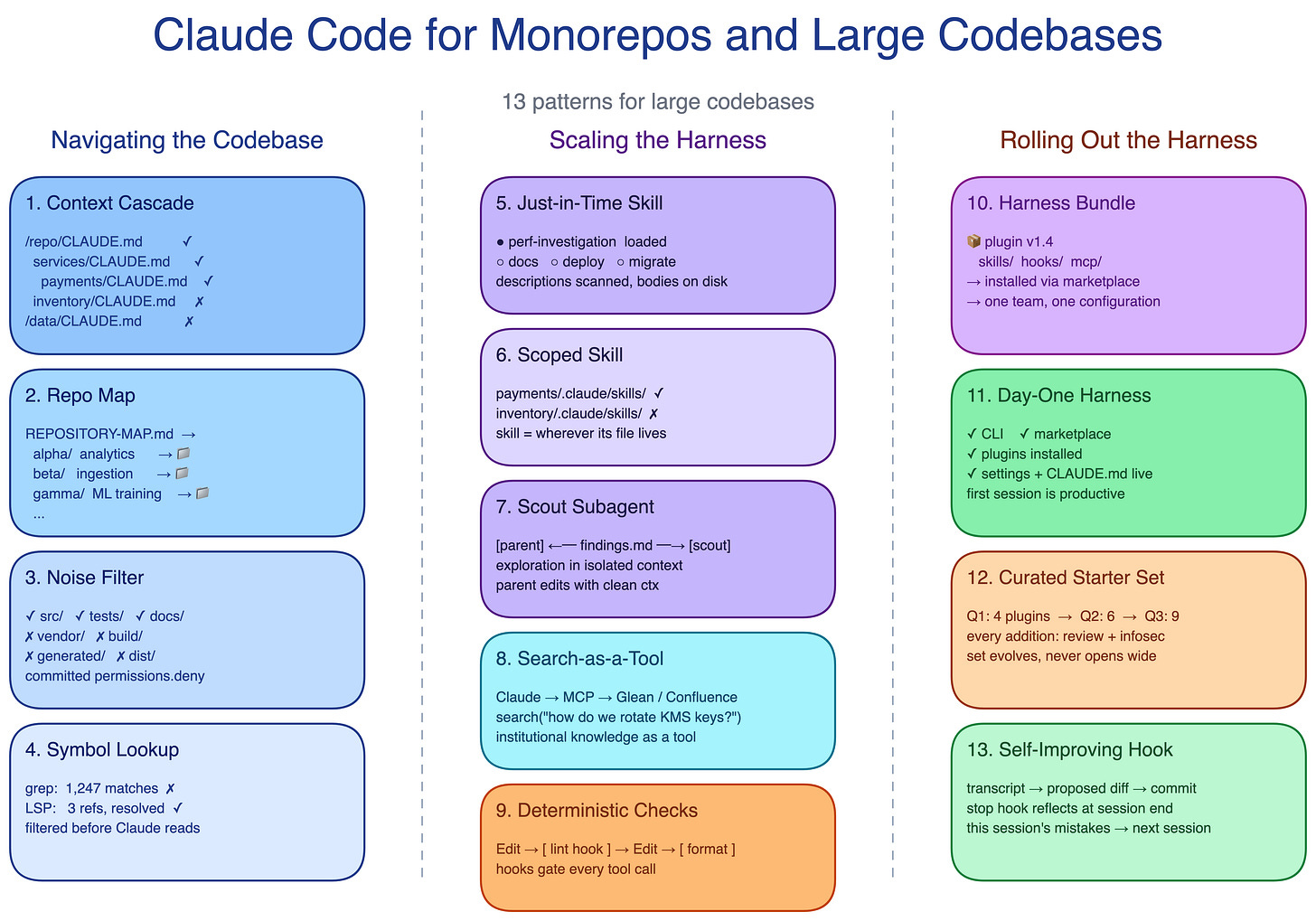
Pattern map for scaling Claude Code in large engineering organizations
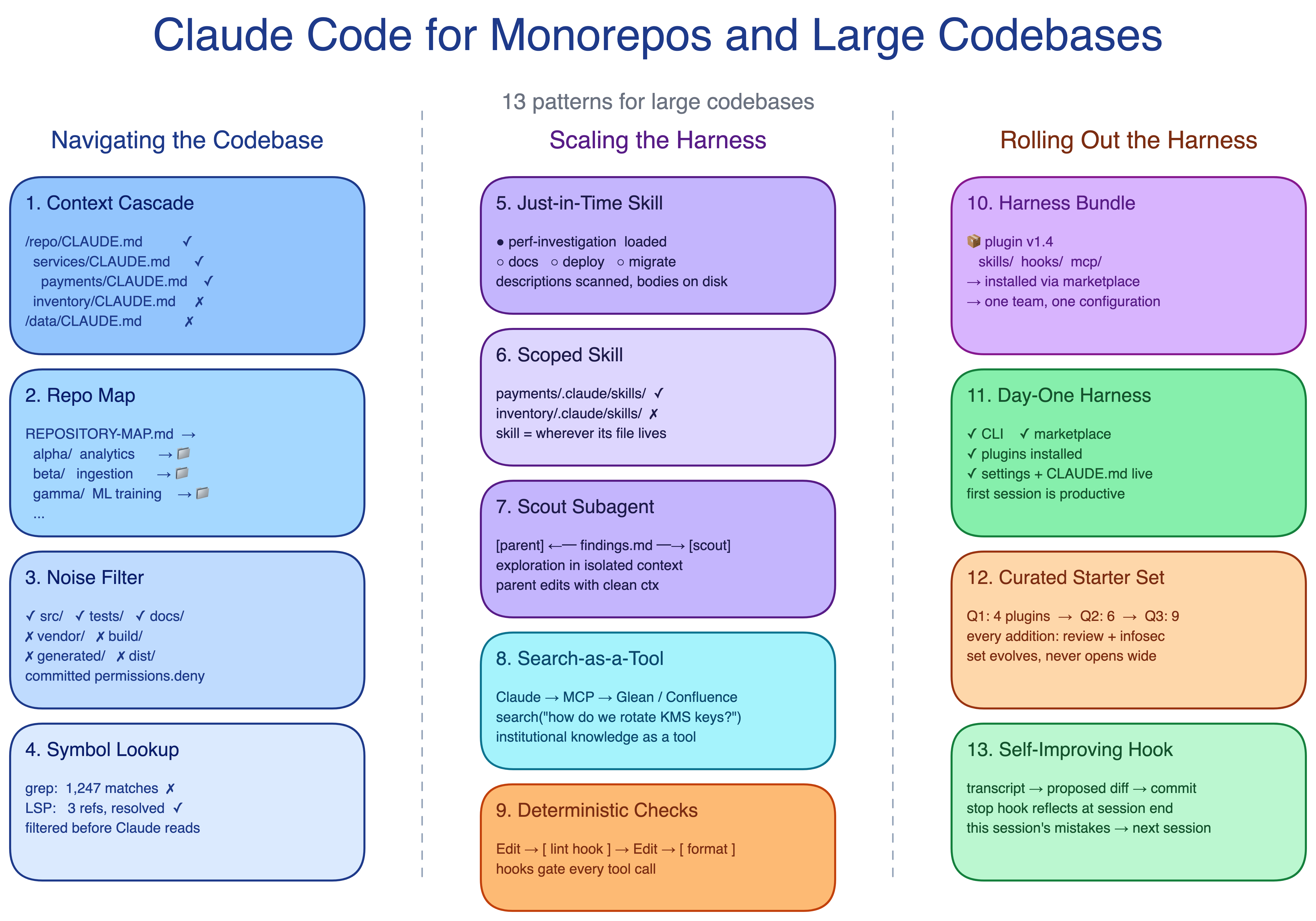
Navigating the Codebase
In a large codebase, Claude is only as useful as its ability to find the right context. Loading too much context slows it down and distracts it, while loading too little leaves it guessing. These four patterns make the repo legible before Claude starts reading files.
1. Context Cascade Pattern
A single root-level CLAUDE.md becomes either bloated or too vague. In a large repo, one file cannot carry every team’s conventions, commands, and gotchas without turning into noise.
The Context Cascade pattern puts CLAUDE.md files at multiple levels of the tree. The root file contains global rules, pointers, and critical gotchas. Subdirectory files hold local commands, conventions, and domain terms. Claude loads the files along the path from the working directory to the root, so guidance gets more specific near the code being edited.
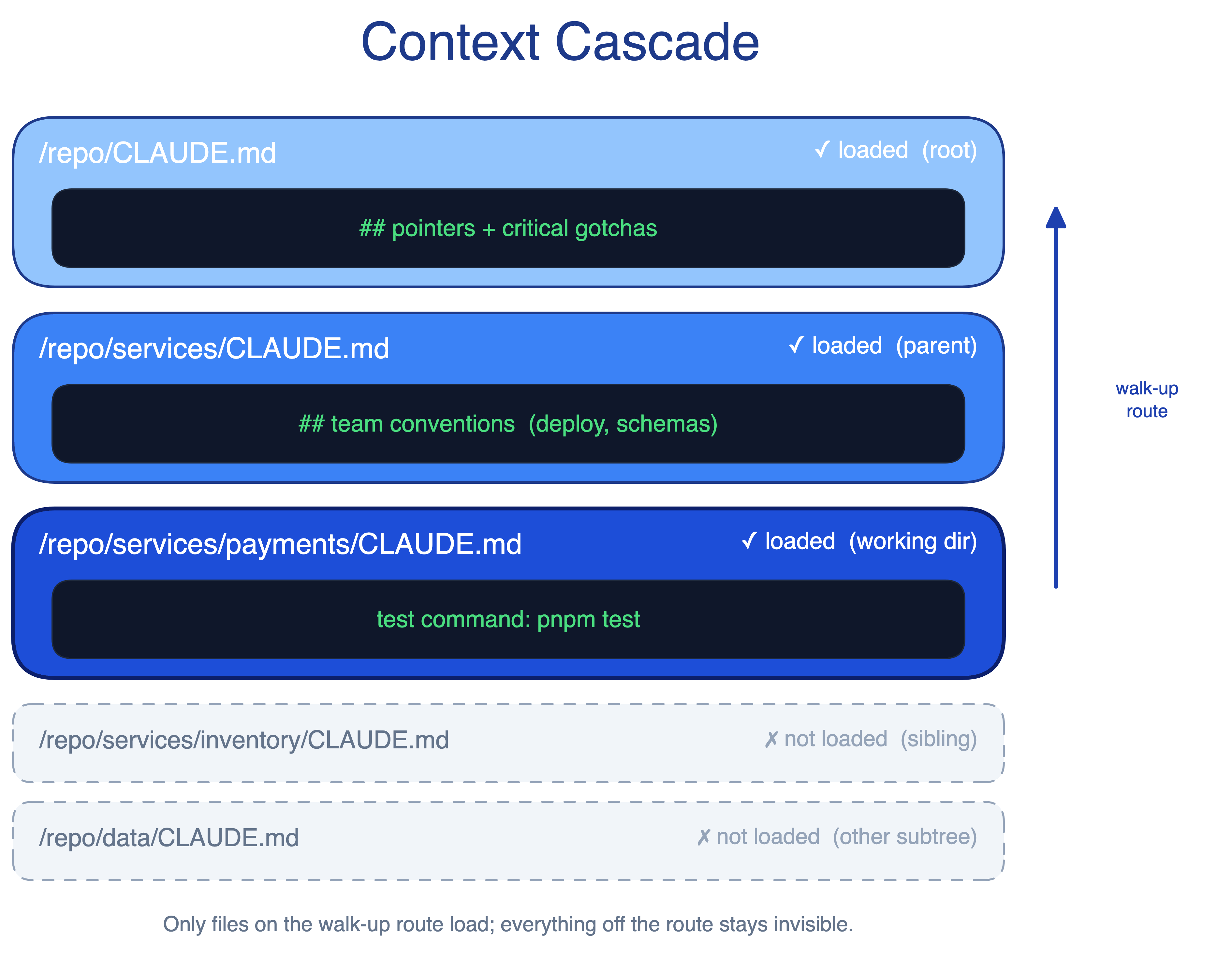
Start the session where the work happens. Running claude from services/payments/ picks up the payments-specific tests, lint rules, and build commands. Starting from the repo root may only load the root guidance. This works well in service-oriented monorepos, while compiled-language monorepos with deep cross-directory dependencies may also need project-level build configuration.
When to use. Any monorepo with multiple team conventions, or any codebase where subtrees follow different rules.
The main trade-off. The cascade only works if teams keep each level focused. Session-level notes in the root file, or universal rules buried in a leaf directory, undo the benefit.
2. Repo Map Pattern
When directory names are opaque, Claude cannot infer where to start. Legacy partitions, internal codenames, domain slices, and years of reorgs all create the same problem: the right code exists, but the tree gives weak clues.
The Repo Map pattern adds a lightweight Markdown file at the repo root. It lists each top-level folder with a one-line description. Claude scans the map before opening folders, which reduces blind search.
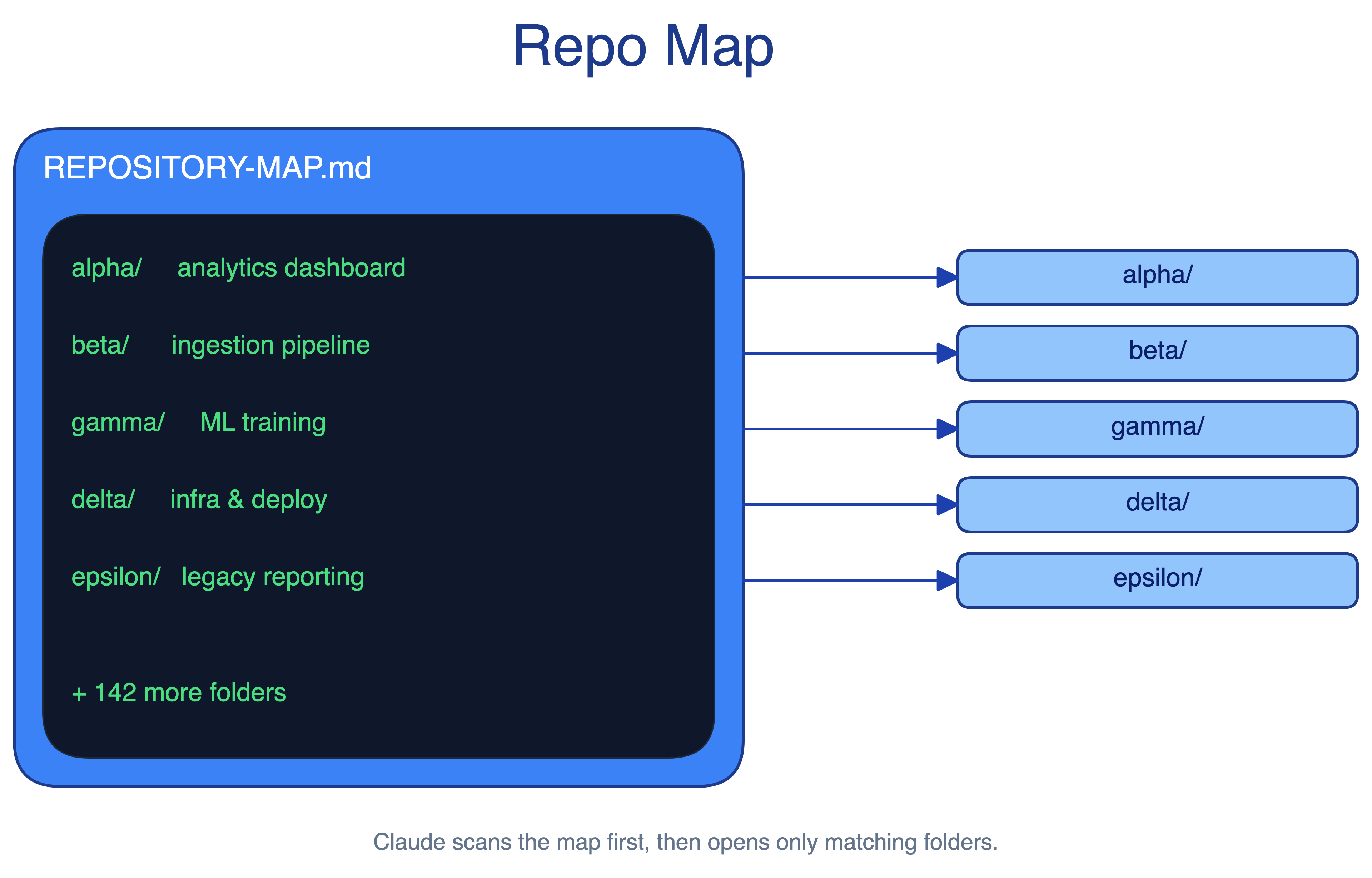
Keep the map boring and factual: folder name, owner if useful, purpose, and main entry points. Avoid architecture prose that will go stale.
When to use. Repos with unconventional layouts, legacy partitions, internal codenames, or many top-level folders. It also helps new engineers orient themselves.
The main trade-off. This adds one more file to maintain. Stale entries actively mislead Claude and send it down the wrong path with confidence.
3. Noise Filter Pattern
Generated files, build artifacts, and vendor code distract Claude in every session. A blanket exclusion rule helps most developers, but it can hurt the team that owns the generator and needs to inspect those files.
The Noise Filter pattern commits default exclusions in .claude/settings.json. Every developer inherits the same search and read defaults on clone. Developers who need exceptions override them locally without changing the team baseline.
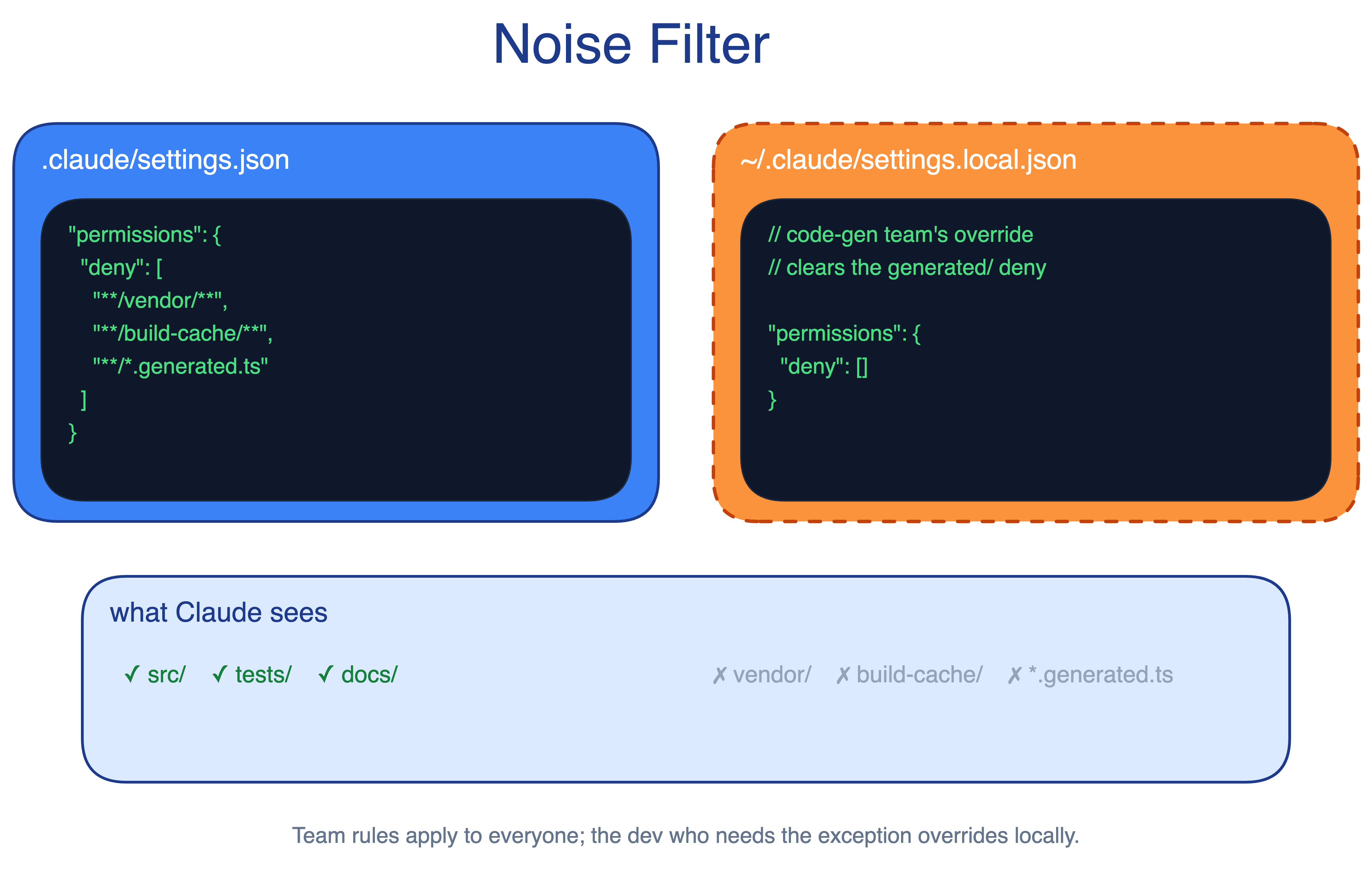
When to use. Any repo where generated code, vendor folders, or build outputs would otherwise pollute Claude’s searches.
The main trade-off. Over-aggressive exclusions hide files that downstream code depends on. Local overrides are the safety valve, but only for developers who know they exist.
4. Symbol Lookup Pattern
A text search for handleRequest in a million-line codebase can return thousands of matches. Claude then burns context opening files just to find the relevant symbol. It can also pick the wrong one, such as two User classes in different modules or two functions with the same name in different languages.
The Symbol Lookup pattern exposes Language Server Protocol capabilities to Claude. Text matching becomes symbol resolution, and filtering happens before Claude reads files. This is especially valuable in strongly typed, multi-language codebases where mature language servers already exist.
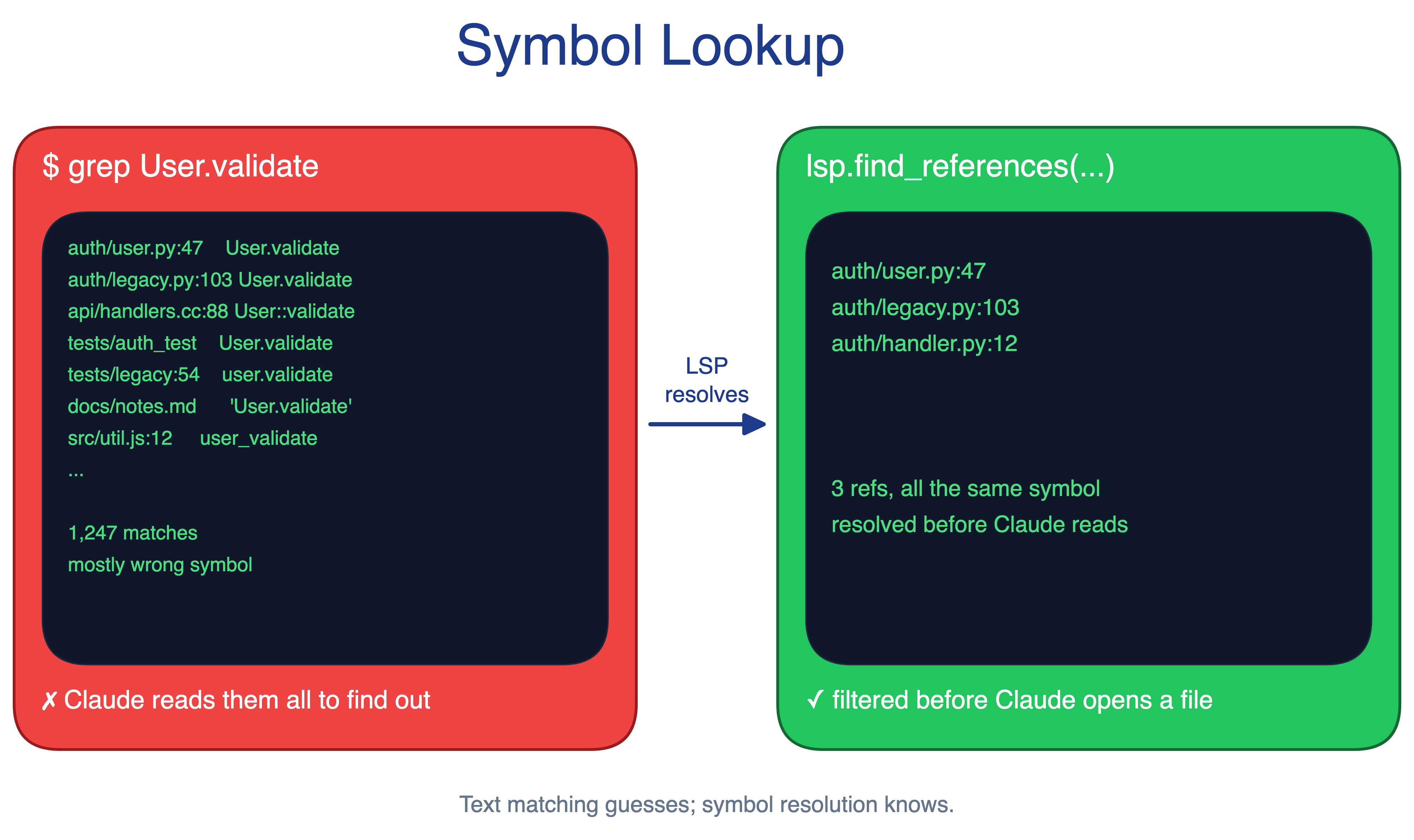
When to use. Multi-language codebases, repos with common function names, and ecosystems with mature LSP support such as C, C++, Java, C#, and TypeScript.
The main trade-off. The setup cost is real. Each language needs the right code-intelligence plugin and language server binary, and ecosystems with weak LSP support will return less value.
Scaling the Harness
The harness, not the model alone, determines how well Claude Code performs in a large repo. Here, harness means CLAUDE.md, hooks, skills, plugins, MCP servers, and subagents. These five patterns keep sessions useful as the codebase grows.
5. Just-in-Time Skill Pattern
A large codebase carries many task types: security review, docs, deploys, migrations, release checks, and more. Only one or two matter in a given session, so loading every workflow into CLAUDE.md makes every session pay for knowledge it does not need.
The Just-in-Time Skill pattern packages each specialized workflow as a skill that loads only when the task calls for it. The base context stays small, and task-specific knowledge appears when needed.
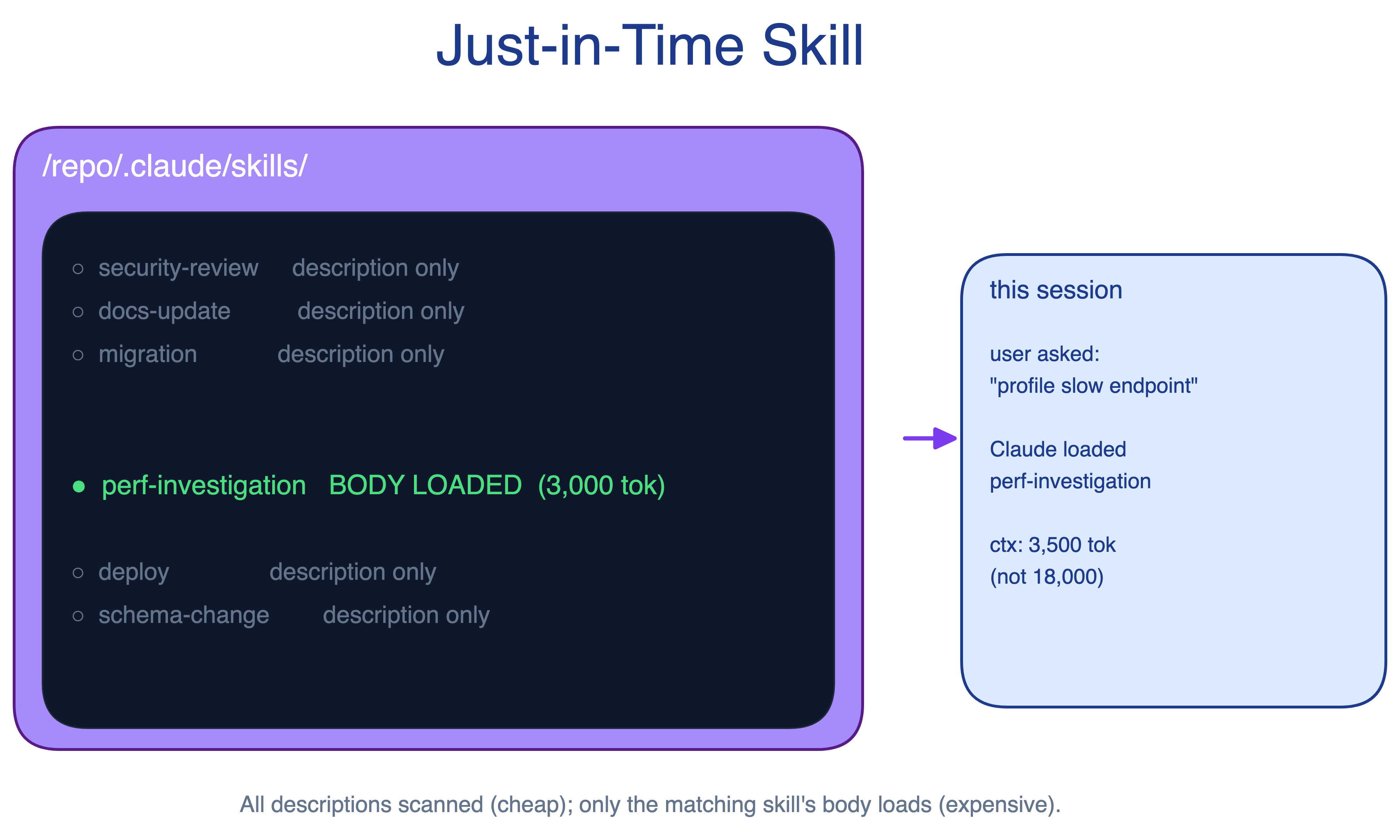
Keep each skill narrow: when it should trigger, what steps it follows, which commands it runs, and what common failures mean.
When to use. Any codebase with more than a handful of distinct task types, especially when workflows would dwarf the actual coding context.
The main trade-off. Activation logic needs care. Skills that trigger too eagerly bloat context; skills that trigger too narrowly stay dormant when they would have helped.
6. Scoped Skill Pattern
In a monorepo, a payments deployment skill should not load while someone edits the inventory service. Generic skill activation ignores where the work is happening, which turns useful expertise into noise.
The Scoped Skill pattern binds skills to specific subtrees. Teams can place skill files under a subtree’s .claude/skills/ directory or use paths globs in the skill frontmatter. A payments deployment skill becomes visible in payments sessions and invisible elsewhere.
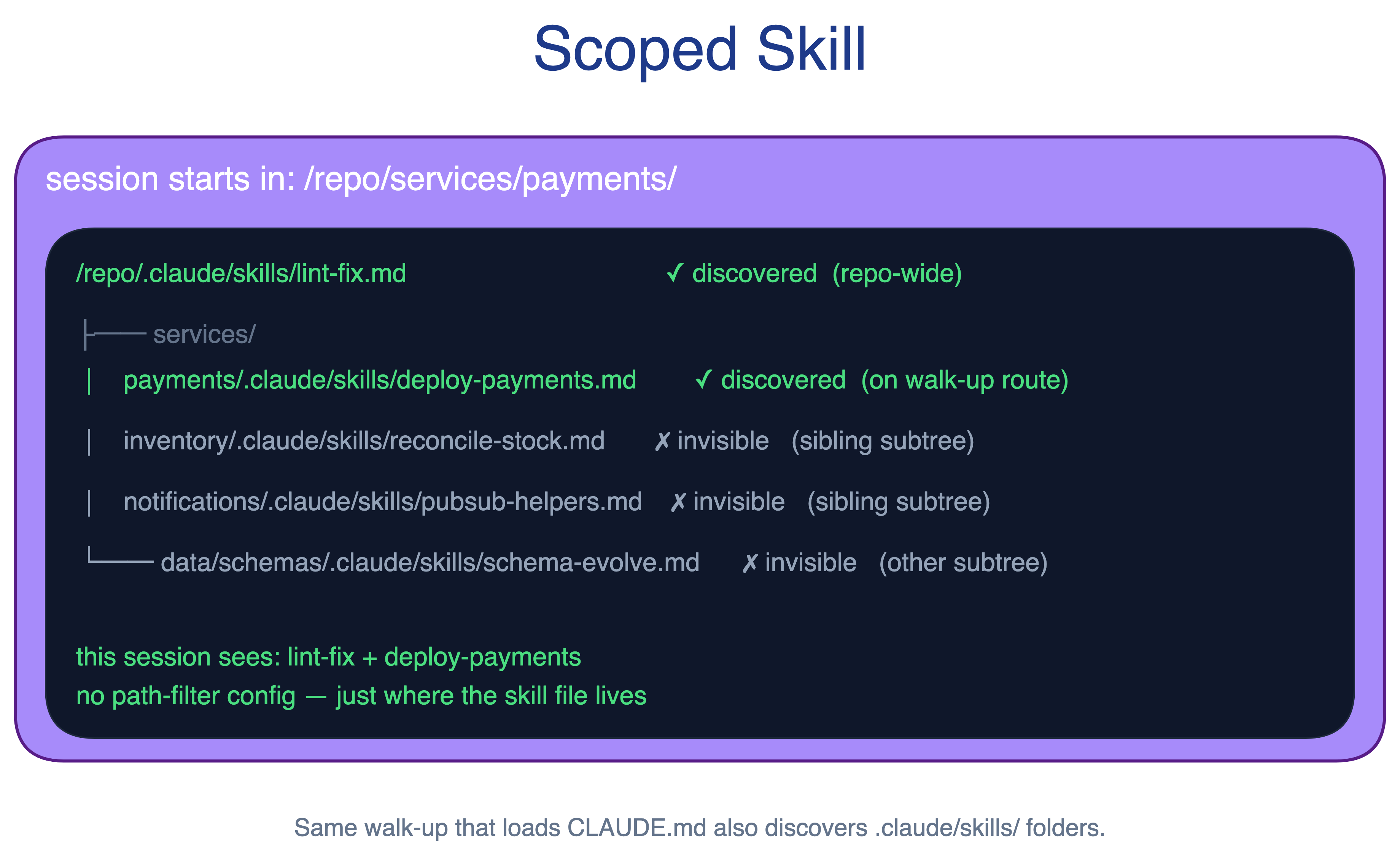
When to use. Multi-team monorepos where subtree-specific procedures differ enough that cross-loading them is harmful.
The main trade-off. Skill ownership can outlive team ownership. When a path changes hands, its skill bindings need review.
7. Scout Subagent Pattern
Mapping a subsystem and editing code are different jobs. Doing both in one session burns the same context window on exploration, notes, and implementation. By the time editing starts, the context may already be polluted with irrelevant detail.
The Scout Subagent pattern uses a read-only subagent for exploration. The scout maps the subsystem in its own context, writes findings to a file, and returns the path. The main agent then reads the findings and edits with a cleaner context.
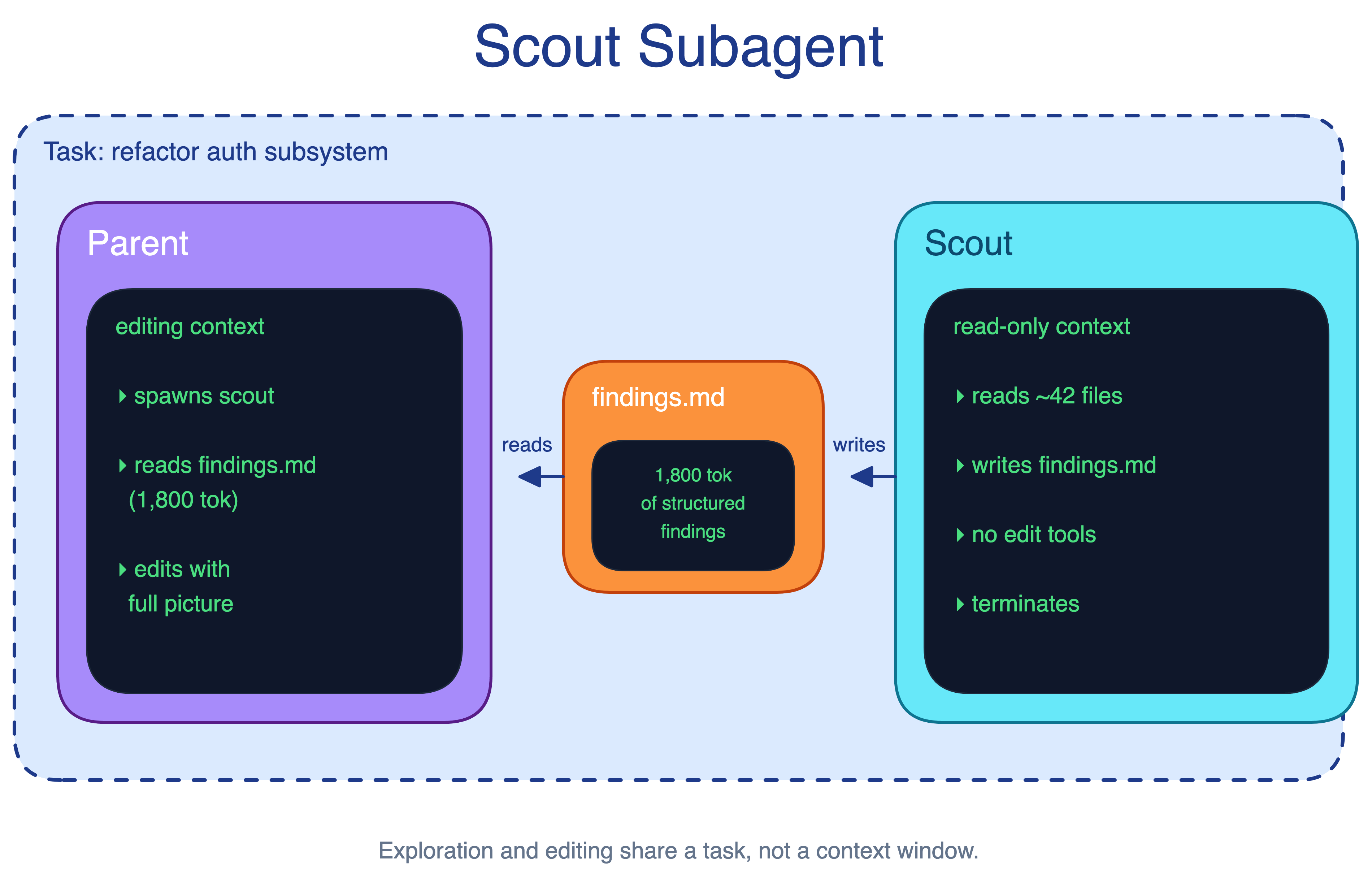
A useful scout output is concrete: relevant files, ownership boundaries, important call paths, tests to run, and risks to avoid.
When to use. Refactors, cross-cutting bug fixes, security audits, or integrations with code Claude has not seen before.
The main trade-off. This adds another round-trip, and the scout’s findings are only a snapshot. If later edits invalidate an assumption, the main agent must notice and re-check.
8. Search-as-a-Tool Pattern
Claude’s default tools work inside the repo, but much of the knowledge a developer needs does not. Design docs, postmortems, runbooks, tickets, dashboards, and incident notes often contain the answer Claude needs.
The Search-as-a-Tool pattern wraps the organization’s existing search infrastructure as a tool Claude can call. That search backend might be Elasticsearch, Glean, an internal knowledge graph, or another system. MCP is only the mechanism; the pattern is making institutional knowledge accessible from the coding session.
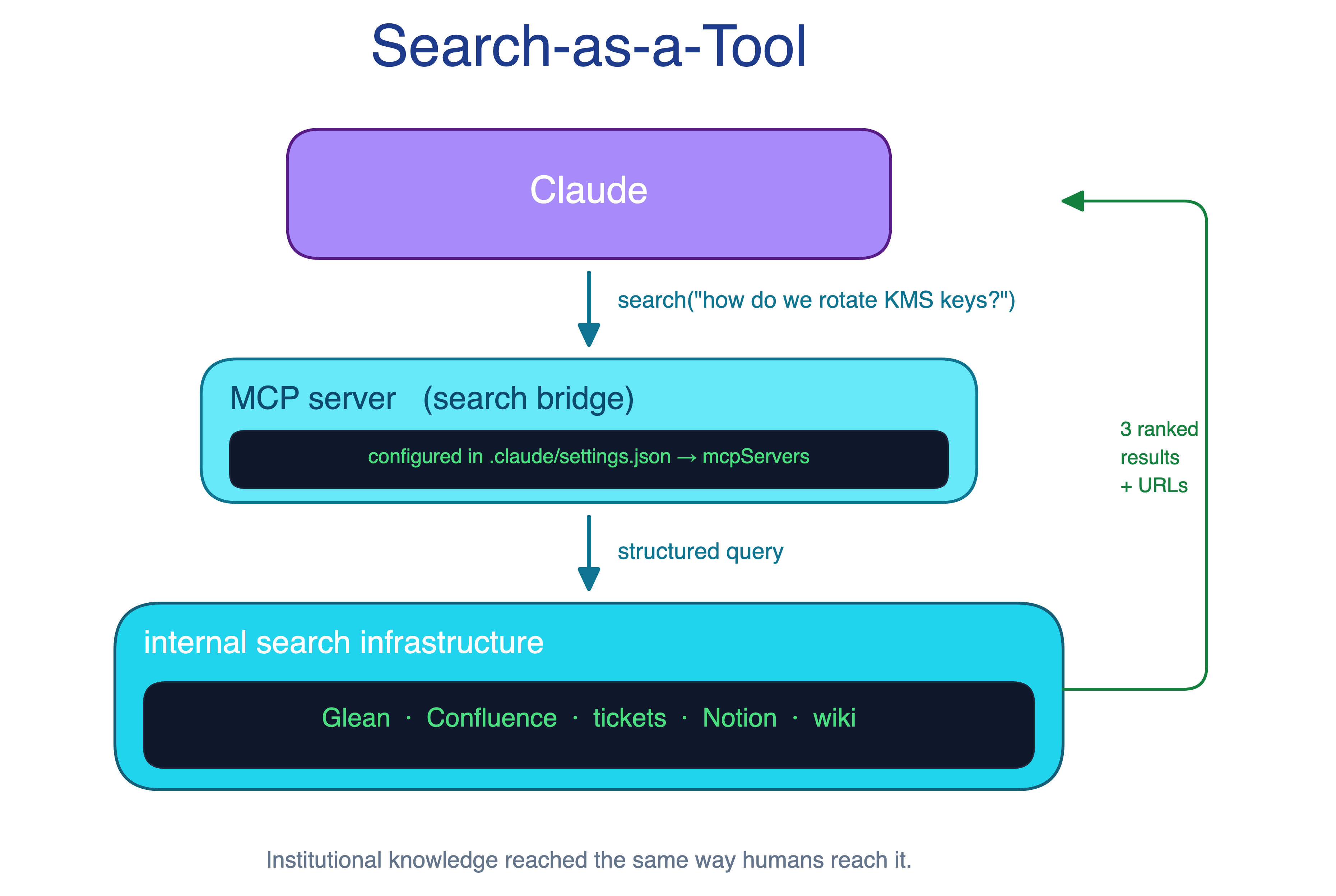
When to use. Organizations where Claude routinely needs information outside the repo and where internal search already exists.
The main trade-off. The search tool becomes critical infrastructure, so outages affect every session that depends on it. Access control also matters because Claude inherits the permissions behind the tool.
9. Deterministic Checks Pattern
Instructions such as “always run the linter before committing” are easy to forget. They compete with every other instruction in context and produce inconsistent behavior across sessions.
The Deterministic Checks pattern moves quality enforcement from instructions into hooks. Linting, formatting, type-checking, and targeted tests run on defined events whether Claude remembers them or not.
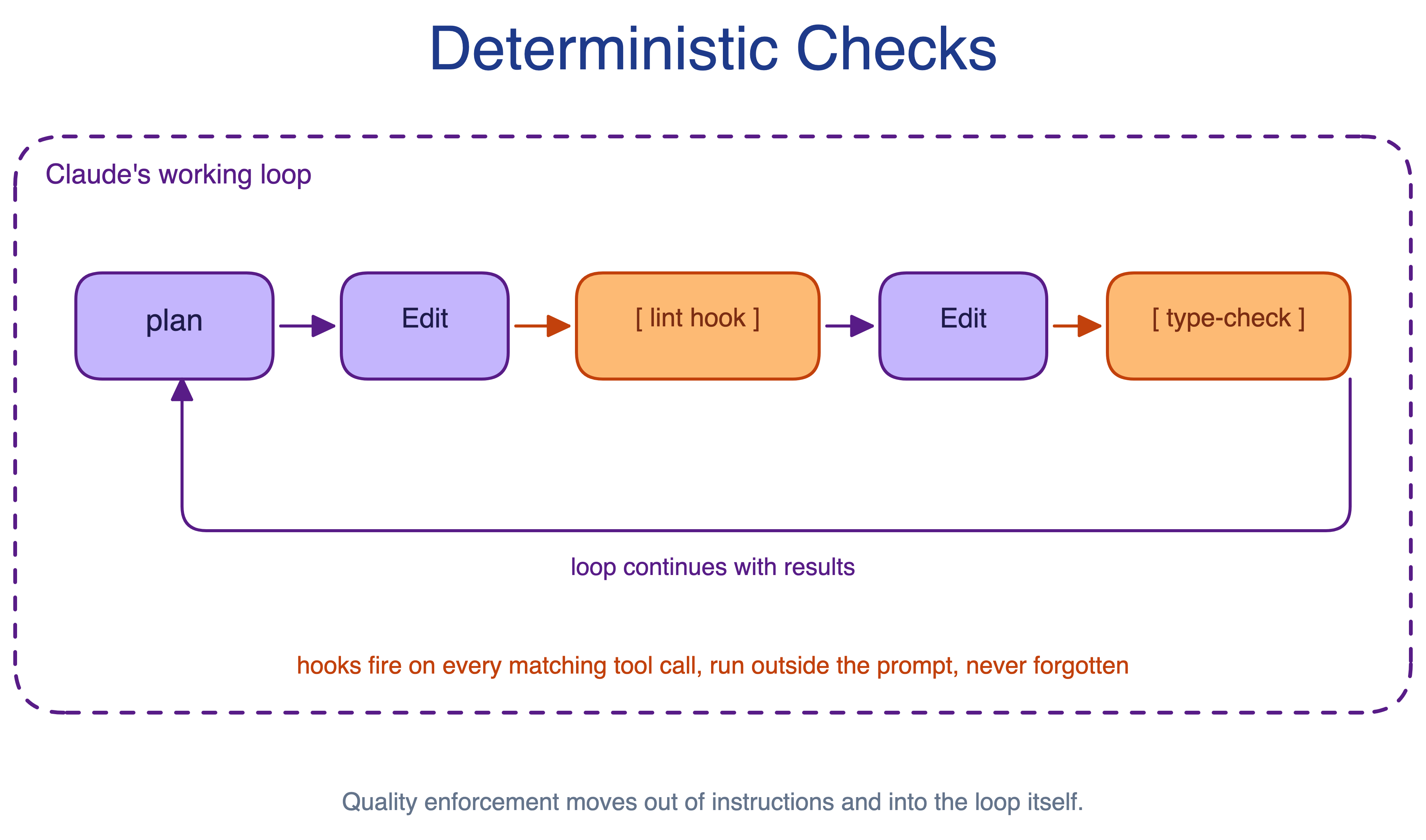
When to use. Any rule that can be expressed as “this check must always run on this event”: lint on save, format before commit, type-check after file write, or run a focused test after a generated change.
The main trade-off. Slow hooks drag every session, and hooks that fail noisily interrupt Claude’s flow. Checks should be fast, focused, and easy to interpret.
Rolling Out the Harness
The technical patterns only matter if they reach developers and stay maintained. These four patterns cover packaging, rollout, governance, and continuous improvement. In most organizations, a single DRI owns the harness. In larger ones, this becomes an “agent manager” role: a hybrid PM and engineer responsible for settings, permissions, plugin catalogs, and CLAUDE.md conventions.
10. Harness Bundle Pattern
Good Claude Code setups often stay tribal. One engineer wires up a useful mix of skills, hooks, and MCP servers on their machine. Another team rebuilds the same thing months later, usually worse. New engineers start from zero.
The Harness Bundle pattern packages skills, hooks, and MCP configuration into a single installable plugin. New engineers install it on day one and inherit the team’s working setup. Updates flow through a managed channel instead of copy-pasted local config.
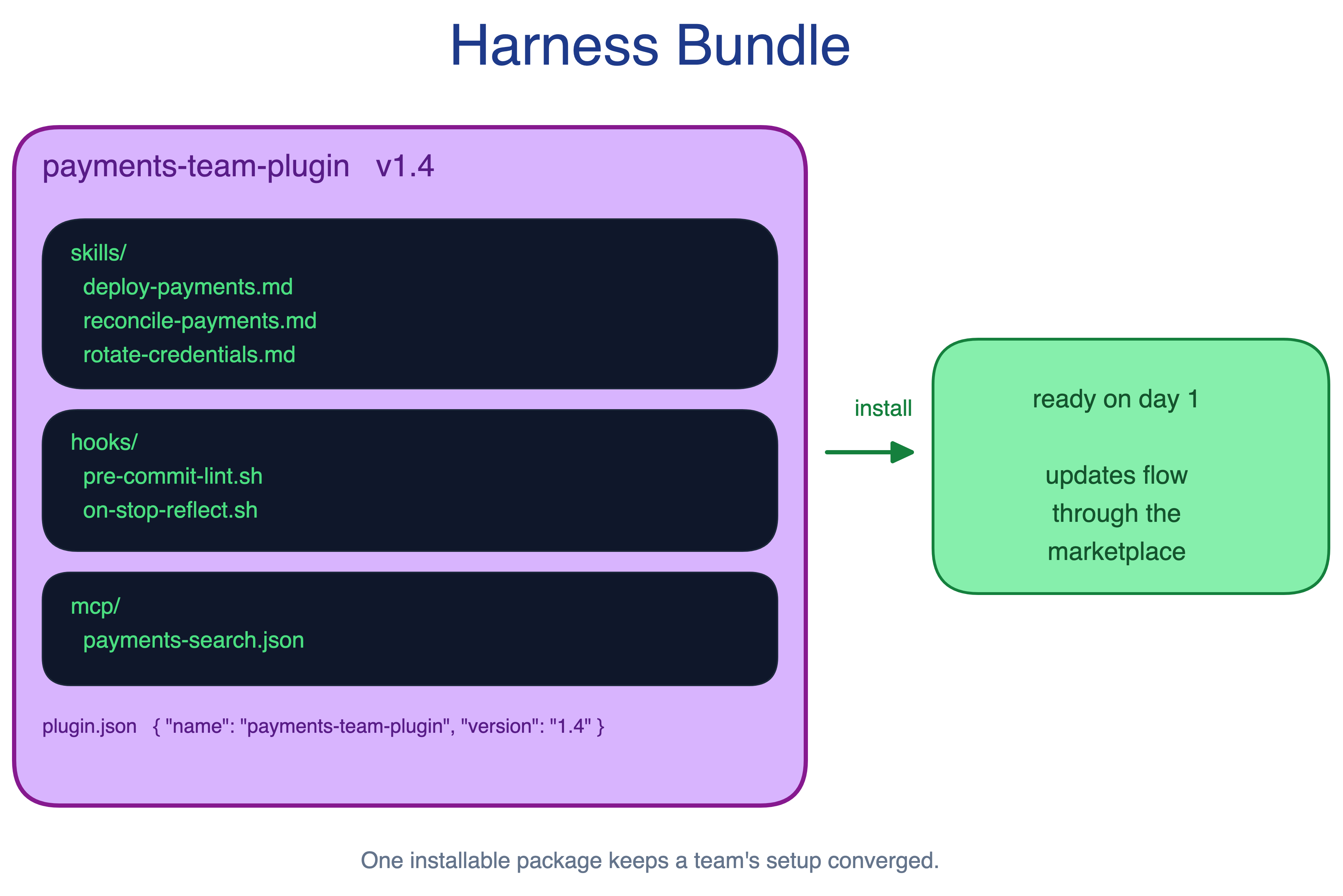
When to use. Whenever a useful configuration exists on one machine and the team would benefit from sharing it. Most teams reach that point within weeks of adoption.
The main trade-off. Bundles ossify. A plugin that everyone installs becomes hard to change without coordinating across consumers, just like any shared library.
11. Day-One Harness Pattern
A developer’s first Claude Code session strongly shapes adoption. If they must assemble the harness before getting value, many bounce. Bottom-up enthusiasm can also fragment into incompatible local setups.
The Day-One Harness pattern builds the harness before broad access opens. A small team prepares the core plugins, MCP servers, skills, hooks, and docs so a developer’s first session works with the codebase, not against it.
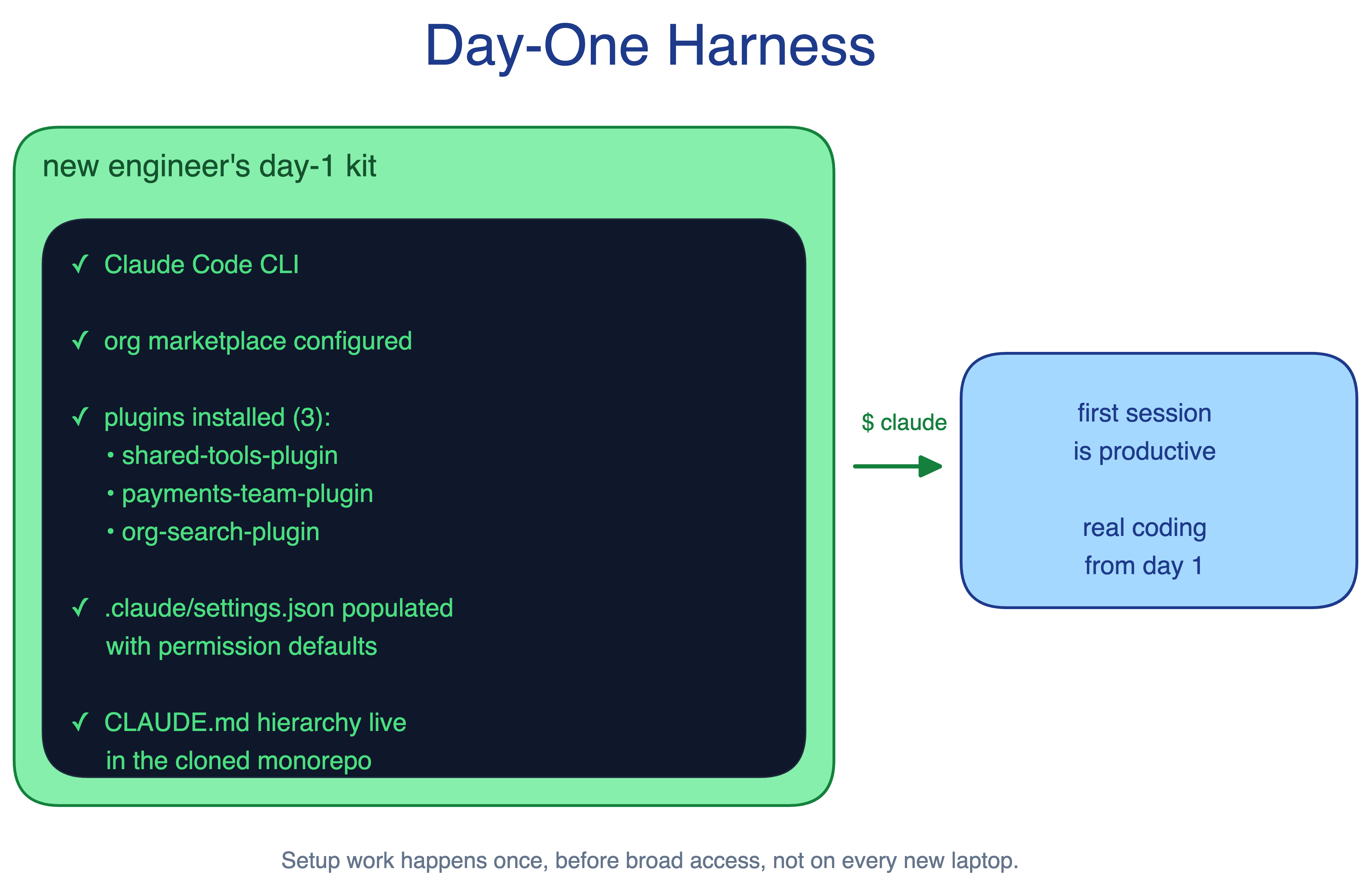
When to use. Any organization rolling out Claude Code beyond a pilot, especially when the codebase has non-obvious conventions.
The main trade-off. Pre-rollout work costs time and people. Skipping it is cheaper at first, but usually creates a long tail of fragmented setups to clean up later.
12. Curated Starter Set Pattern
Open access to every skill and plugin creates security, governance, and consistency problems. A misconfigured MCP server can read too much. An unreviewed skill can push developers toward unsafe workflows. Blocking everything kills adoption.
The Curated Starter Set pattern starts narrow: approved skills and plugins, required review processes, and limited initial access. The set expands as confidence grows and edge cases become clear.
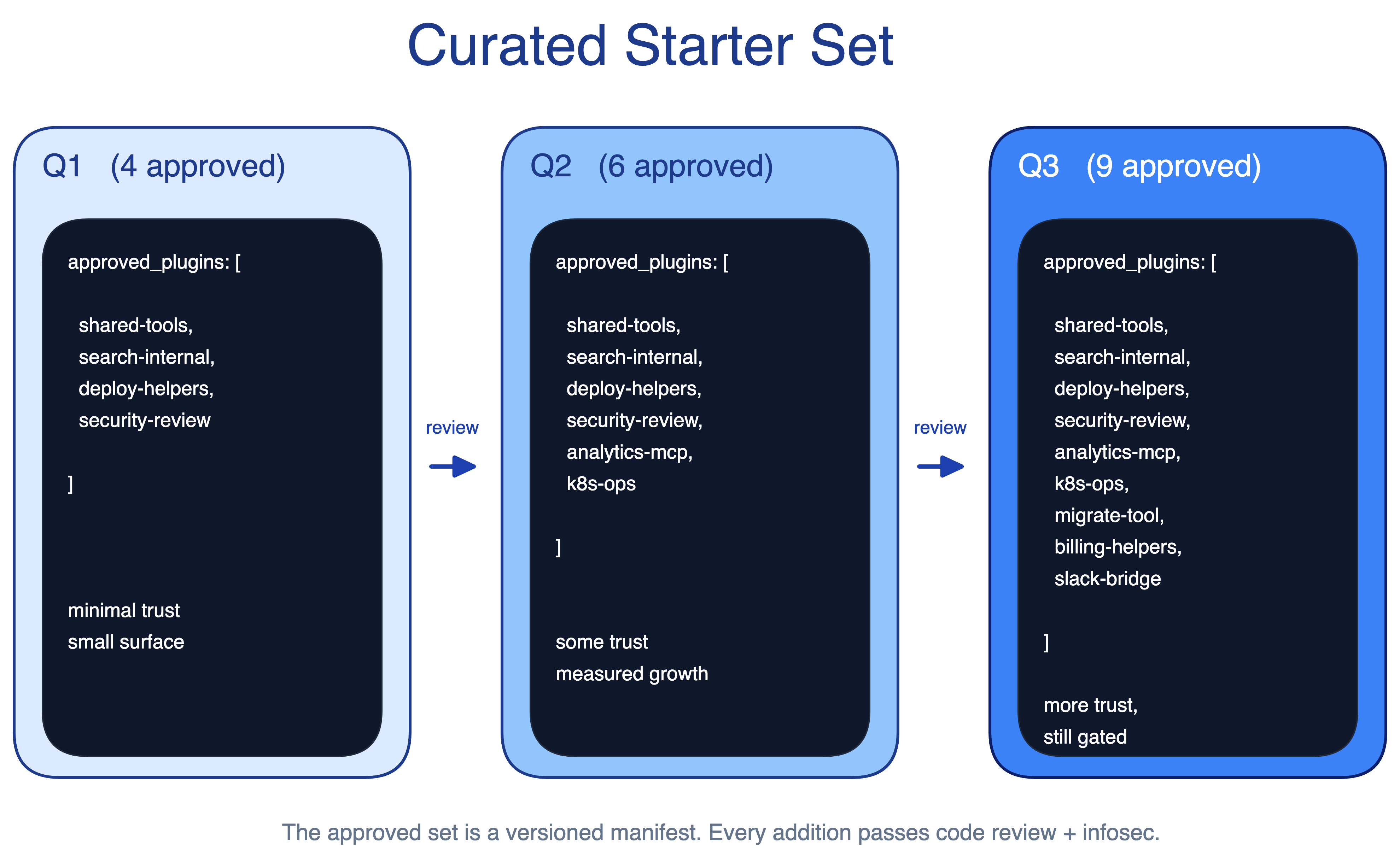
When to use. Regulated industries such as finance, healthcare, and defense. It is also useful in any large organization where security review comes before broad adoption.
The main trade-off. An overly conservative starter set frustrates early advocates. The expansion cadence matters as much as the starting set; slow curation makes the rollout feel blocked.
13. Self-Improving Hook Pattern
Claude’s mistakes are visible during a session and then easy to forget. The next session repeats them. CLAUDE.md improves only if someone updates it while the lesson is still fresh.
The Self-Improving Hook pattern runs a stop hook at session end. The hook reviews the transcript and proposes CLAUDE.md updates, including additions and retirements. It also surfaces drift as models and tools improve. A workaround that helped an older model may constrain the current one; a shim for a missing tool may become dead weight once native support lands.
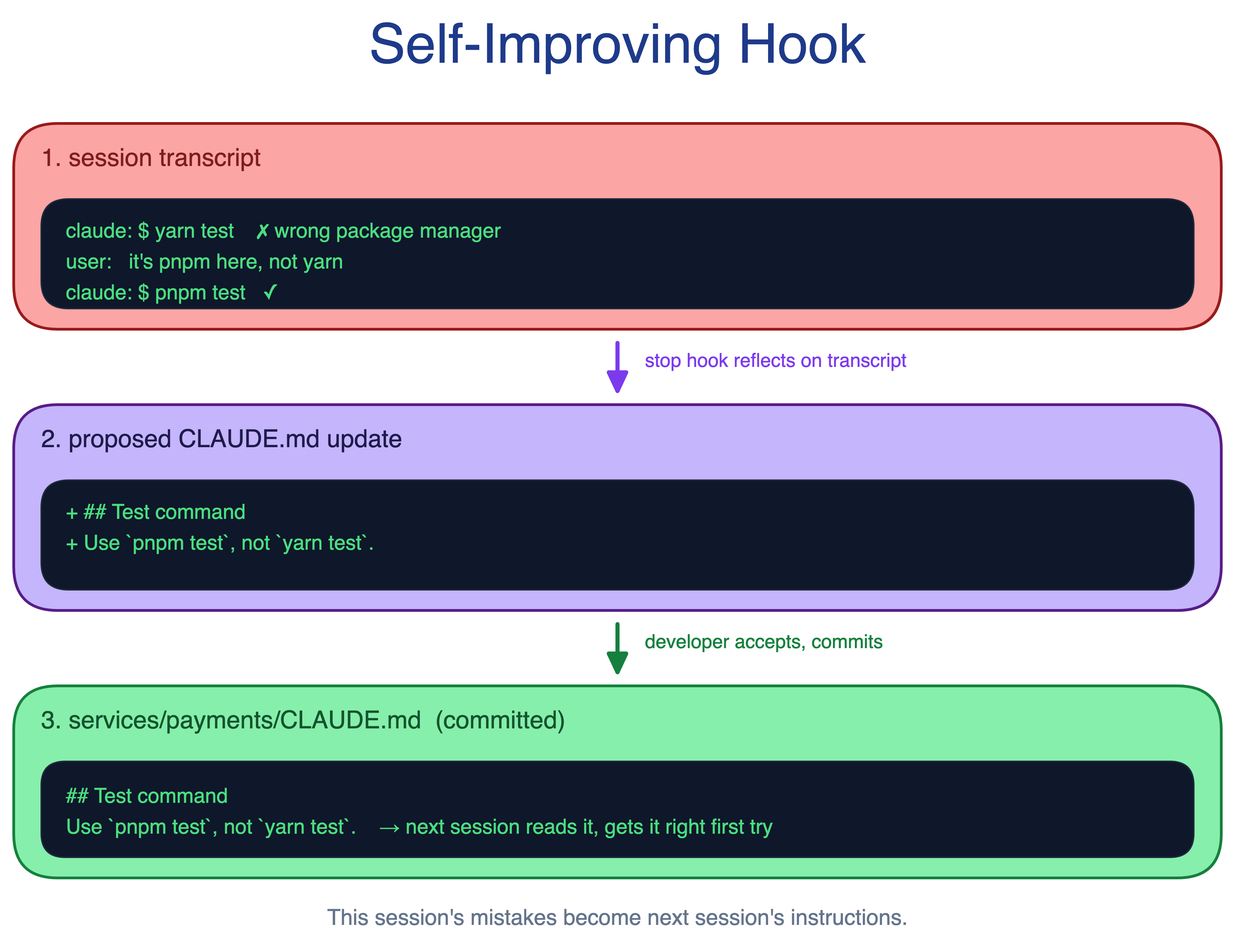
When to use. Teams that actively maintain CLAUDE.md and benefit from small, frequent improvements. It pairs especially well with the Context Cascade pattern.
The main trade-off. Without curation, suggestions pile up and noise overtakes signal. The hook proposes changes, but humans still decide what to merge.
The takeaway
Claude Code can work well in large codebases, but not because it magically understands the whole repo. It works when the codebase gives it the same advantages a good engineer has: a clear starting point, local conventions near the code, a map when the structure is not obvious, and tools that expose knowledge outside the repo.
The practical setup is not one giant CLAUDE.md. It is a fitted harness around the existing codebase: a small root file, local CLAUDE.md files, repository maps, path-scoped skills, fast hooks, LSP-backed symbol lookup, and search tools for internal knowledge. Together, these narrow the work before Claude spends context.
The best large-codebase setups look ordinary from the outside. They reduce search waste, load context just in time, enforce checks consistently, and make one good configuration available to every developer. The goal is not more agent infrastructure. It is a codebase that Claude Code can enter at the right place, read with the right hints, and change without dragging the whole repository into the session.
Most of these help the model find things. The one that saves you is deterministic checks. On a small repo you eyeball the diff. On a monorepo the model edits the right function in the wrong package and it reads as correct. The harness isn’t about speed. It’s there to catch the confident wrong answer before it ships.