

On March 31, 2026, security researcher Chaofan Shou posted (more than 34 million views) that Claude Code’s entire source had leaked through a sourcemap left in Anthropic’s public npm package. Roughly 500,000 lines of TypeScript across about 1,900 files. Not the model or weights, but the harness around them: system prompts, tool routing, memory, permissions, hooks, subagents, and a large amount of product wiring.
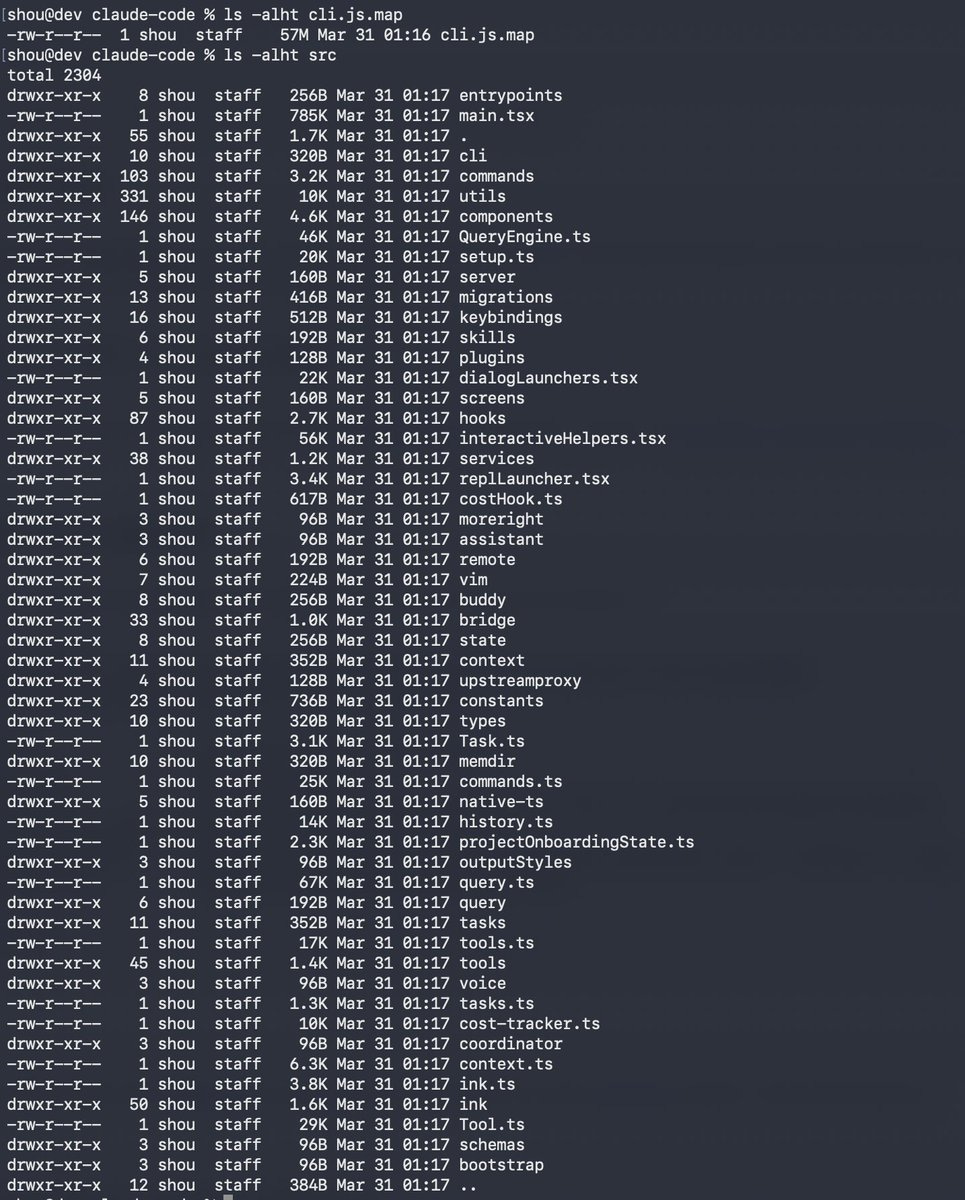
The leak handed everyone a blueprint for how a production coding agent is assembled. That blueprint is more interesting than the drama around it, and this post is about the practical lessons I took from it, things Claude Code users and agent builders can apply.
What happened
If you want a video walkthrough, Matthew Berman’s coverage is the fastest entry point. Anthropic confirmed this was a release packaging mistake caused by human error, not a hack. No customer data, API credentials, or model weights were exposed.
One surprising detail, noted by Justin Schroeder, is that much of the system prompting lives in the client-side source rather than behind a server-side API. For a company like Anthropic, shipping prompts, which are important IP, inside a distributed npm package was unexpected. The codebase is TypeScript and React with Bun bindings, and the code is full of comments written for LLMs, not humans, so that agents working on the codebase can understand each section. A technical breakdown at ccunpacked.dev mapped the full structure.
What happened next
The code escaped almost immediately. Mirrors spread across GitHub, takedowns followed, and community rewrites appeared within hours.
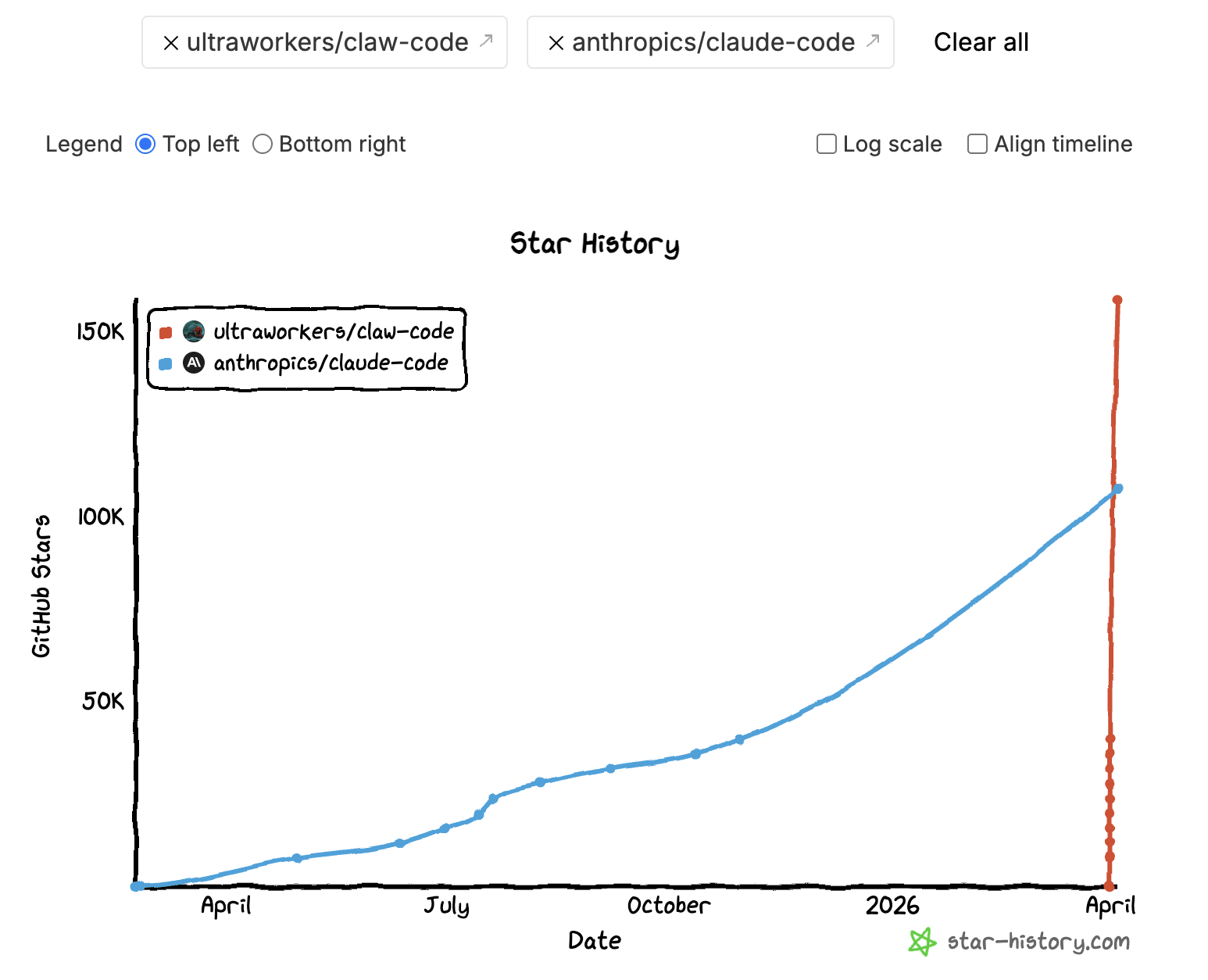
The most visible follow-on project was Claw Code, presented as a clean-room Python rewrite of the harness. The repository now includes a Rust port and frames itself as “better harness tools” rather than an archive of leaked code. That “clean-room” phrasing matters, but it is not a magic legal shield. Whether a rewrite is actually lawful depends on how it was produced, not on what the README says.
There is also a security warning. BleepingComputer reported fake GitHub repositories using the leak as bait for infostealer malware. Attackers also registered malicious npm packages targeting anyone who tried to compile the leaked source. The sensible stance: study the incident, learn from it, do not run random “leaked Claude Code” repos.
The more interesting signal is how quickly open-source projects started absorbing the patterns. You can see it directly in OpenCode’s issue tracker, where users asked whether the harness design should be incorporated. The community treated the leak as a public architecture review, not gossip.
What Claude Code users can learn from this
Below are ten lessons. They are useful whether you use Claude Code or you are building your own agentic application.
1. Treat CLAUDE.md like a config file
The leak confirmed that CLAUDE.md is not an optional README. It is a control file loaded at the start of every session. A community analysis showed how the harness treats it as persistent project memory that shapes every interaction. Build commands, test commands, architecture boundaries, naming rules. It all belongs there.
Run /init once to generate a starting version, then edit it by hand. A good CLAUDE.md reads more like a .eslintrc than a README:
# CLAUDE.md

## Build & test
- Run tests: `npm test`
- Lint: `npm run lint`
- Build: `npm run build`

## Architecture rules
- All API handlers go in `src/api/`
- Never import from `src/internal/` outside that directory
- Use Zod for all request validation, no manual parsing

## Conventions
- Use `snake_case` for database columns, `camelCase` for TypeScript
- Every new endpoint needs a test in `tests/api/`
If you are building your own agent, the same principle applies. Give it a structured instruction file that loads every session, not a prompt you paste each time.
2. Keep memory selective, not exhaustive
One of the most detailed breakdowns of the memory system showed a three-layer design: MEMORY.md as a compact index always loaded into context, topic-specific memory files loaded on demand, and session transcripts only searched when needed. Auto memory is capped at the first 200 lines. The code also revealed an “autoDream” mode, a background process that consolidates memories during idle periods, merging duplicates, pruning contradictions, and keeping the index tight. A separate mem0 analysis found 8 phases of memory management and 5 types of context compaction.
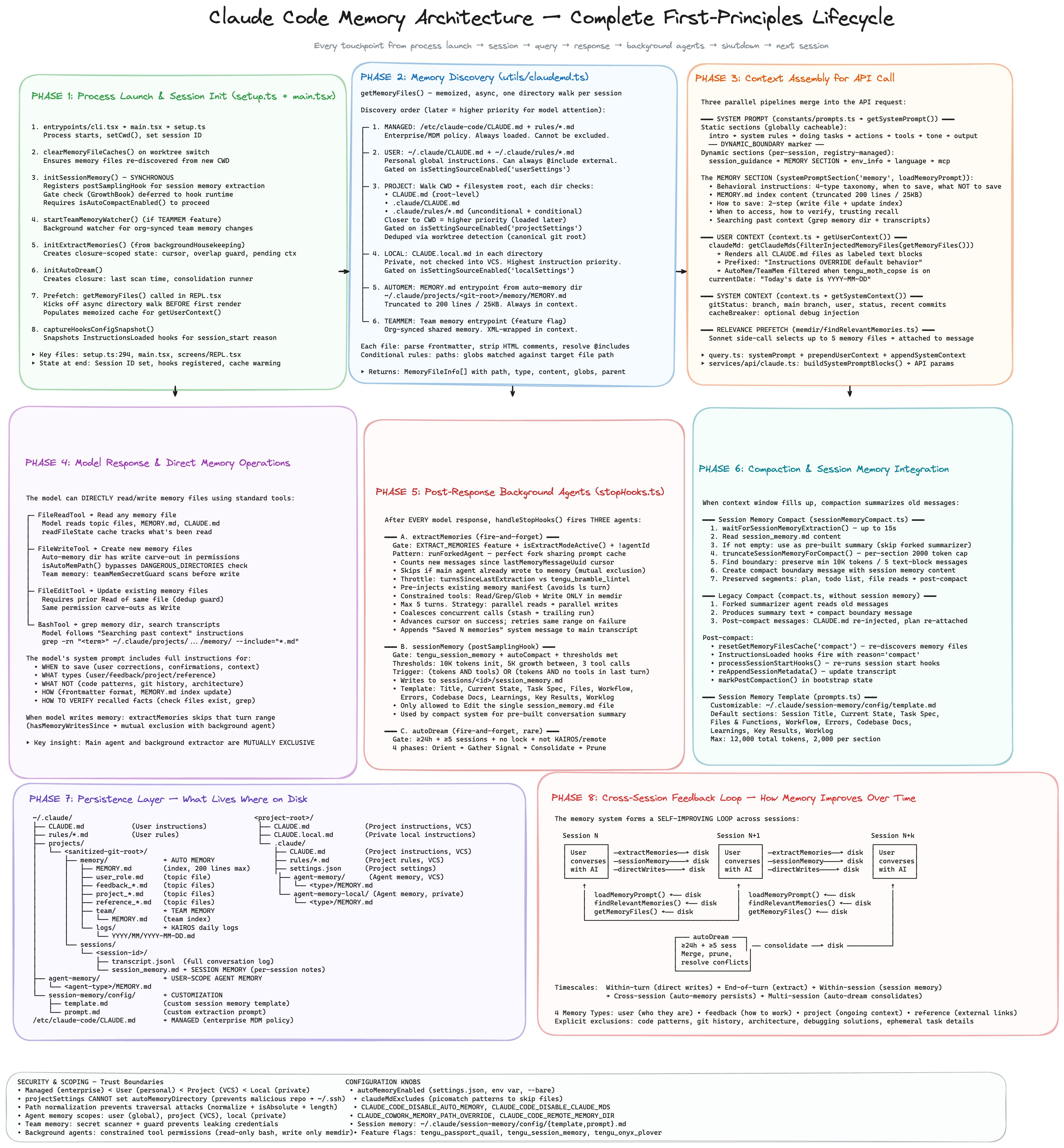
The takeaway: memory should be curated. Store stable preferences, recurring workflow hints, and things that are not obvious from the code. Do not store stack traces, logs, or facts Claude can derive by reading the repo. If a memory note would not help in a future session, it should not exist.
3. Split instructions by scope
The leaked code showed context assembled from multiple files dynamically, not crammed into one prompt. Claude Code supports multiple instruction scopes: org-level, user-level, project root, local overrides, parent and child directories.
Keep one short root CLAUDE.md with broad project rules. Put language-specific or module-specific instructions closer to the code they govern.
4. Explore first, then plan, then code
The leak revealed how seriously Anthropic treats the separation between planning and execution. The harness has distinct plan and act phases, and the system prompts steer the agent away from editing before it understands the codebase.
In practice: first ask Claude to map the codebase. Then ask for a plan. Only then let it edit or run commands. This one habit eliminates most “random edits to the wrong files” problems. The impulse to jump straight to coding is strong, but exploration first is always faster.
5. Use subagents to isolate context
The leaked source showed a modular multi-agent architecture with separate system prompts and cache boundaries for each subagent type. The Explore agent is read-only. It can search and analyze but cannot mutate anything. Each subagent runs in its own context window with restricted tool access.
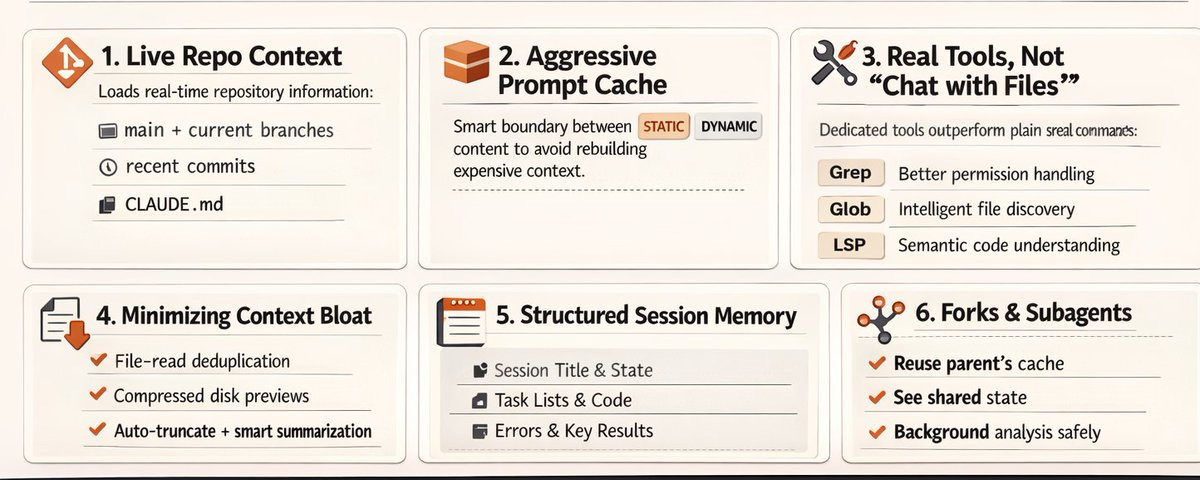
Context contamination is one of the main failure modes in long agentic sessions. Research, planning, and editing have different context needs. Mixing them degrades all three. Use separate agents or modes for each phase. If you are building your own agents, treat context isolation as a design decision, not a side effect.
6. Use worktrees for parallel work
More analysis of the subagent system showed that subagents leverage cached context for fork-join operations, making parallel execution essentially free in terms of repeated context loading. Claude Code spawns background agents in isolated git worktrees, one per unit of work.
When you have multiple independent tasks, use separate worktrees. Do not let several agents edit the same branch. If a task is large, split it into chunks with clear outputs. And stop starting fresh sessions for everything. Continue sessions when working on related code.
7. Configure permissions at the tool level
One of the most concrete findings was the tool count: Claude Code runs fewer than 20 default tools. AgentTool, BashTool, FileReadTool, FileEditTool, FileWriteTool, WebFetchTool, WebSearchTool, and a handful of others. A deeper inventory showed the system can expand to 60+, but the default set is deliberately small. Fewer tools, better results.
8. Reduce approval fatigue
The leaked source confirmed that Claude Code users approve 93% of permission prompts. The auto-mode classifier found in the code is Anthropic’s answer: a layered system that auto-approves low-risk actions while keeping a safety classifier for anything dangerous.
When you approve almost everything, the permission system becomes a speed bump, not a safety mechanism. You stop reading what you approve. Move repetitive safe actions into allow rules. Use Plan mode or Accept Edits mode where appropriate. Use Auto mode when the task is bounded and the direction is clear. The goal is not fewer safety checks. It is better-placed checks you actually pay attention to.
9. Use hooks for repeatable automation
The community found 25+ event-driven hook points in the leaked code, including PreToolUse, PostToolUse, SessionStart, CwdChanged, and more. Hooks are one of the most powerful features in Claude Code and probably the most underused.
A hook that runs tests after every file edit:
{
  "hooks": {
    "PostToolUse": [
      {
        "matcher": "FileEditTool",
        "command": "npm test --silent 2>&1 | tail -5"
      }
    ]
  }
}
The general principle: if you repeat the same instruction in every prompt, it should be a hook.
10. The harness matters more than the prompt
This is the lesson: Sebastian Raschka put it well: Claude Code’s secret sauce is probably not the model. If you are building your own agent, spend less time polishing one giant system prompt. Spend more time on tool boundaries, context loading, review loops, and memory discipline. The best coding agent is not the one with the cleverest instructions. It is the one with the best workflow design.
Bonus: the small details
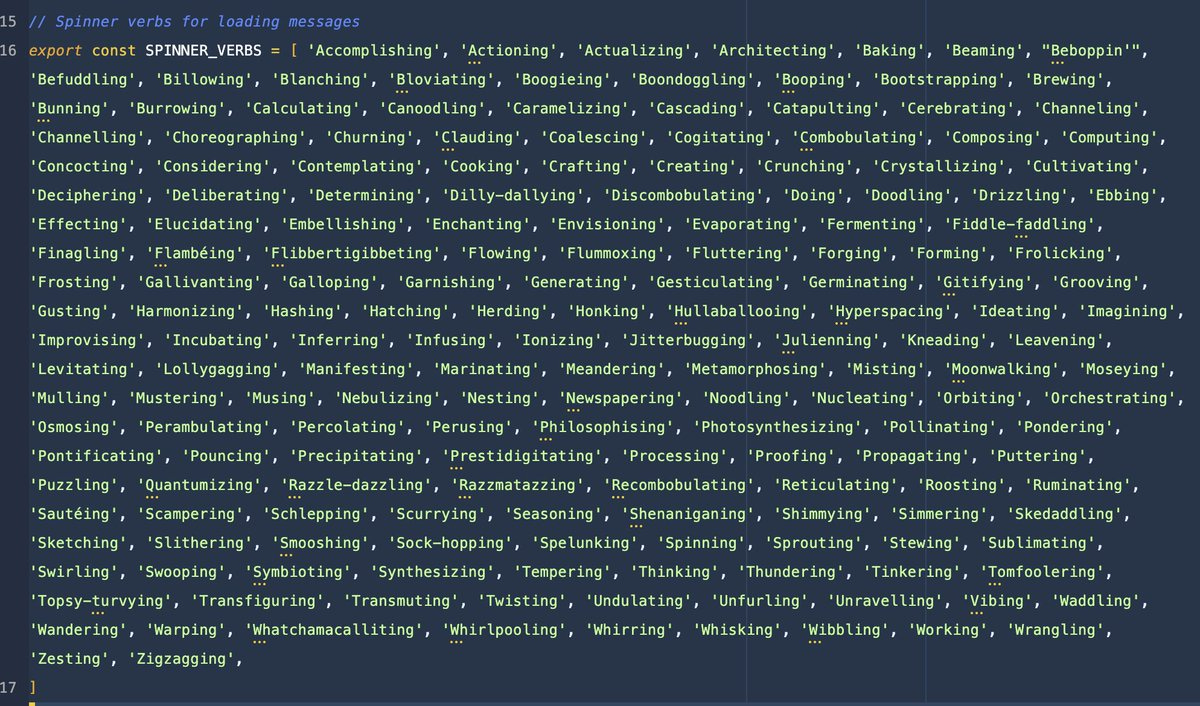
The leak also surfaced things that are not actionable but say a lot about how the product is built. Wes Bos found 187 hardcoded spinner verbs, the loading messages you see while Claude thinks.
Someone found Boris’s WTF counter, an internal metric tracking unexpected states. Good agent products are not only inference. They are interface, orchestration, trust, and taste.
The bottom line
The takeaway is straightforward: use the product more deliberately: write a better CLAUDE.md, keep memory tight, split exploration from editing, move repeated behavior into hooks, configure permissions properly, and use worktrees when parallelism matters. Most of these features were already documented. It took seeing the internals to realize how seriously the team behind Claude Code takes them.
For anyone building agentic applications, the lesson is the same. The moat is not the model, it is the harness.