

When an agent performs poorly, we tend to blame the model. The next fix is often to expand the system prompt. When that becomes unwieldy, the following move is to add another agent. All can help, but they skip a more useful design question: what is the agent missing, and where should that information or control enter the run?
An agent system has several places to add context and control. Tool definitions advertise available capabilities upfront in the model request. A system prompt establishes the baseline. Project files and path rules add local instructions. A user prompt brings the immediate task. Skills provide procedures when they become relevant. Tool results later return data, errors, or action outcomes. Steering can change an active run, and delegation can move work into a separate context.
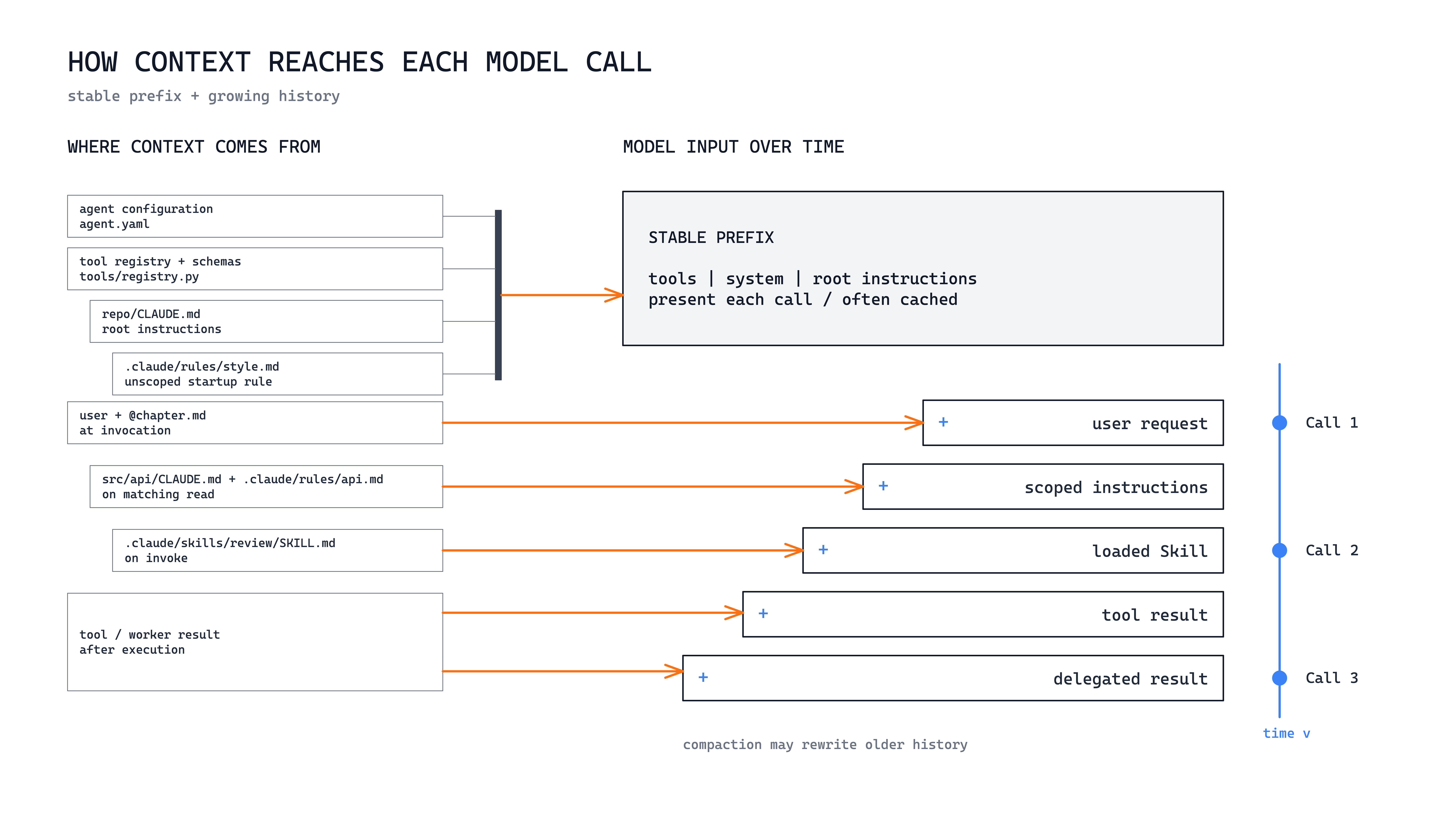
These mechanisms have different scope, timing, and trade-offs. They are not interchangeable ways to stuff more instructions into an agent. The design problem is to put the right information or control at the narrowest useful point, for only as long as it is needed. I will use Claude Code as the running example. Other agent systems expose comparable mechanisms, though their names and behavior vary.
This diagram separate two clocks. The left side shows when the runtime resolves a source: configuration, files, user input, a Skill, or a result. The right side shows how calls evolve. Eager tool definitions, the system prompt, and root instructions form a stable prefix that is presented on every call and often cached. Conversation, matched instructions, invoked Skills, and results append to growing history, which may later be compacted. Let’s dive into each one.
1. User prompt: tell the agent what matters now
The most immediate place to add task-specific context is the user prompt. It is the instruction sent with the current turn and represents what the user wants the agent to care about now.
> Review @docs/chapter.md.
> Focus on the argument and examples. Do not rewrite it yet.
In Claude Code, the message enters the conversation portion of the active context. An @file reference includes the file contents with that turn, while an attachment serves a similar purpose on surfaces that support it. The prompt identifies the desired outcome, the artifact that matters, and any temporary constraints around the task.
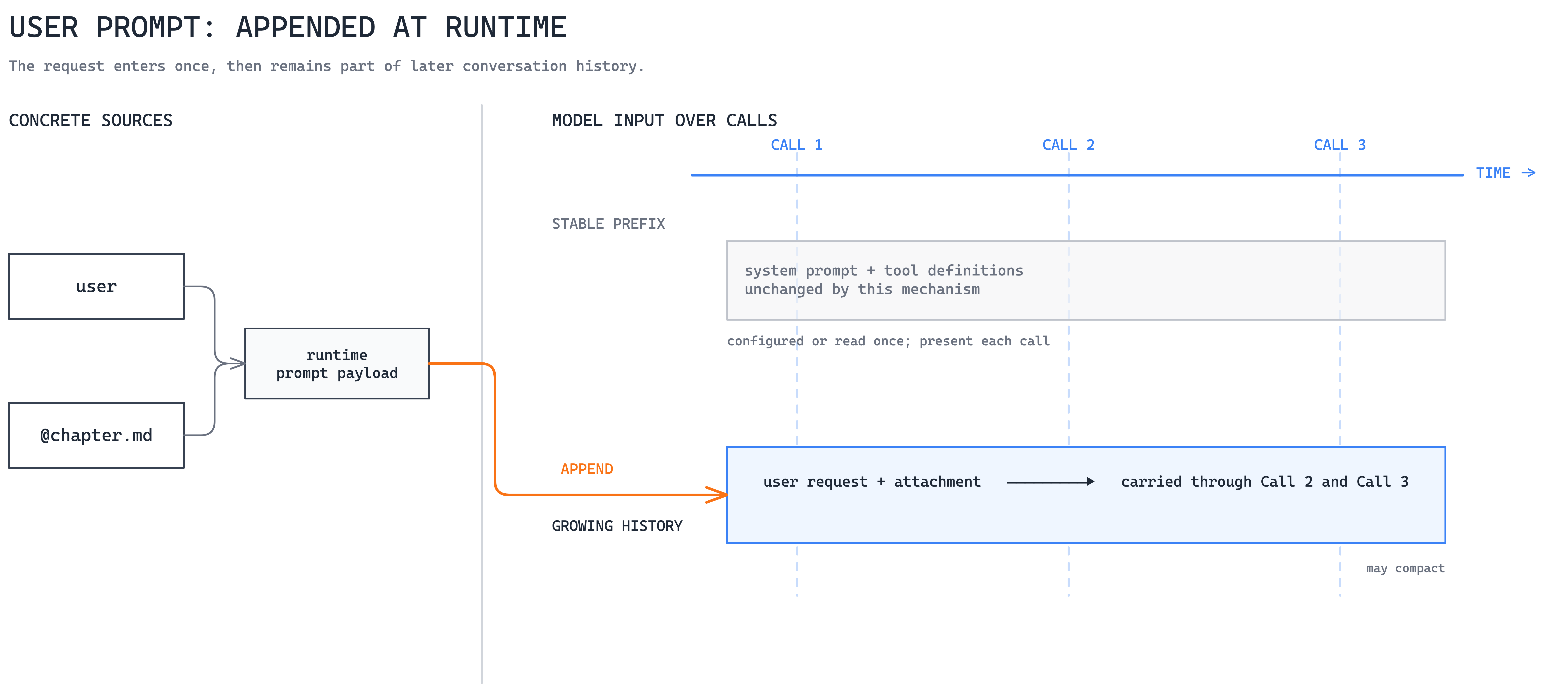
The message can remain until the context is cleared or older history is compacted, so it may influence follow-up turns. Its intended scope is still the current task. The user prompt is therefore the right place for one-off objectives, corrections, output formats, referenced material, and temporary instructions.
When to use. Immediate tasks, temporary constraints, conversational corrections, and attached or referenced material.
The main trade-off. User prompts are flexible and precise, but repeated guidance depends on the user remembering to supply it consistently.
If guidance keeps recurring, place it according to scope: in the system baseline if it is universal, in scoped instructions if it is project-local, or in a Skill if it describes a procedure.
2. System prompt: establish the standing baseline
The system prompt sits at the other end of the persistence spectrum. It is supplied by the host before the user conversation and defines the agent’s baseline identity, operating rules, tool-use guidance, and constraints that should influence the whole run.
Claude Code already provides a default system prompt. You can extend it for one invocation without replacing its built-in coding and tool guidance:
claude --append-system-prompt \
  "Separate verified facts from inference. Cite the evidence used."
The --append-system-prompt flag adds that instruction to the system layer for the session. A custom agent application usually configures the same kind of baseline when creating the agent. Some APIs call this a system instruction, but the architectural role is similar.
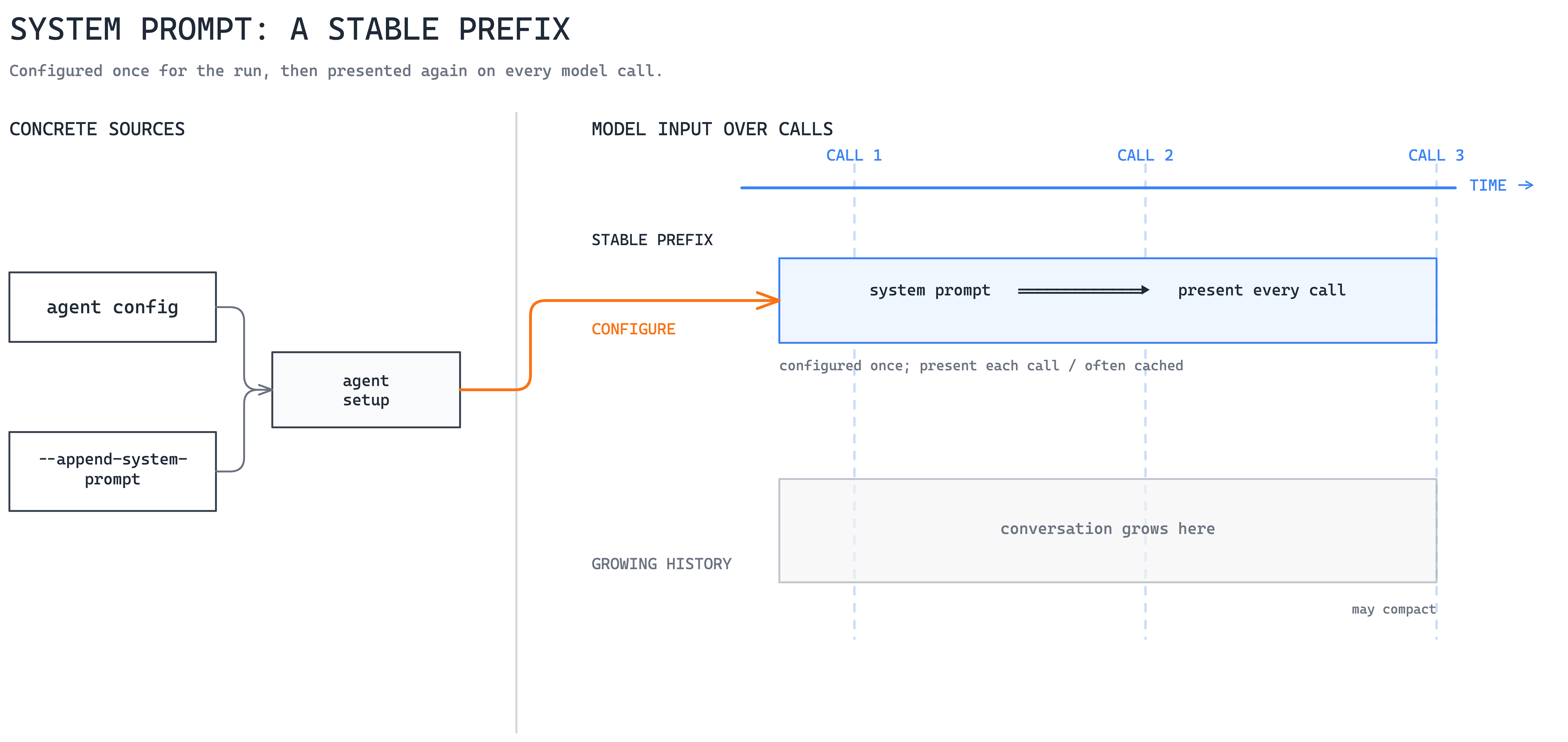
The temptation is to treat the system prompt as the universal home for anything important. That becomes expensive because every model call carries the instructions whether the task needs them or not. Each addition also competes for limited context and model attention.
For that reason, this layer should contain things that genuinely apply across the run: identity, broad safety constraints, universal response requirements, and important behavioral defaults. A 60-line production release checklist does not belong here. That checklist may be critical during a release, but every unrelated task would otherwise carry it as well.
When to use. Identity, universal priorities, broad safety posture, and rules that should influence nearly every model call.
The main trade-off. System instructions are consistently available, but they consume context on every task. As the baseline grows, conflicts become more likely and adherence problems become harder to diagnose.
Most durable guidance is not actually universal. Repository architecture, build commands, package conventions, and local coding rules matter only when working in a particular project or area. That is where scoped instructions become useful.
3. Scoped instructions: load project guidance where it applies
Rather than putting all persistent guidance into the system prompt, agent systems can scope instructions to a repository, directory, or file pattern. The guidance stays close to the code it describes and enters context only when that part of the workspace becomes relevant.
CLAUDE.md is Claude Code’s native project instruction file. AGENTS.md is a portable project instruction format used by compatible coding agents. Claude Code does not read it directly, but a project can import a shared file rather than maintaining duplicate instructions:
@AGENTS.md
## Claude Code additions
Use pnpm, not npm. Run `pnpm test` before finishing.
For more precise targeting, .claude/rules/api.md can add a path selector:
---
paths:
  - "src/api/**/*.ts"
---
Validate every public API input.
See the AGENTS.md specification for the portable file format.
Claude Code loads CLAUDE.md files from the working directory and its ancestors when the session starts. Nested files below that directory can load when Claude reads files in their subtree. Rules without a paths selector load at launch, while path-scoped rules become relevant when Claude reads a matching file.
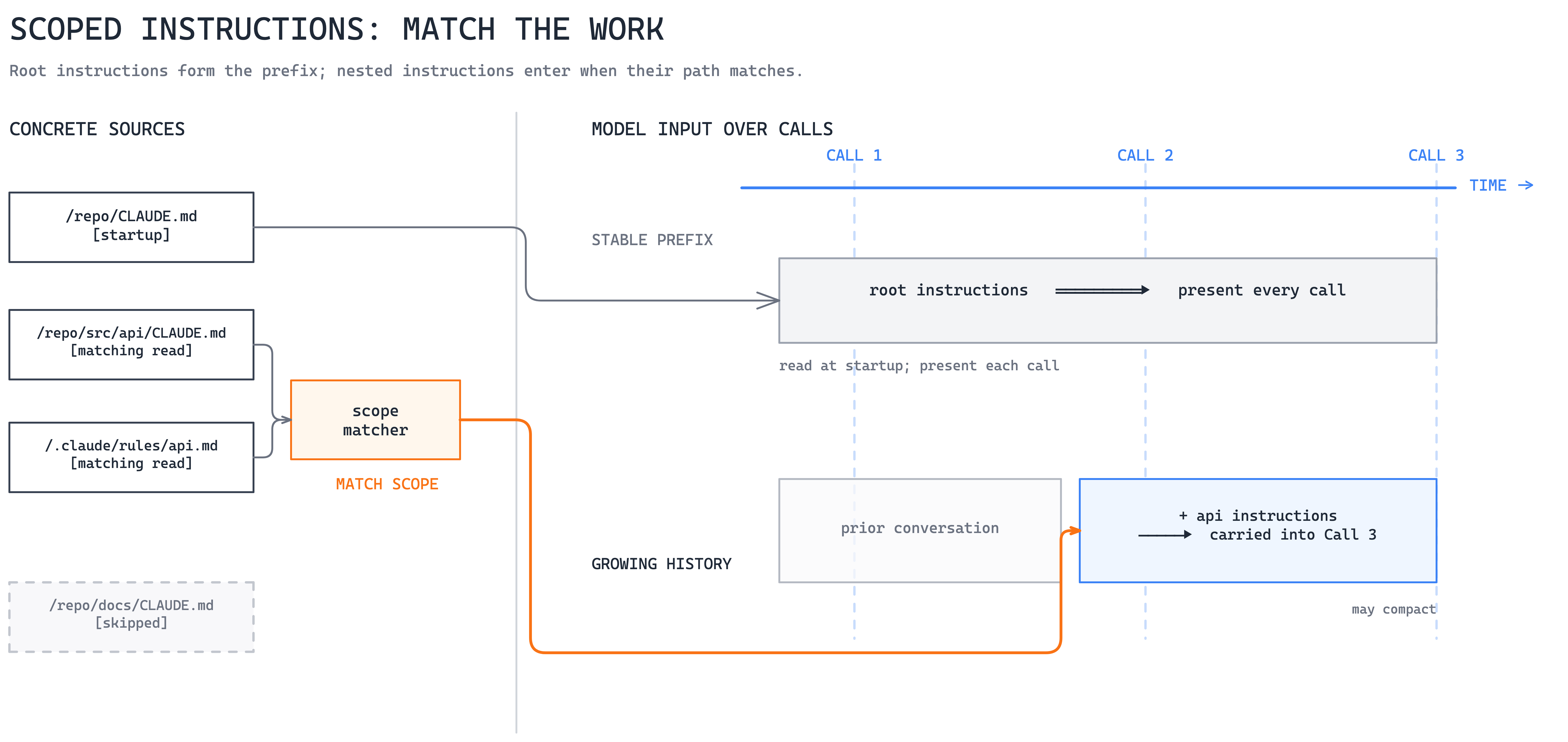
Here, the workspace location or matching path determines which guidance applies. We can keep API conventions with API code, migration guidance with migrations, and generated-code rules with the files they govern instead of making every task carry all of them.
There is also a difference between loading a rule and enforcing one. CLAUDE.md, AGENTS.md, and similar natural-language files provide advisory context to the model. Their loading may be deterministic, but the model can still fail to follow what they say. Permissions and blocking hooks, which we will get to later, provide a stronger runtime boundary.
When to use. Project architecture, build commands, team conventions, and guidance that applies only to particular packages, directories, or file types.
The main trade-off. Scoping removes irrelevant context, but it also makes the full active instruction set less obvious. Nested files can overlap or conflict, and the model can still fail to follow the guidance.
Scoped instructions are useful for describing what is true or expected. They are less suitable for a procedure that should run only when a particular kind of work is requested. A release review is a good example: the repository may contain release-related conventions, but there is no reason to load the full release procedure while fixing an unrelated test.
That is the gap Skills address.
4. Skills: load a reusable procedure when needed
A Skill packages reusable instructions for performing a recurring task. Instead of copying a procedure into the system prompt, project rules, or every user request, we can keep it separately and make it available when the task requires it. In Claude Code, a project Skill lives in .claude/skills/<name>/SKILL.md.
---
name: release-check
description: Verify release readiness before approving a production release.
---
1. Run the required test suites.
2. Check migrations, monitoring, and rollback readiness.
3. Return a go or no-go recommendation with evidence.
The Agent Skills specification uses progressive disclosure. Initially, the agent sees only enough metadata, such as the Skill name and description, to understand when the procedure might be useful. When the Skill is selected, the full SKILL.md body enters the active context. Supporting references, templates, assets, and scripts can remain outside the working context until the procedure actually needs them.
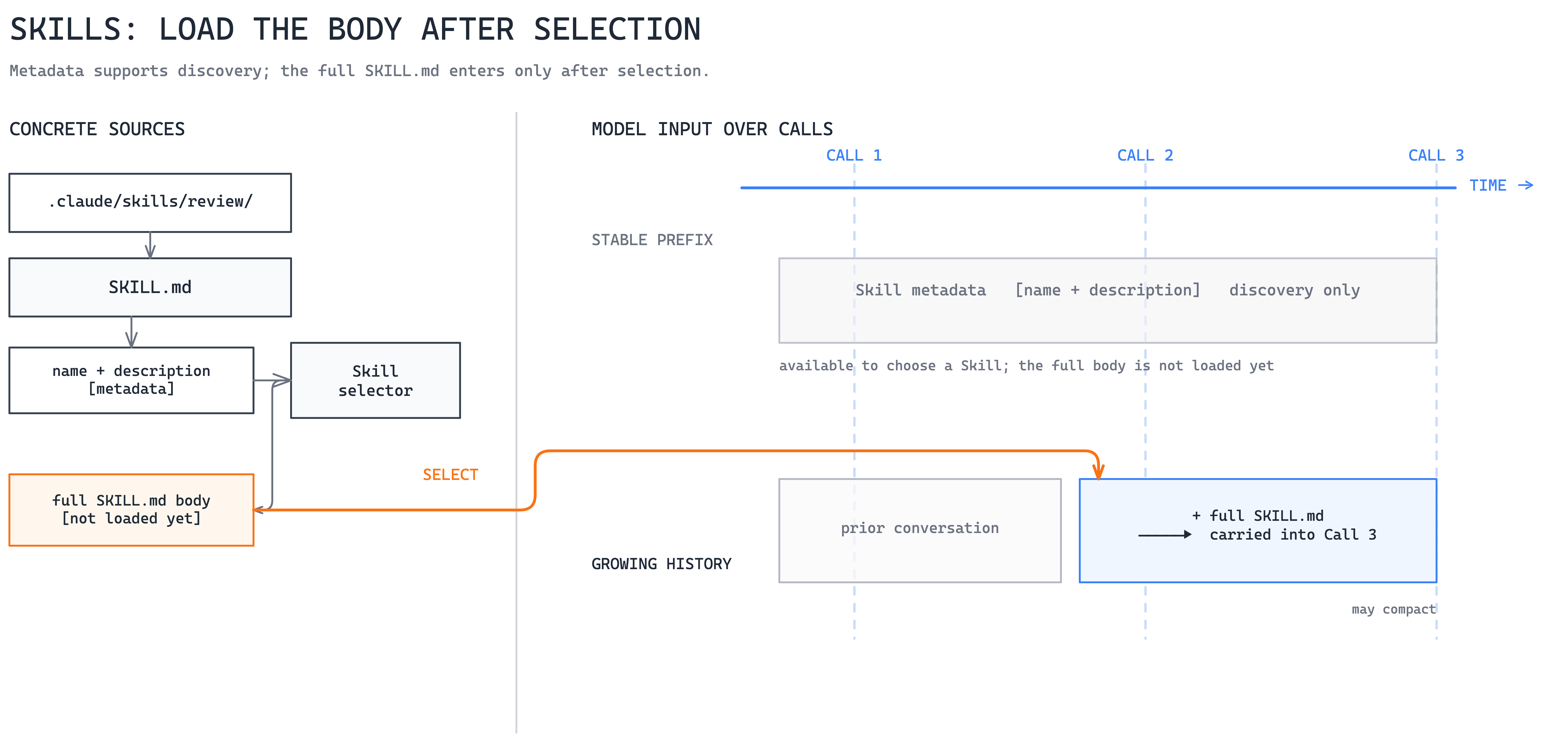
An agent can therefore access many procedures without loading all their instructions into every request. In Claude Code, Claude may select the Skill from its description, the user can invoke /release-check directly, or a custom subagent can preload it.
The distinction from scoped instructions is the trigger. A path rule becomes relevant in a matching part of the repository. A Skill becomes relevant because a procedure has been selected for the task. One describes how work should be done in a scope; the other packages a reusable method.
A Skill is still instructions, not a new capability. In Claude Code, allowed-tools can pre-approve listed tools while the Skill is active, but it does not restrict the other tools the agent can see. Host permissions still apply, and writing “check the current deployment” into SKILL.md does not magically give the agent access to the deployment system.
When to use. Repeatable, conditional procedures such as releases, incident investigation, migrations, research, or specialized review methods.
The main trade-off. Progressive loading keeps the initial context smaller, but it introduces a routing decision. A vague description may prevent the correct Skill from being selected or activate it for the wrong task. Once selected, its instructions also occupy working context.
This brings us to the next boundary. A procedure can tell an agent that it should verify the production release status, but retrieving that live status requires something more than instructions. It requires a capability.
5. Tools: expose a capability and bring back results
Tools connect the model to computation, files, APIs, and external systems. A tool definition tells the model what an action is called, what it does, and which arguments it accepts. A simplified Anthropic client-tool definition might look like this:
{
  "name": "release_status",
  "description": "Read the current deployment state for a service.",
  "input_schema": {
    "type": "object",
    "properties": { "service": { "type": "string" } },
    "required": ["service"]
  }
}
Tools contribute to the agent’s context at two different points. Before the model runs, each tool’s name, description, and input schema tell it which capabilities exist and how to call them. After a tool is invoked, its result brings new information into the conversation. The definition affects what the model knows it can do, while the result changes what it knows about the world.
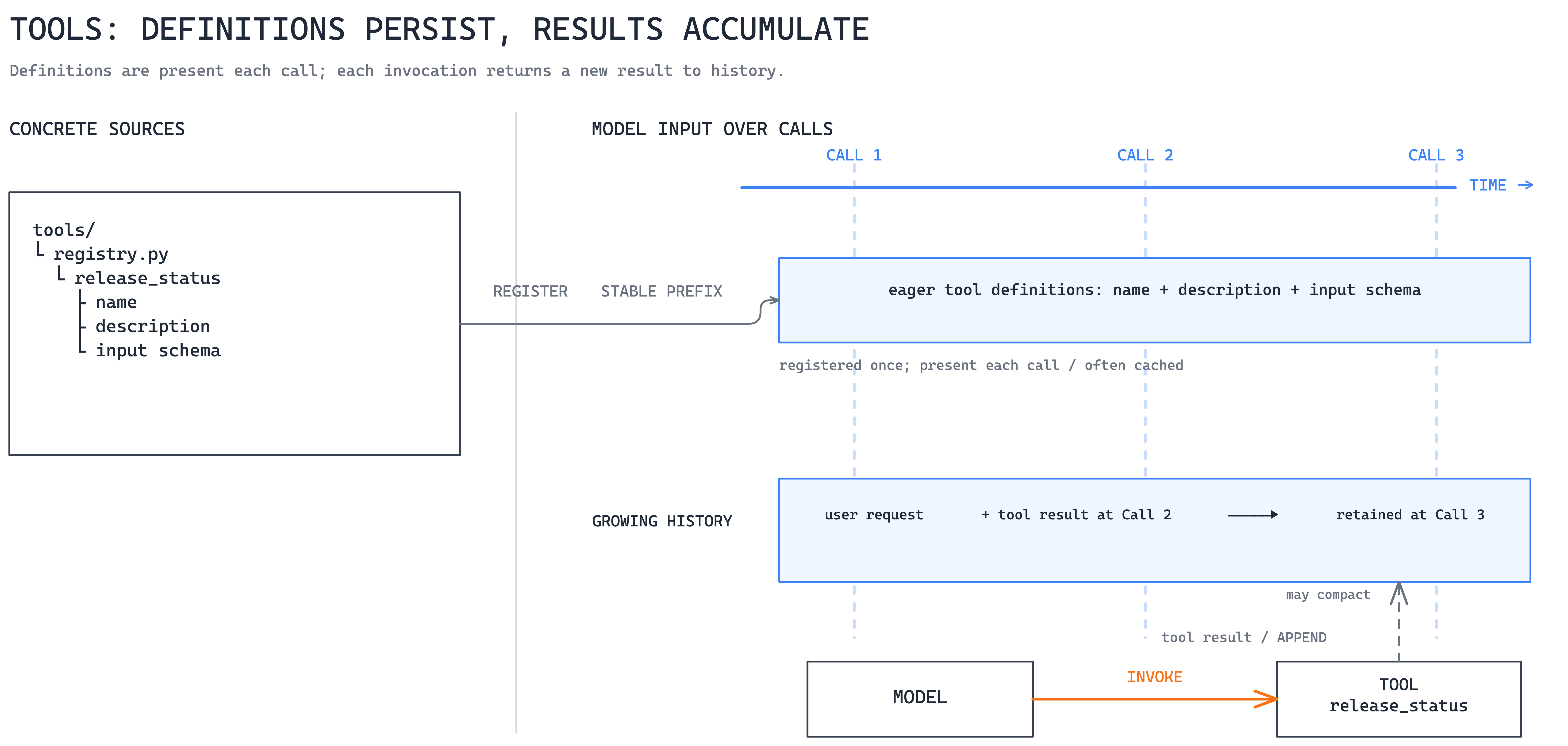
This is earlier than the previous diagram implied. For Claude, Anthropic documents the stable request prefix in the order tools, system, then messages. Other APIs may expose these as sibling request fields, but a tool definition is still part of the input prepared before inference, not something appended after the conversation.
This matters as the tool catalog grows. A handful of definitions is cheap, but hundreds of schemas can consume a significant part of the starting context before the task begins. The tool list should therefore contain capabilities the agent can realistically need, with concise descriptions and schemas.
MCP fits into this layer as the connection mechanism that can expose tools, resources, and prompts. It should not be confused with the procedure for using those capabilities well. A Skill might explain when and how to check release readiness, while an MCP server exposes the deployment system that allows the agent to retrieve the actual release state.
When to use. Live data, deterministic computation, external services, and actions with explicit inputs and outputs.
The main trade-off. Tools consume upfront context and introduce permissions, latency, schema drift, partial failures, and potentially side effects.
At this point, the agent has instructions telling it what to do and tools allowing it to act. But giving a model access to an action is different from deciding whether that action should actually be allowed. A release Skill may conclude that a deployment should proceed, for example, but that does not mean an autonomous git push or production deployment should happen without another control point.
That is where steering enters the loop.
6. Steering: intervene while the loop is running
The mechanisms so far shape what the model knows, the guidance it receives, and the capabilities it can invoke. Steering acts on live execution. A human can interrupt, a permission rule can require approval, or a hook can inspect a proposed action before it executes.
{
  "permissions": {
    "ask": ["Bash(git push *)"],
    "deny": ["Read(./secrets/**)"]
  }
}
In Claude Code, permission rules provide allow, ask, and deny gates around tool calls. PreToolUse hooks can inspect the tool and its arguments, rewrite them, inject context, require approval, or block the call. The hook runs outside the conversation unless it returns guidance to it.
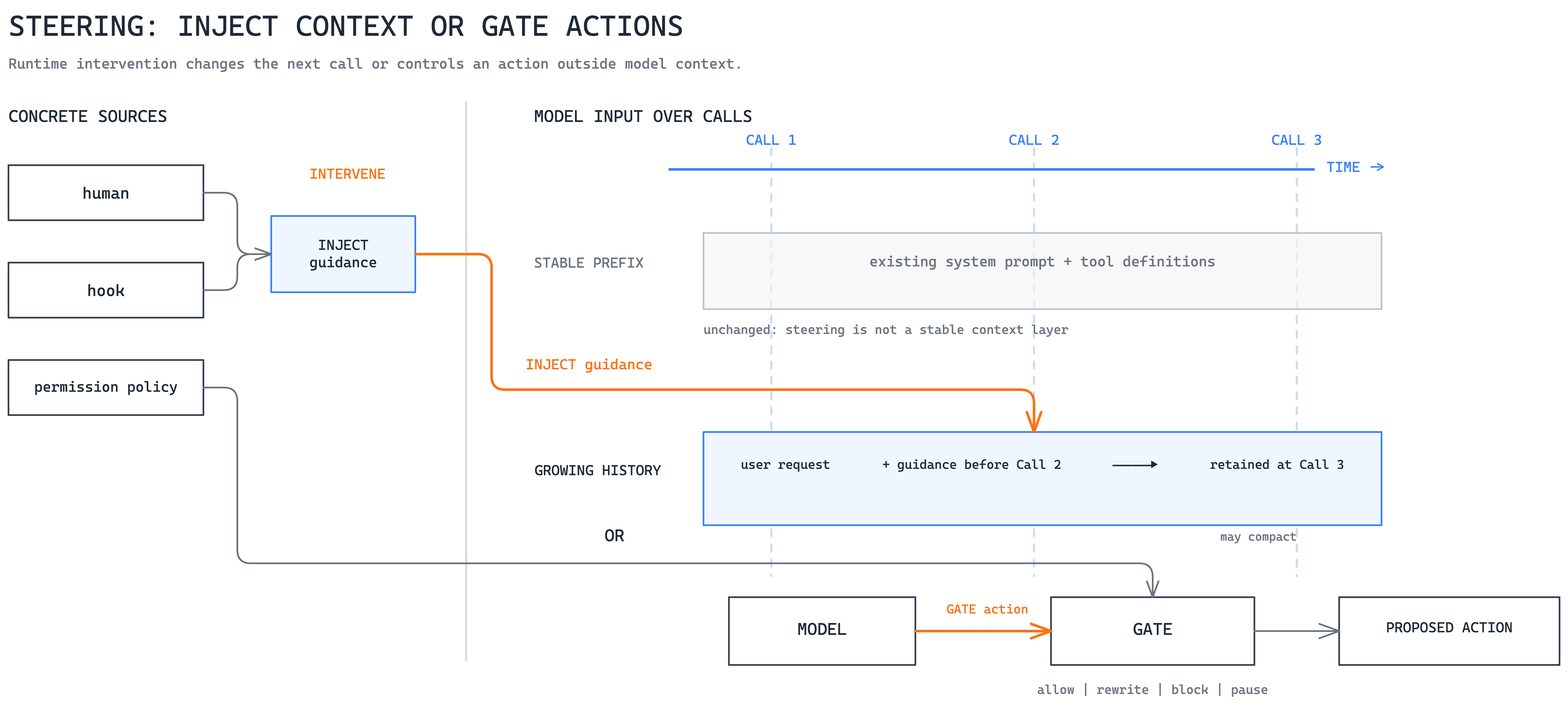
This highlights an important difference between two kinds of “rules” that are easy to mix together in agent systems. A natural-language rule in CLAUDE.md tells the model what it should do. A permission rule or blocking hook determines what the runtime will allow it to do. One relies on model behavior, while the other places control around that behavior.
Not every hook is steering either. A passive hook that records tool calls for audit purposes is instrumentation because it observes the run without changing it. It becomes steering when it can alter the next step, inject corrective information, require approval, or stop an action.
When to use. Human approval, action validation, output checks, recovery guidance, and policies that need to react to the current execution state.
The main trade-off. Runtime intervention introduces more branches, retries, latency, and state that must be tested. Some hook failures leave the action to normal permissions rather than block it, so security-critical restrictions still need permissions, sandboxing, and least privilege.
Steering is useful when the current loop is still the right place to perform the work but some of its decisions require control. Sometimes, however, the problem is the loop itself. A security review may require reading dozens of files, running searches, and producing a focused result, while none of that intermediate work needs to occupy the parent’s context.
For that kind of work, rather than continuing to enlarge the current context, we can open another one.
7. Delegation: open a separate context for the work
Delegation gives a bounded task to another agent loop. The worker receives its own instructions and selected context, performs the work separately, and returns a result to the parent. In Claude Code, a custom worker can be defined in .claude/agents/security-reviewer.md:
---
name: security-reviewer
description: Review security-sensitive changes and report evidence.
tools: Read, Grep, Glob
---
Inspect only the area named in the delegated task.
Return concise findings with file references.
The parent can then delegate directly from the conversation:
> Run the security-reviewer and test-runner in parallel.
> Give each the changed files, then combine their findings.
A non-fork Claude Code subagent starts with a fresh context window. It does not automatically see the parent conversation, previously invoked Skills, or files that the parent has already read. The parent supplies a task message, while the worker adds its own system prompt, applicable project instructions, configured tools, and any preloaded Skills.
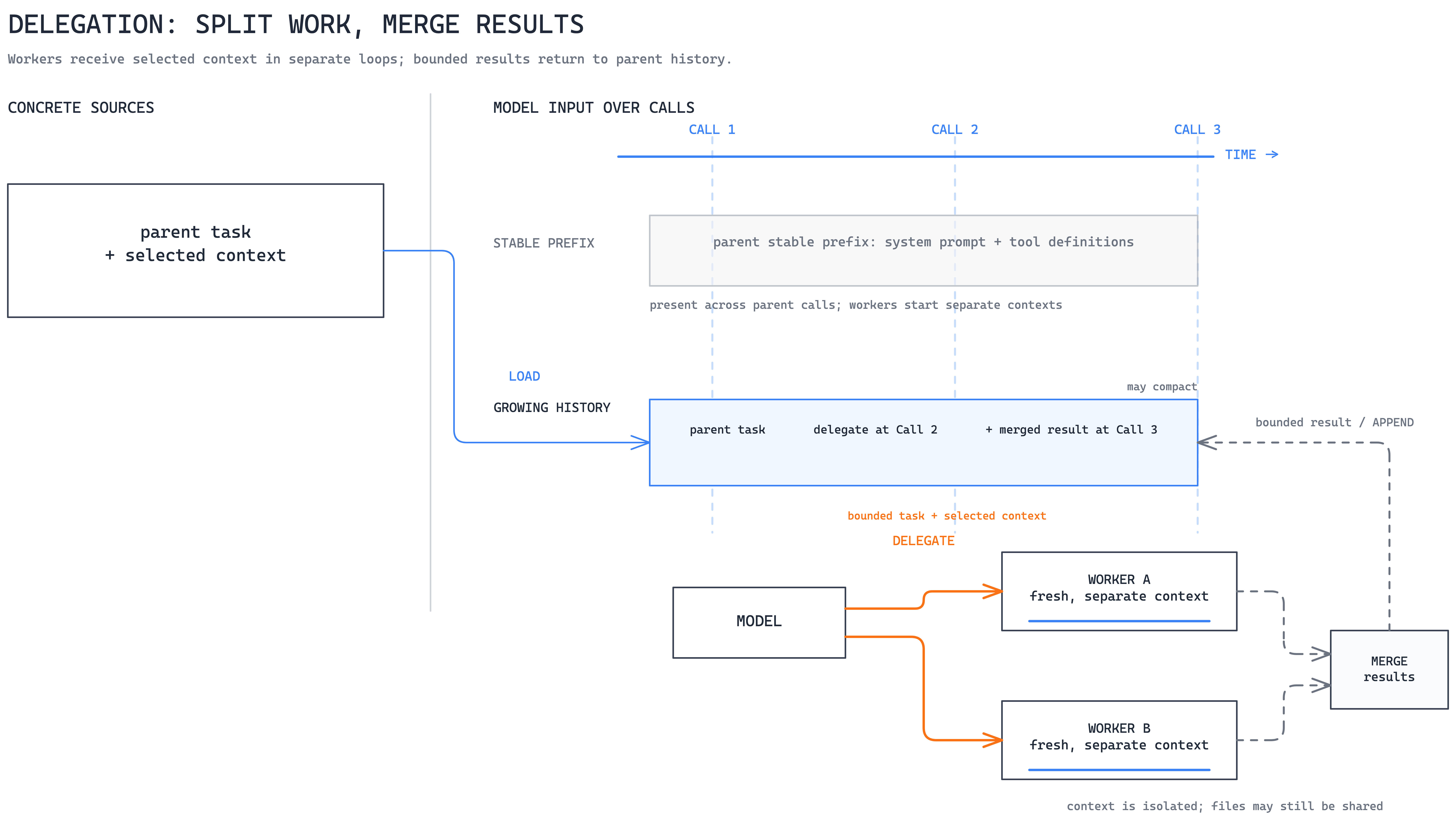
A security reviewer can search dozens of files, inspect dependencies, and collect evidence without filling the main conversation. The parent receives a bounded result rather than the complete working history. A context-inheriting fork is the exception.
Several workers can run concurrently for independent work such as security review, test execution, or documentation analysis. Parallelism helps, but context isolation is often more important: specialist work does not consume the context needed for the main task.
Context isolation should not be confused with filesystem isolation, though. Two workers with separate context windows may still edit the same checkout and overwrite each other’s changes. Separate worktrees, sandboxes, or explicit file ownership are still needed when parallel changes must not collide.
When to use. Specialist, high-volume, expensive, or independent work that benefits from a clean context and can return a bounded result.
The main trade-off. Delegation adds cost, latency, routing risk, and potentially lossy handoffs. Parallel modification also introduces coordination problems unless the underlying files are isolated.
Delegation is therefore not simply a way to “make the agent smarter.” It is another context-management mechanism. Instead of putting even more information into the current loop, we decide that a piece of work deserves a context of its own and bring back only the result that matters.
The takeaway
When an agent struggles, first ask when the missing context or control should enter, how far it should reach, and whether the work needs its own context.
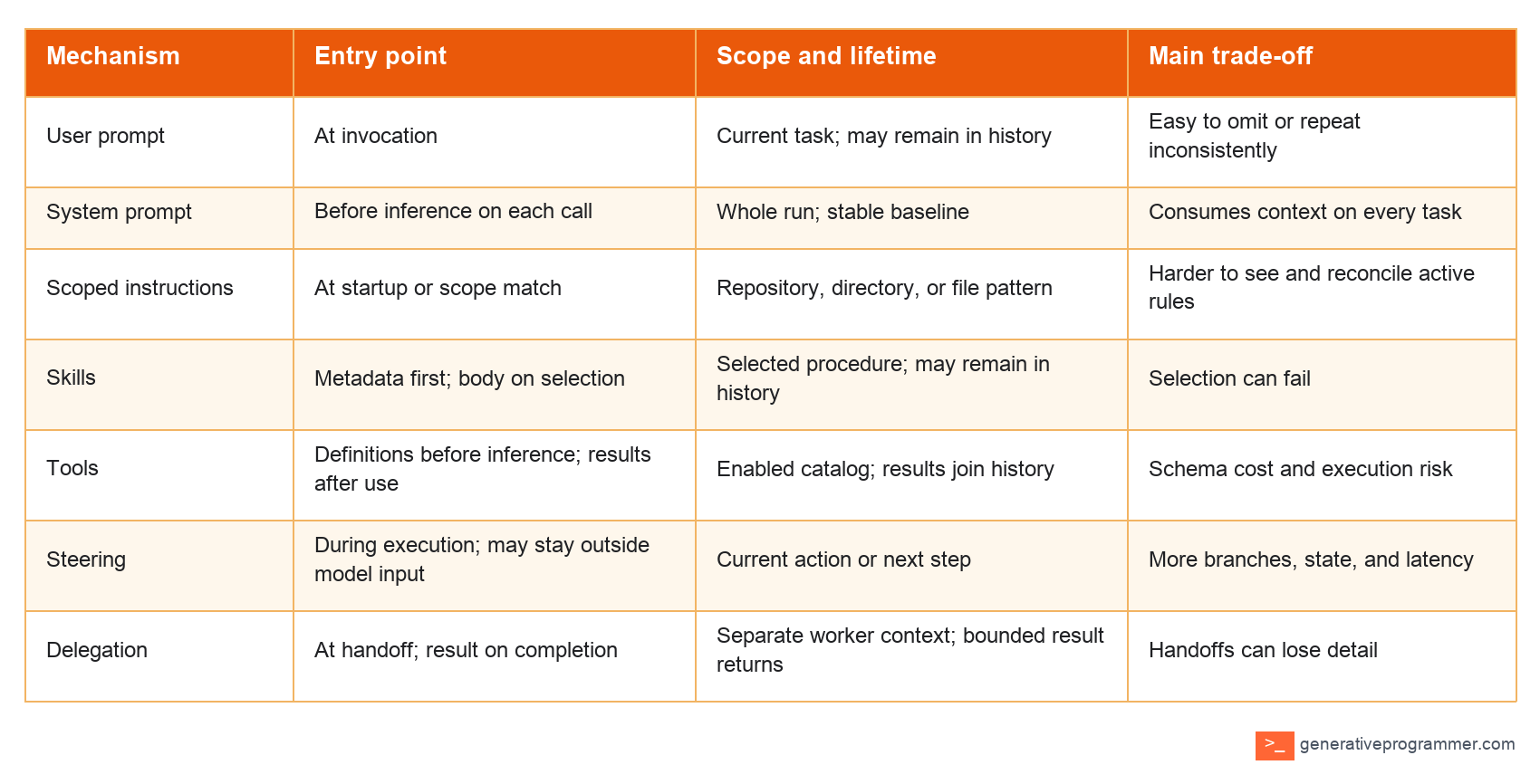
Use the narrowest mechanism that introduces what is missing where it becomes relevant. The goal is not more context, but correctly placed context.
Thanks for writing this up. Scope and time are better axes than the usual list of what goes in the prompt, though the load-on-demand case is the awkward one, deciding to load is itself a model call you have to pay for.
I turned these concepts into a runnable tutorial using Python, now with 500+ GitHub stars: https://github.com/hardness1020/awesome-agent-architecture/tree/main/sections/10-system-prompt