

Every Claude Code setup has a gravitational pull toward CLAUDE.md. It starts as a helpful project note with build commands, test commands, repo layout, and a few conventions, then slowly becomes the place for release steps, migration rules, security warnings, production commands, response style, and every other instruction that did not yet find a better home.
That is the point where memory becomes a mixed control plane. The issue is not that CLAUDE.md is bad; it is that one file is asked to carry facts, procedures, boundaries, style, external capabilities, and workflow triggers, even though Claude Code has separate mechanisms for each of these jobs.
Project memory, path-scoped rules, skills, manual commands, subagents, hooks, permissions, MCP servers, output styles, and system-prompt overlays steer Claude in different ways. They have different context costs, different loading models, and different authority over the final behaviour. Treating them as stronger or weaker versions of the same prompt is how instructions get duplicated, diluted, and then repeated in chat again.
The practical question is simple:
Where should this instruction live so that it is visible when needed, cheap when not needed, and enforced when it must be?
Why this matters now
Claude Code has grown into a small operating environment around the model: memory files hold project facts, rules scope constraints, skills package work, subagents isolate investigation, hooks and permissions enforce behaviour, output styles set response posture, and MCP servers connect live capabilities. Once a repository uses more than one or two of these, the useful design question becomes placement rather than wording.
The concrete artifact in this post is Claude Code itself. I am not trying to restate the docs, but to extract the operating map teams need when their setup grows beyond one shared memory file.
That placement question has two dimensions. The first is scope: how widely should this apply across every session, one directory, one file glob, one workflow, one subagent, one external tool, or one lifecycle event? The second is enforcement: is this guidance the model should follow, or a boundary the runtime must guarantee?
If you get these two dimensions right, Claude feels much more reliable because each instruction has a natural place and a matching level of authority. If you get them wrong, you end up repeating the same intent in multiple places, while still paying for it on turns where it does not matter.
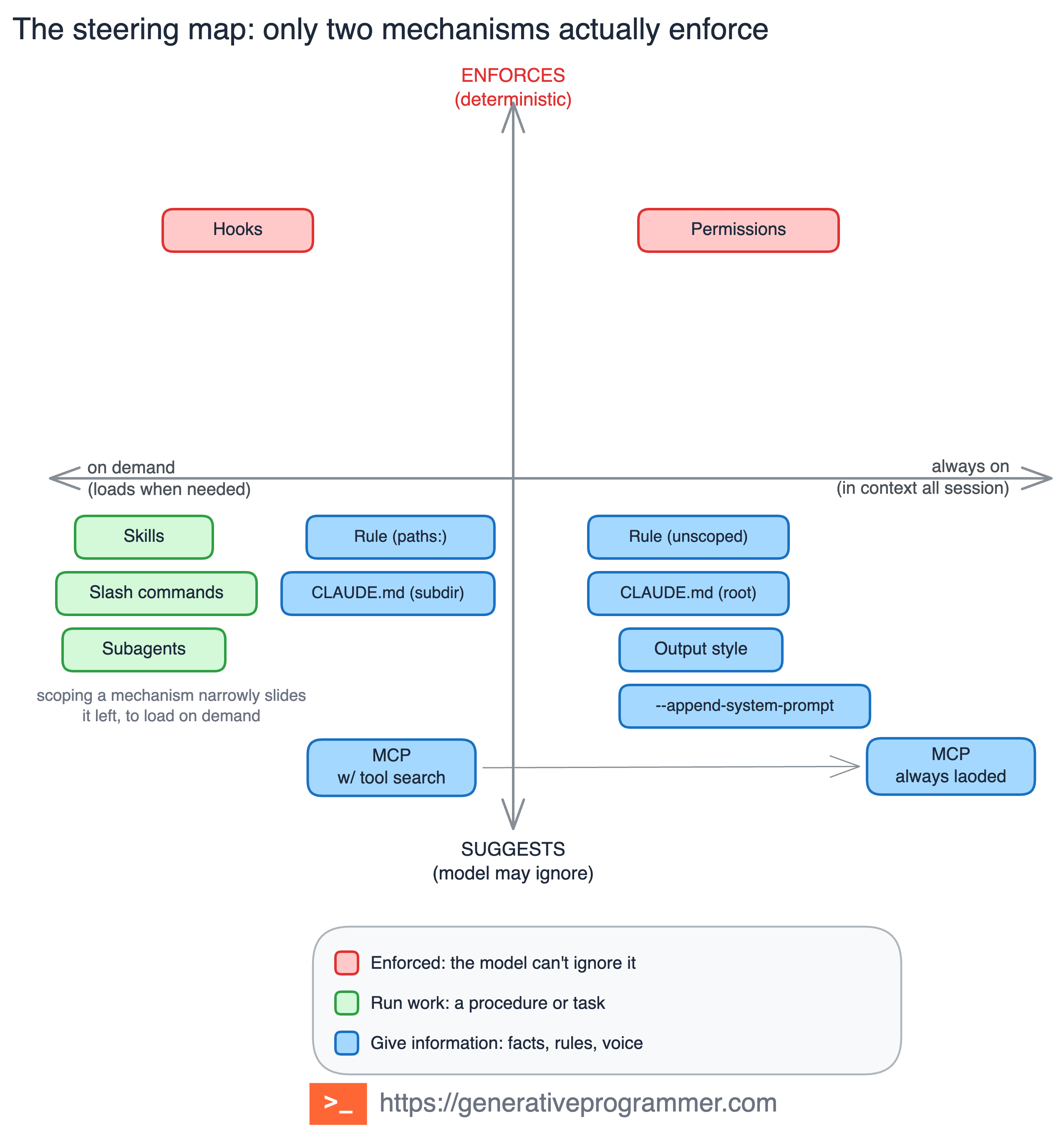
The map is the whole article in one picture. Most mechanisms guide Claude through context, routing, tool access, response posture, or isolation, while hooks and permissions enforce outside the model in the hard sense. The rest still matter, but they do not become hard policy just because the sentence sounds strict.
A rule such as “never edit production migrations” does not belong only in CLAUDE.md. The memory file can explain the policy, but the boundary itself belongs in a permission rule or a hook, because the model may forget prose while the harness should not forget policy.
The 10 steering mechanisms
These are not just features. They are placement mechanisms, and each one answers a different question about where an instruction should live.
1. Project Memory Index: CLAUDE.md
Use CLAUDE.md for stable project facts that Claude should know in most sessions: build commands, test commands, repo layout, architectural landmarks, and team conventions.
Think of it as an index rather than a manual. A new teammate should be able to read it and understand where they are, but it should not contain every process your team ever invented. Procedures belong in skills, local constraints belong in rules, and hard boundaries belong in hooks or permissions.
Use it when: the information is broad, stable, and useful across many tasks.
Example:
# Project basics
- Package manager: pnpm
- Unit tests: pnpm test
- API routes live in packages/api/src/routes
- Service ownership is documented in docs/service-ownership.md
2. Path-Scoped Constraint: rules
Rules are for constraints that are narrower than project memory. They live under .claude/rules/; without paths, a rule becomes broad context, while with paths, it loads only when Claude works with matching files.
This is the main mechanism for monorepos and mixed stacks, where API code, frontend code, infrastructure code, generated code, and migrations rarely share the same rules. A rule can improve behaviour significantly, but it is still text. If editing old migrations must be impossible, add a hook that blocks the edit rather than trusting a convention written as prose.
Use it when: a convention applies to a directory, file type, or concern.
---
paths:
  - "src/api/**/*.ts"
---
All API handlers must validate input with Zod before processing.
Return errors using the shared ApiError format.
3. Just-in-Time Procedure: skills
A skill is the right home for a reusable workflow, such as release notes, code review, incident analysis, dependency upgrades, migration planning, or API change review.
Only the skill description is visible up front, so Claude can decide when to use it, and the body loads only when the skill is invoked. That makes skills the best way to carry long procedures without paying for them on every turn. The description is the routing signal, so write it like a trigger, not like a vague title.
Use it when: you keep pasting the same checklist into chat.
Example:
---
name: release-notes
description: Create release notes from the current git diff and recent commits.
---
Create release notes for $ARGUMENTS.
1. Read the current diff and recent commits.
2. Group changes into Features, Fixes, Breaking Changes, and Internal.
3. Mention migration risk only when visible in the diff.
4. Keep the final output under 400 words.
4. Human-Triggered Workflow: manual skills and slash commands
Some workflows should not run just because Claude thinks the work looks ready. Commit, deploy, publish, release, notify, migrate, and update production are human-triggered workflows because the moment they run matters as much as the steps inside them.
Custom commands now fit into the skill model, but the operational distinction is still useful: some skills Claude may choose, and some skills the user must invoke explicitly. Convenience is good for review, but it is not a deployment policy.
Use it when: the workflow has side effects and should start only by explicit user action.
Example:
---
name: deploy-staging
description: Deploy the current branch to staging.
disable-model-invocation: true
allowed-tools: Bash(pnpm test *) Bash(pnpm build *) Bash(./scripts/deploy-staging *)
---
Deploy $ARGUMENTS to staging.
1. Run tests.
2. Build the application.
3. Deploy to staging.
4. Verify the health endpoint.
5. Summarise the result.
Invoke it explicitly:
/deploy-staging payments-service5. Isolated Investigator: subagents
A subagent runs work in its own context and returns a result to the main session. It can have its own prompt, tools, model, permissions, hooks, skills, and MCP access, which makes it useful when the investigation should not flood the main conversation.
Use this mechanism for noisy work such as broad code search, log analysis, security review, dependency audit, or parallel investigation. The main conversation does not need every intermediate grep result, and in many cases it is better to receive a focused conclusion than a transcript of the whole search.
Claude does not pick a subagent only because the file name sounds relevant. Automatic delegation depends on the task, current context, and especially the description; natural language is a hint, while an @ mention guarantees the subagent for one task and --agent makes it session-wide.
Use it when: the work is useful, but the transcript would pollute the main thread.
Example:
---
name: security-reviewer
description: Use proactively after auth, crypto, permission, or data-access changes.
tools: Read, Grep, Glob
model: sonnet
---
Review the changed files for security risks.
Return only concrete findings with file references, risk level, and fix suggestions.
6. Session Posture: output styles
Output styles change how Claude responds by modifying the system prompt to set role, tone, and output shape. They are useful for persistent posture, but they do not add project knowledge and they do not enforce correctness.
Use an output style when you want Claude to keep acting like an architecture reviewer, terse implementer, teacher, RFC reviewer, or pair programmer across the session. For strict JSON, exact document structure, or a policy that must always hold, use a schema, test, hook, or CI step instead. For coding styles, keep keep-coding-instructions: true unless you intentionally want to remove Claude Code’s default software-engineering behaviour.
Use it when: you keep asking for the same response style every turn.
Example:
---
name: Architecture Review
description: Respond as an architecture reviewer who explains trade-offs first.
keep-coding-instructions: true
---
Start with the trade-off being made.
Then cover coupling, operational impact, security risk, migration cost, and simpler alternatives.
Keep the answer direct. Avoid generic praise.
Set it in settings:
{"outputStyle":"Architecture Review"}7. One-Run Overlay: --append-system-prompt
Appending to the system prompt is for temporary framing that applies to the current invocation without changing project memory, repository rules, or saved output styles.
Use it in scripts, CI jobs, one-off reviews, and temporary domain framing where the instruction is important for this run but should not become part of the repo. Keep it sharp, because a command flag can quietly become a second CLAUDE.md if every team preference starts getting pasted into it.
Use it when: the instruction matters for this run, not for the repo.
Example:
claude --append-system-prompt-file ./prompts/rfc-reviewer.txtWhere rfc-reviewer.txt says:
For this session, review changes as an RFC reviewer.
Always include risks, alternatives, and migration impact.
8. Live Capability Boundary: MCP servers
An MCP server is not another memory file and it should not be treated as one. It is a capability boundary that gives Claude a controlled way to reach live systems such as GitHub, Jira, databases, documentation, observability tools, browser automation, or internal APIs, where static context is either stale, too large, or unable to perform actions.
Tool search can defer MCP tools until needed, which reduces context cost, but broad MCP access is still broad capability. Use alwaysLoad only for the small set of tools Claude truly needs every turn, and connect the rest in a way that matches the task rather than exposing your whole stack by default.
Use it when: Claude needs live external data or external actions.
Example:
Use the GitHub MCP server to read PR #421, check unresolved comments, and review only the changed files.9. Event Gate: hooks
Hooks run outside the prompt and fire on lifecycle events such as before a tool call, after a file edit, at session start, before compaction, or when a turn ends.
This is where “always do X when Y happens” belongs. PreToolUse is the place to block or validate before an action, while PostToolUse is better for formatting, logging, and reaction because the tool has already run by then.
Use it when: behaviour must run mechanically at a known event.
Example:
{
  "hooks": {
    "PreToolUse": [
      {
        "matcher": "Bash",
        "hooks": [
          {
            "type": "command",
            "command": "\"$CLAUDE_PROJECT_DIR\"/.claude/hooks/block-dangerous-bash.sh"
          }
        ]
      }
    ]
  }
}
The script can inspect the tool input and exit with the blocking code when it sees a dangerous command.
10. Hard Boundary: permissions
Permissions decide which tools, files, commands, domains, and skills Claude may use, and they are enforced outside the model context.
This is the right home for “never”, because prose helps the model understand a boundary while permissions make the boundary operational. A denied action cannot be negotiated back into existence by a convincing explanation in the chat.
Use it when: the action must be allowed, denied, or require approval regardless of what Claude wants to do.
Example:
{
  "permissions": {
    "allow": [
      "Bash(git diff *)",
      "Bash(pnpm test *)"
    ],
    "ask": [
      "Bash(git push *)"
    ],
    "deny": [
      "Read(./.env)",
      "Read(./.env.*)",
      "Read(./secrets/**)",
      "Bash(git push --force *)"
    ]
  }
}
The decision tree
The mechanism catalog tells you what exists, while the tree gives you a practical starting point when you are about to place a new instruction.
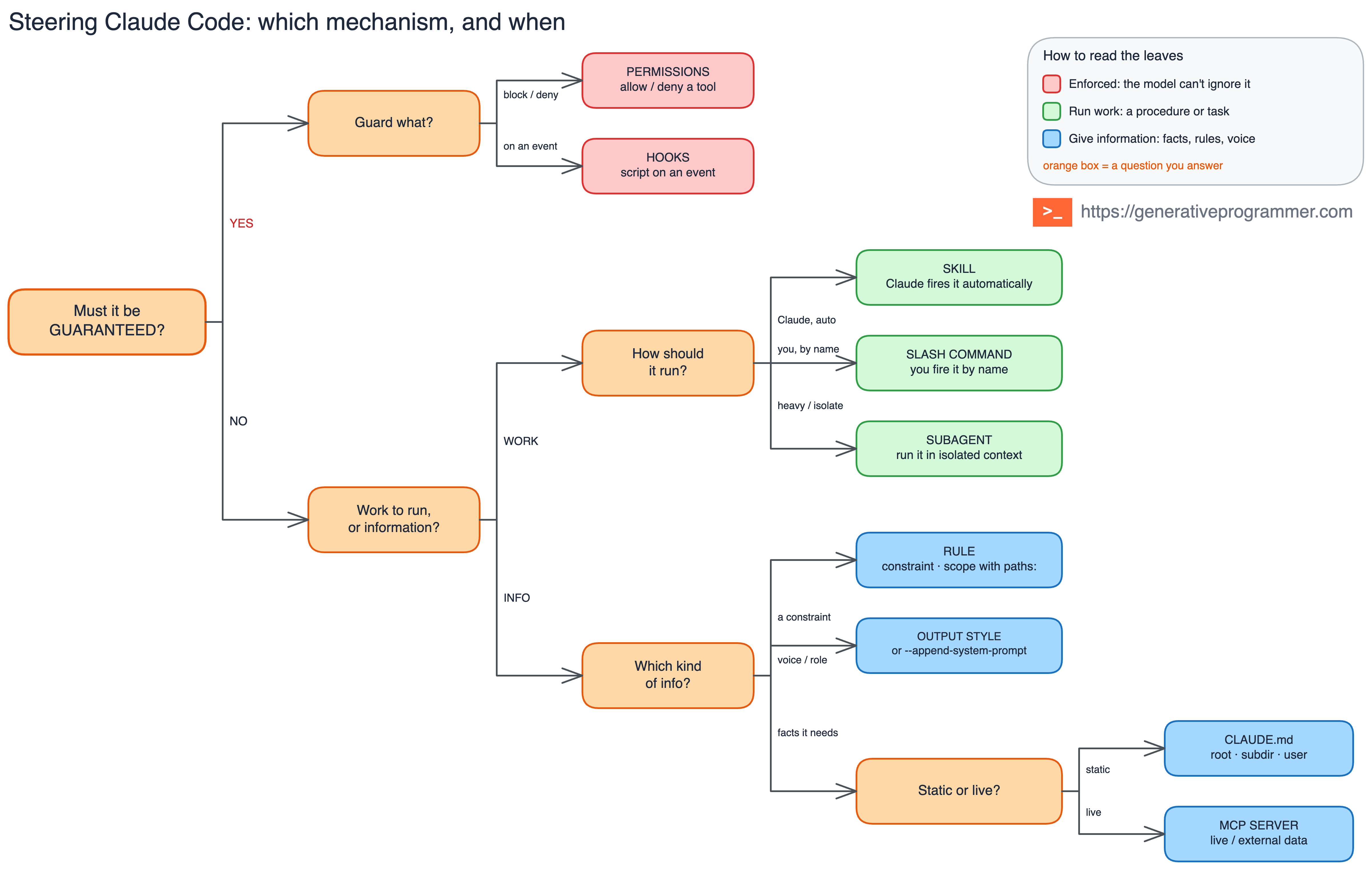
The first question is the only one that changes the category: must this be guaranteed? If the answer is yes, stop writing a better paragraph and use permissions to allow, ask, or deny, or use hooks to run, block, or validate at a lifecycle event.
If the answer is no, decide whether you are steering work, context, voice, or capability. Work becomes a skill, manual command, or subagent; context becomes CLAUDE.md or a rule; voice becomes an output style or appended system prompt; live data and external actions become MCP.
That sounds like many choices, but in practice the map becomes fast: facts go to CLAUDE.md, scoped constraints go to rules, procedures go to skills, human-triggered procedures go to slash commands, noisy investigations go to subagents, session voice goes to output styles, one-off framing goes to appended system prompts, live capability goes to MCP, always-do behaviour goes to hooks, and never-do boundaries go to permissions.
What changes in long sessions
Long sessions make placement visible because compaction does not treat every mechanism the same way. Root CLAUDE.md and unscoped rules come back after compaction, but they still compete for attention. Nested CLAUDE.md files and path-scoped rules return only when Claude works near matching files again, while skill bodies enter when used and may need to be re-invoked after compaction.
Subagents keep noisy intermediate work out of the main thread and return summaries instead of full transcripts. Output styles and appended system prompts live at the system-prompt level for the session. MCP depends on how tools are loaded: tool search keeps tools deferred, while alwaysLoad puts them into startup context.
Hooks and permissions do not need to survive compaction because they never depended on the main context in the first place. They are code and configuration around the model, which is why the cheapest guardrail is often the one outside the context window.
Final takeaway
The recent Anthropic post on steering Claude Code is useful as a feature tour, but the team lesson is more operational. Claude Code is now a small operating environment around the model, and that means the steering layer deserves the same design attention as any other part of the system.
Scope controls cost, while enforcement controls reliability. Once you know how widely an instruction should apply and whether it must be guaranteed, the right mechanism becomes much easier to pick.
Subscribe to The Generative Programmer for practical maps, pattern catalogs, and production notes on AI coding agents.